64
PROGRAMMING MODE - COLLECT MODE
PROGRAMMING MODE -
COLLECT MODE
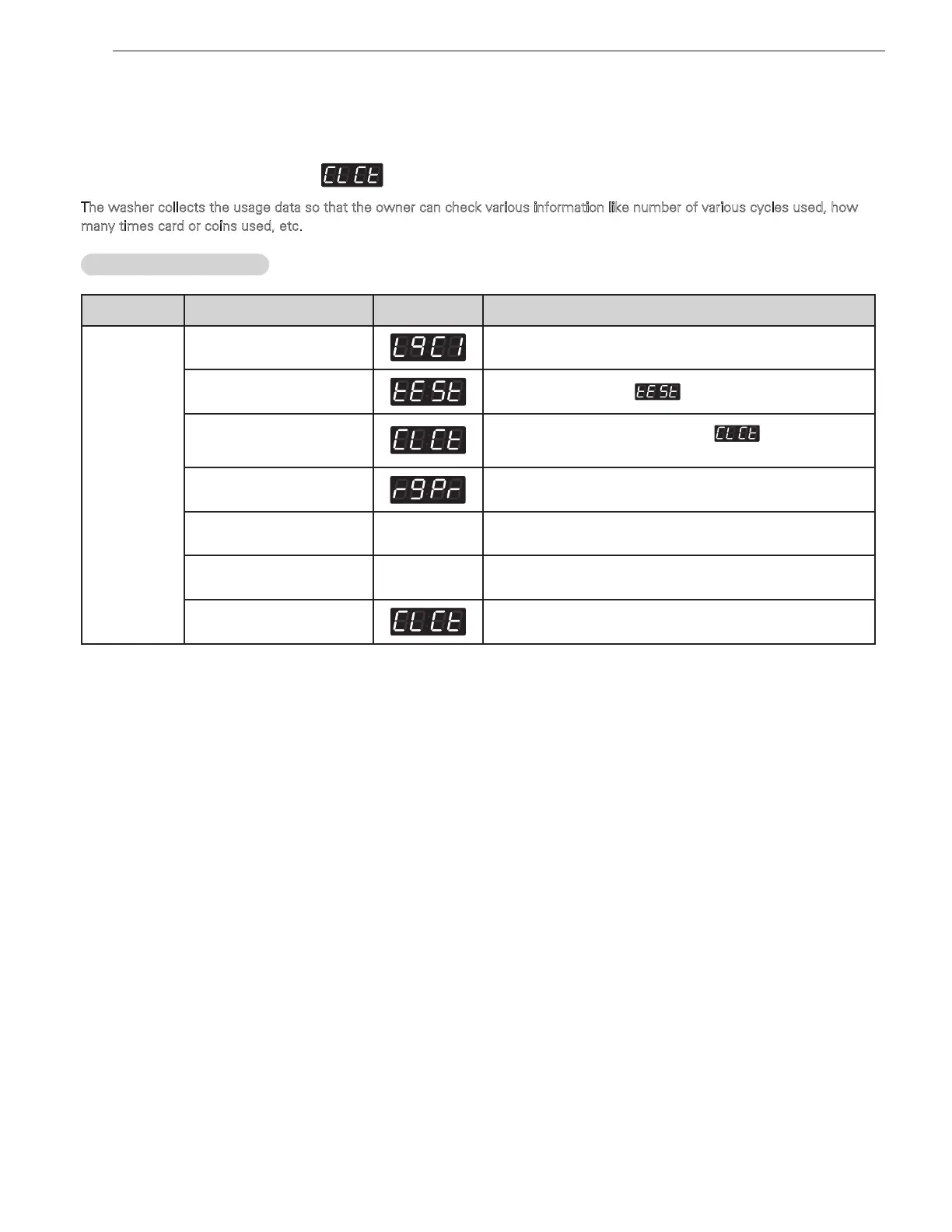
Collect information data : (display)
The washer collects the usage data so that the owner can check various information like number of various cycles used, how
many times card or coins used, etc.
Entering the collect mode
Data Name
Button Display Description
Entering
the collect
mode
1.
Entering the programming
mode.
Insert service card (card type), turn on/off toggle switch (coin type).
2.
Hot
Press the
Hot
button until appears in the display.
3. Warm(+), Cold(-)
Press the
Warm (+), Cold (-)
button until appears in the
display.
4. Start
Enter the Collect information data.
5. Warm(+), Cold(-)
xxxx
Move to each data list that you want to check by pressing with
Warm (+)
or
Cold (-)
button.
6. Start
xxxx
Display the value of selected data list
7. Hot
Move to upper level or Comes back to Idle State
❖
Check the collect information reference to the follow lists. The lists are displayed by abbreviations.



 To Next Page