Connecting14
Connecting
2
Connections to Your
TV
Make one of the following connections, depending
on the capabilities of your existing equipment.
y
Depending on your TV and other
equipment you wish to connect, there are
various ways you could connect the player.
Use only one of the connections described
in this manual.
y
Please refer to the manuals of your TV,
Stereo System or other devices as necessary
to make the best connections.
,
Note
y
Make sure the unit is connected directly
to the TV. Tune the TV to the correct video
input channel
y
Do not connect your player via your VCR.
The image could be distorted by the copy
protection system.
>
Caution
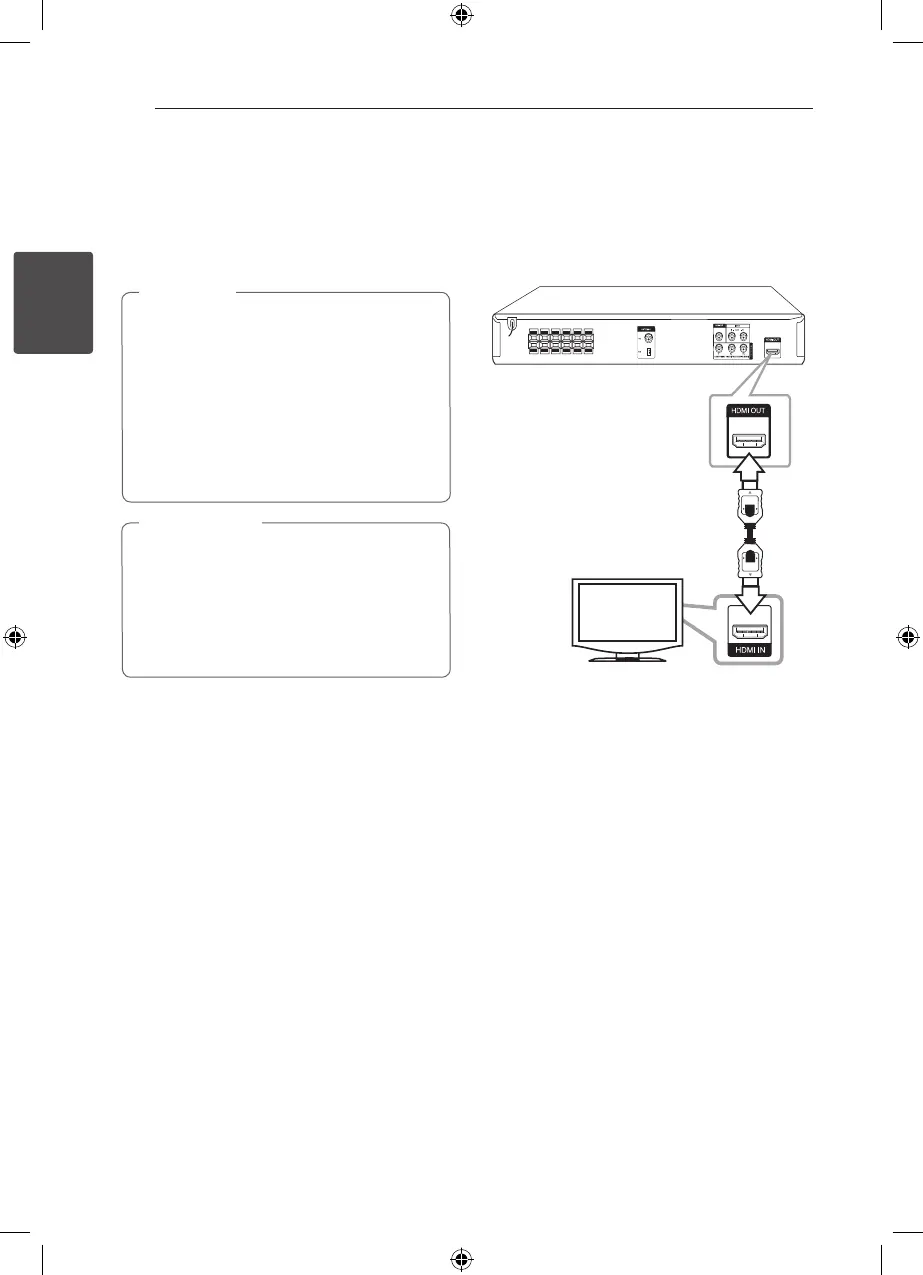
HDMI OUT Connection
If you have a HDMI TV or monitor, you can connect
it to this player using a HDMI cable(Type A, High
Speed HDMI™ Cable). Connect the HDMI OUT
jack on the player to the HDMI IN jack on a HDMI
compatible TV or monitor.
Set the TV’s source to HDMI (refer to TV’s Owner’s
manual).
HT306SU-A2_BISRLLK_ENG_5736.indd 14 2011-04-08 �� 2:44:52



 To Next Page