Accessories Installation
38
Hydro Kit
Water tank temperature sensor Connection
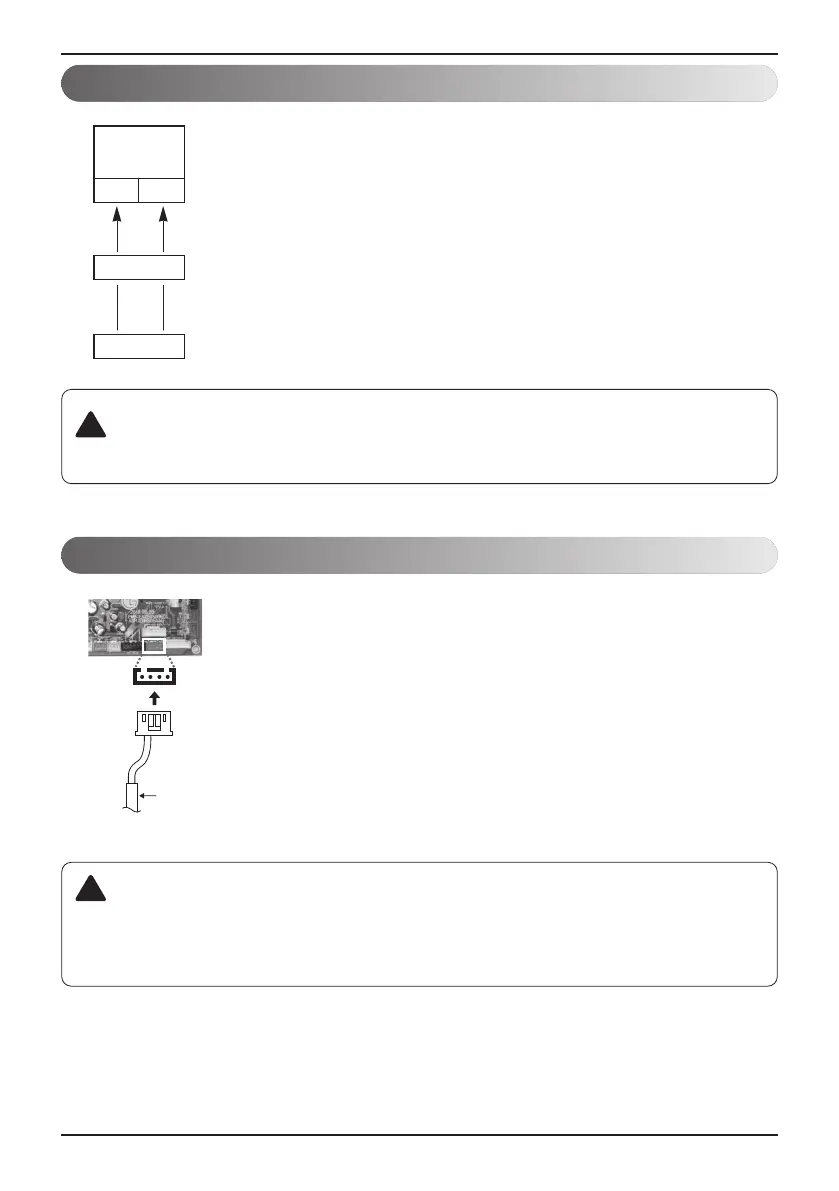
• Select the suitable pump by referring to the flow rate table with water
temperature difference between the entrance and the exit.
• It is recommended that the flow rate is Rated water flow (refer to the
specification of PDB)
• Use the pump with enough capacity to guarantee the loss of entire water
pressure and to supply the
Hydro Kit
with water.
• Select a suitable relay for pump capacity when connecting the pump to the
unit.
• Connect the relay to the terminal block Pump(A) of the control box.
• Water tenk temperature sensor is needed for hot water mode.
• Connect sensor housing to PCB‘CN-TH4’ connector (red).
• To activate hot water mode, Dip S/W should be set #2, #3
according to DIP Switch Setting.
NL
Pump
(A)
Relay
Pump
Water tank
thermistor
Housing
CN-TH4
CAUTION
• Make sure to supply external power with the pump.
!
CAUTION
• When the water tank temperature sensor is disconnected or shorted, CH08 error will occur.
• In case of floor heating mode, water tank temperature sensor doesn’t need to be
connected.
!
Main Pump Connection





 To Next Page