Accessories Installation
Hydro Kit
Installation Manual 43
ENGLISH
Remote Temperature Sensor
Remote temperature sensor can be installed any place a user wants to detect the temperature.
How to Install Remote Temperature Sensor
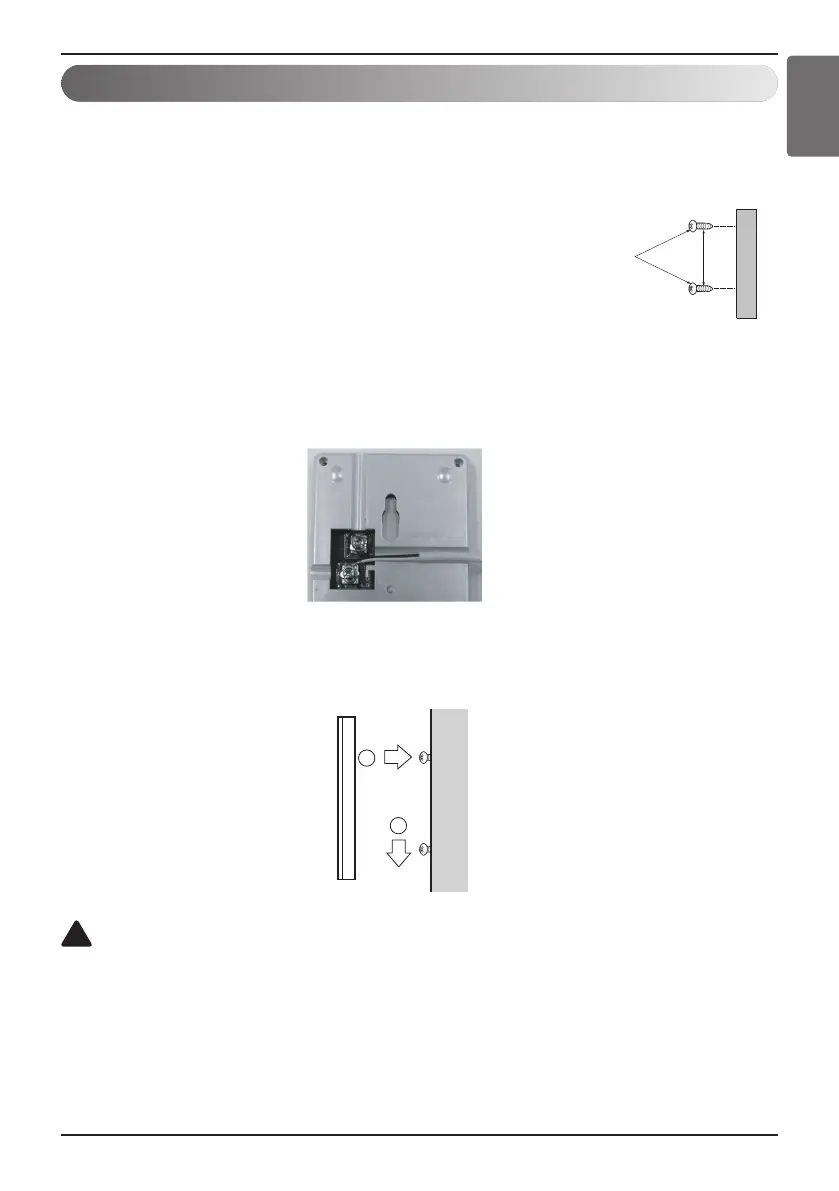
Step 1. After deciding where the remote temperature sensor is
installed, decide the location and height of the fixing
screws. (Interval between the screws : 60 mm)
Step 2. Insert the connector of the connection wire into the space
for the connector in place of the room temperature
sensor.(CN_ROOM)
Step 3. Separately, set the option code of the attached controller
on the indoor unit.
In detail, refer to "installer setting mode".
Step 4. The Connection wire does not matter if you change the color of the wire because of
non-polar.
Fixing the Remote Sensor
2
1
CAUTION
1. Choose the place where the average temperature can be measured for the indoor unit operates.
2. Avoid direct sunlight.
3. Choose the place where the heating devices do not affect the remote sensor.
4. Choose the place where the outlet of the cooling fan do not affect the remote sensor.
5. Choose the place where the remote sensor isn't affected when door is open.
!
Step 5. Integrate the remote temperature sensor with the screws as the order of arrows.





 To Next Page