12
ENG
ENGLISH
CUSTOMIZING SETTINGS
CustomizingSettings
MenuSettings
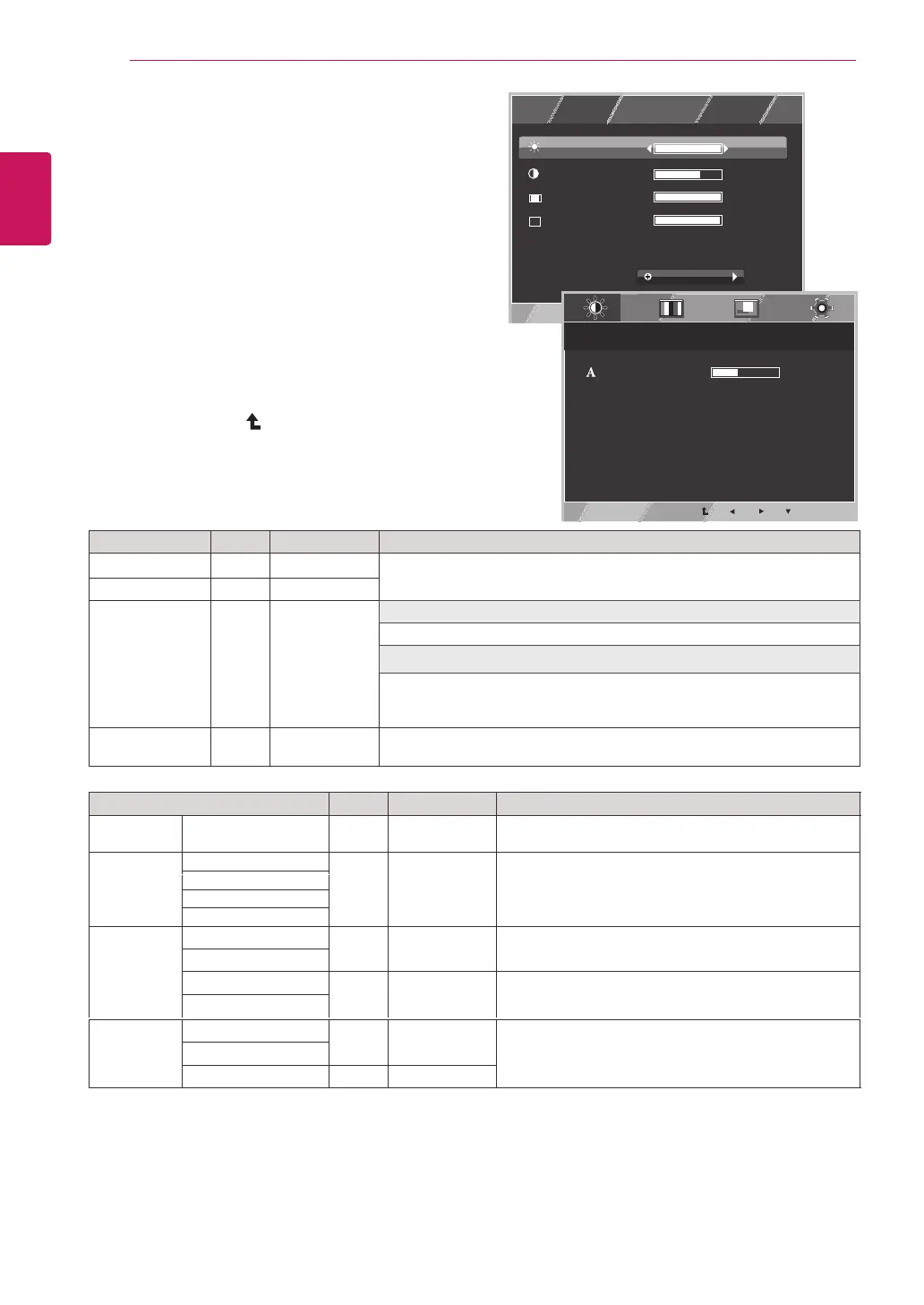
1
PressMENUbuttononthebottomoftheMonitorset
todisplaytheMENUOSD.
2
Settheoptionsbypressingthe◄or►or▼
buttons.
3
Selectthe"NEXTMENU"buttontoenterthemore
optionsettings.
4
SelectEXITtoleavetheOSDmenu.
Toreturntotheuppermenuorsetothermenuitems,
usetheuparrow(
)button.
Eachoptionisexplainedbelow.
MENU > NEXT MENU Analog Digital Description
PICTURE
SHARPNESS ● ● To adjust the clearness of the screen .
COLOR GAMMA
● ● To customize the color of the screen
COLOR TEMP
SIX COLOR
COLOR RESET
DISPLAY HORIZONTAL
● To adjust the position of the screen
VERTICAL
CLOCK
● To improve the clarity and stability of the screen
PHASE
OTHERS LANGUAGE
● ●
To customize the screen status for a user's operating
environment
POWER INDICATOR
WHITE BALANCE ●
●
●
Analog: D-SUB(Analog signal) input.
Digital: DVI-D(Digital signal) input.
MENU Analog Digital Description
BRIGHTNESS
● ●
Toadjustthebrightness,contrastofthescreen
CONTRAST ● ●
WIDE/ORIGINAL
● ●
WIDE
Switchtofullscreenmodeaccordingtoinputimagesignal.
ORIGINAL
Changetheinputimagesignalratiotooriginal.
*ThisfunctionworksonlyifinputresolutionislowerthanMonitorsetratio
(16:9).
RESET
● ●
Restoreallfactorydefaultsettings.Pressthe
◄
,
►
buttonstoreset
immediately.
MENU
EXIT
R
WIDE/ORIGINAL
RESET
CONTRAST
BRIGHTNESS
NO
NEXT MENU
1/2
70
100
1/2
WIDE
MENU > NEXT MENU > PICTURE
SHARPNESS
5
EXIT



 To Next Page