18
ENG
ENGLISH
CUSTOMIZING SETTINGS
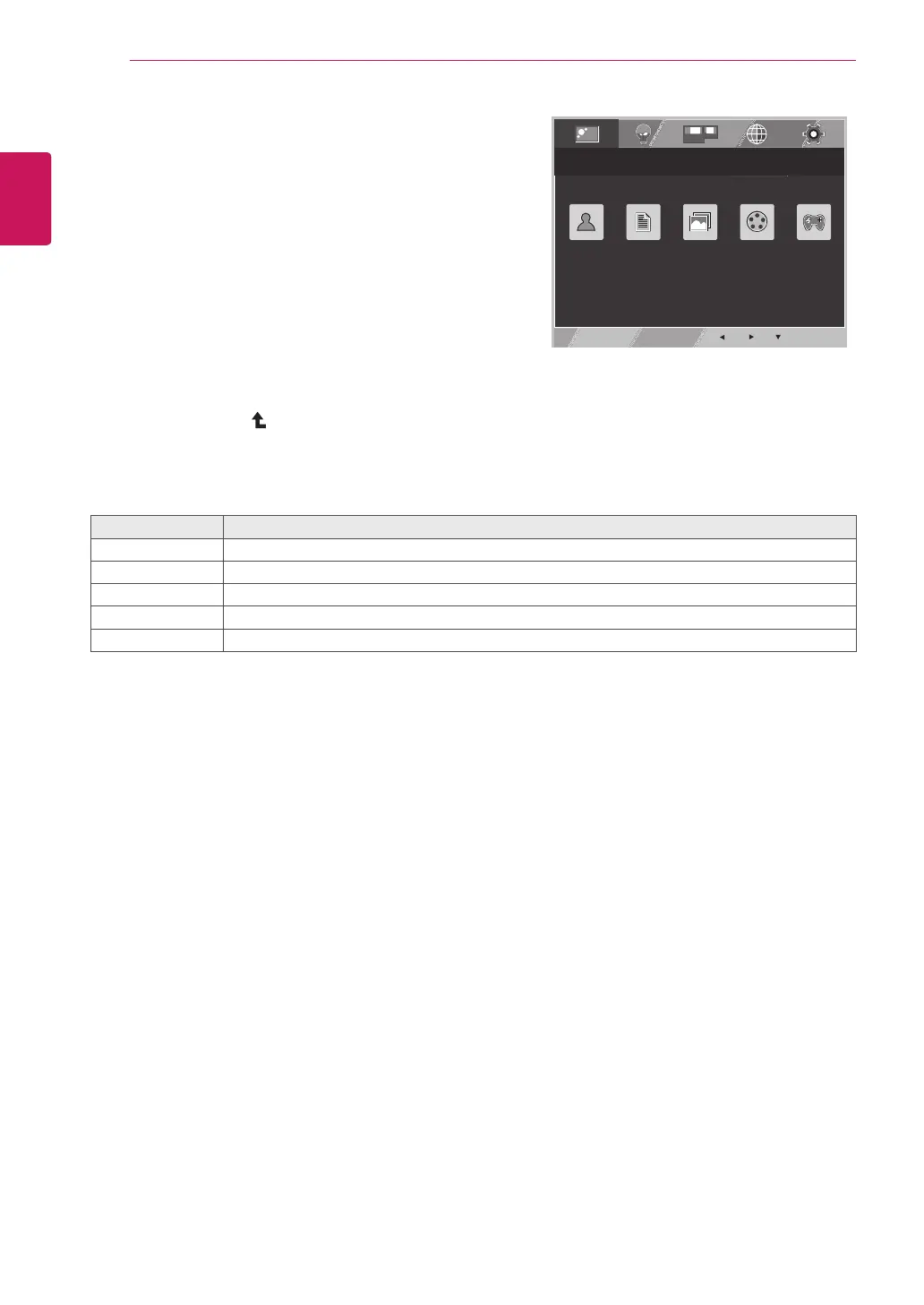
FUNC.Setting
1
Press
FUNC.
buttonon
thebottomoftheMonitorsettodisplaythe
FUNC.OSD.
2
Enterto PICTURE MODE bypressingthe▼button.
3
Settheoptionsbypressingthe◄or►or▼
buttons.
4
SelectEXITtoleavetheOSDmenu.
Toreturntotheuppermenuorsetothermenuitems,
usetheuparrow( )button.
EXIT
TEXT PHOTO CINEMA GAME
CUSTOM
Eachoptionisexplainedbelow.
PICTUREMODE Description
CUSTOM Itisamodethattheusercanadjusteachelement.ItcanadjustthecolormodeoftheMainMenu.
TEXT Itisamodethatthescreenisadjustedtothebestforthetextworks.
PHOTO Itisamodethatthescreenisadjustedtothebesttoviewpictures.
CINEMA Itisamodethatthescreenisadjustedtothebesttoviewthevideos.
GAME Itisamodethatthescreenisadjustedtothebesttoplayagame.
PICTURE MODE



 To Next Page