ENG
ENGLISH
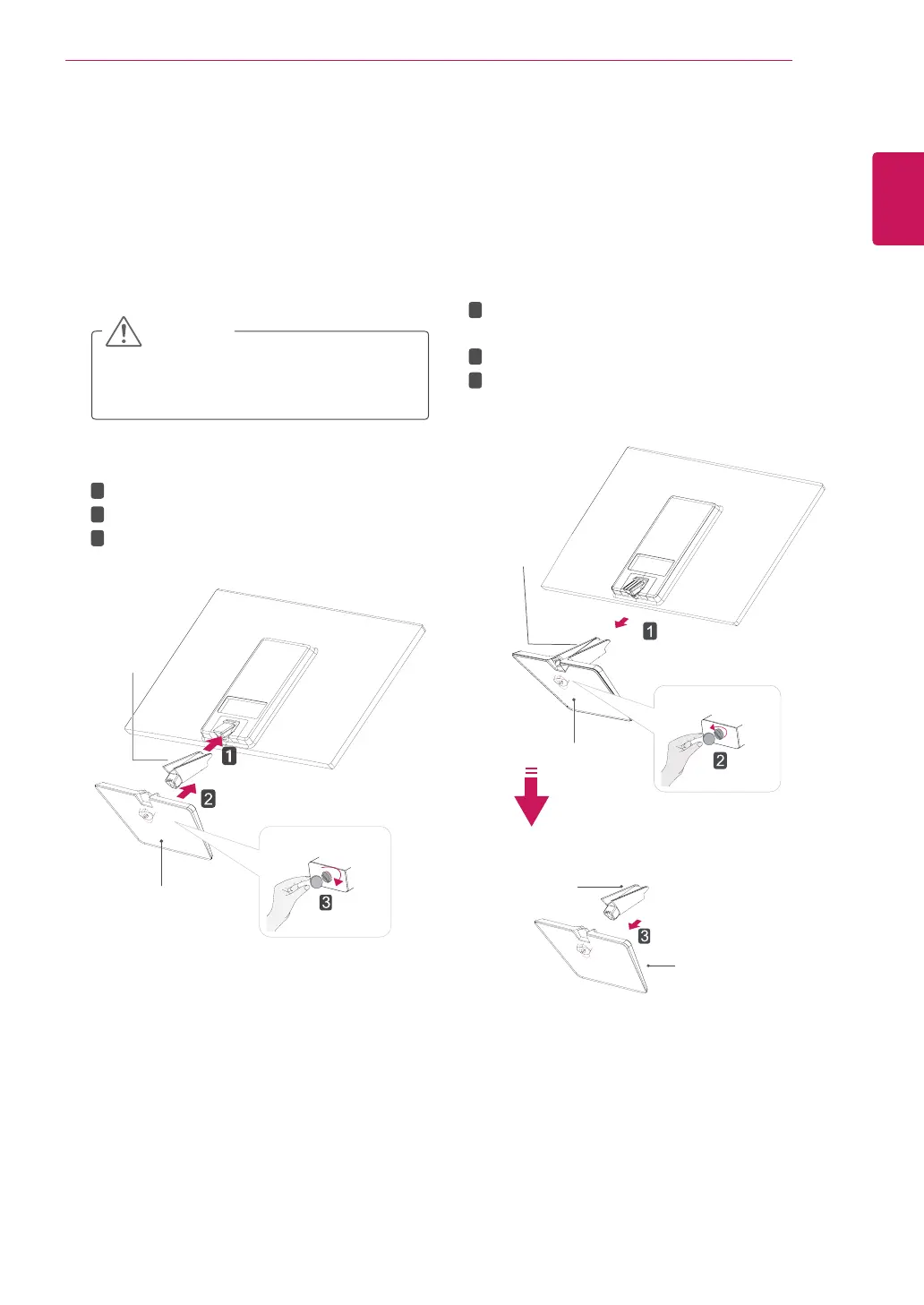
AttachtheStandBodytothemonitorset.
AttachtheStandBase.
Tightenthescrewtotherightwithacoin.
SettinguptheMonitorset
AttachingtheStandBase
1
PlacetheMonitorsetwiththescreenside
downonaflatandcushionedsurface.
Layafoammatorsoftprotectivecloth
onthesurfacetoprotectthescreenfrom
damage.
CAUTION
2
StandBase
StandBody
1
2
3
DetachingtheStandBase
1
PlacetheMonitorsetwiththescreenside
downonaflatandcushionedsurface.
2
StandBase
StandBase
StandBody
StandBody
PullouttheStandBodyandStandBasefrom
themonitorset.
Turnthescrewtotheleftwithacoin.
PullouttheStandBase.
1
2
3
5
ASSEMBLING AND PREPARING



 To Next Page