11Installation
3
Installation
Connecting the
speakers
Attaching the speakers to the
unit
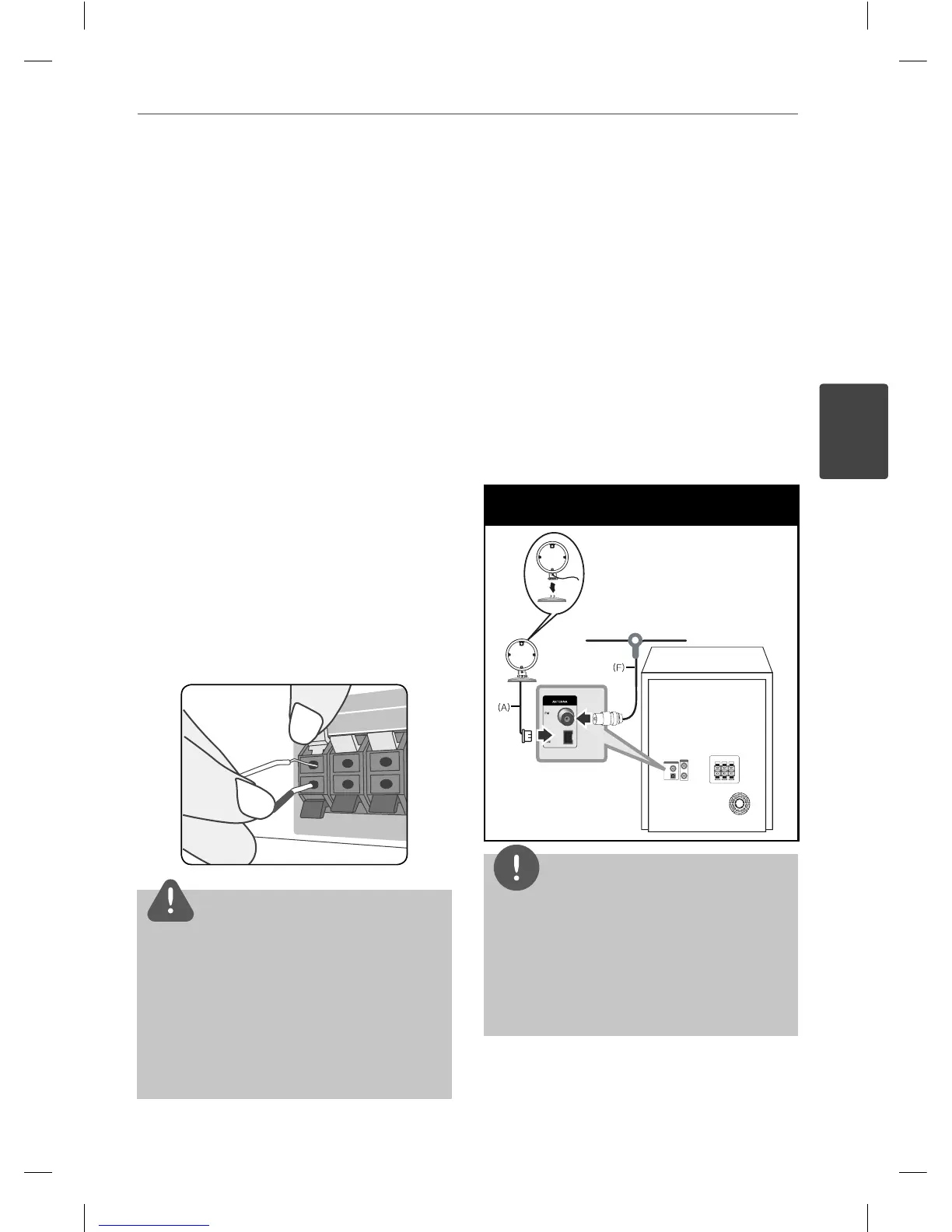
To connect the cable to the unit, press each
plastic nger pad to open the connection
terminals on the unit. Insert the wire and
release the nger pad.
Connect the black end of each wire to the
terminals marked - (minus) and the other end
to the terminals marked + (plus).
CAUTION
• Be careful to make sure children do not put their
hands or any objects into the *speaker duct.
*Speaker duct : A hole for plentiful bass sound
on speaker cabinet (enclosure).
• The speakers contain magnet parts, so color
irregularity may occur on the TV screen or PC
monitor screen. Please use the speakers far away
from either TV screen or PC monitor.
Antenna Connection
Connect the supplied FM (F) /AM (A) antenna
for listening to the radio.
Antenna Connection
NOTE
• To prevent noise pickup, keep the AM Loop
antenna away from the unit and other
components.
• Be sure to fully extend the FM wire antenna.
After connecting the FM wire antenna, keep it as
horizontal as possible.
3
Installation
MCT435-AOU-SMEXCLK-ENG.indd 11MCT435-AOU-SMEXCLK-ENG.indd 11 2010.3.11 4:26:30 PM2010.3.11 4:26:30 PM



 To Next Page