7Preparation
2
Preparation
Remote Control
Remote control
a
b
c
• • • • • • • • • a • • • • • • • •
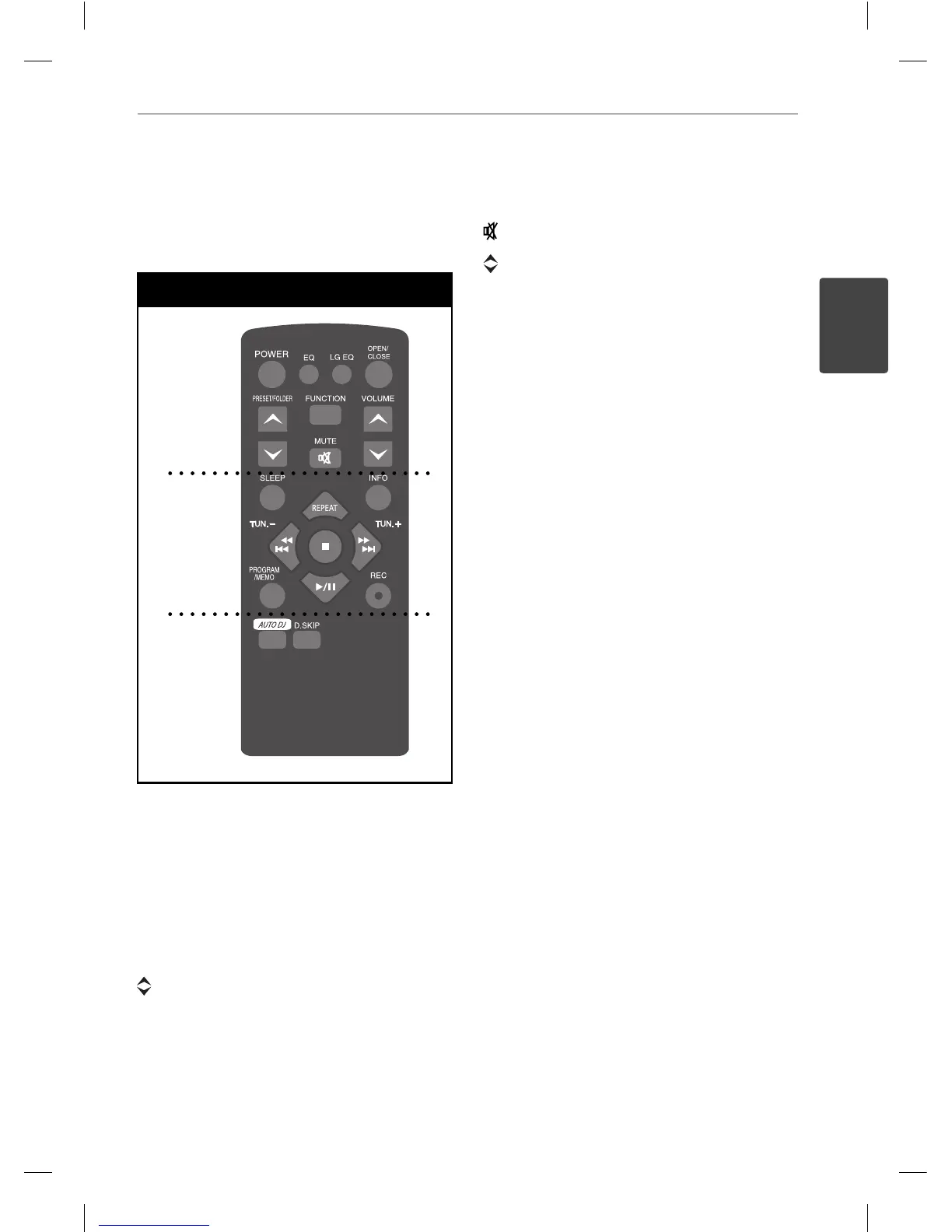
POWER : Switches the unit ON or OFF.
EQ : You can choose sound impressions.
LGEQ : You can select a Natural or Local
Specialization equalizer e ect.
OPEN/CLOSE : Opens and closes the disc tray.
PRESET/FOLDER : Searches for a folder of
MP3/ WMA les. When a CD/ USB containing
MP3/ WMA les in several folders is being
played, press PRESET/FOLDER selects the
folder you want to play. Choose a ‘preset
number’ for a radio station.
FUNCTION : Selects the function and input
source.
(MUTE) : Mutes the sound.
VOLUME : Volume control.
• • • • • • • • • b • • • • • • • • •
SLEEP : Sets the System to turn o
automatically at a speci ed time. (Dimmer :
The display window will be darken by half.)
INFO : Checks information about your music.
MP3/ WMA les often come with tags. The
tag gives the Title, Artist, Album or Time
information.
REPEAT : Selects a desired play mode.
TUN. (-/+) : Selects the radio station.
. m
/
M >
(SKIP/ SEARCH) :
- Searches for a section within a track.
- Skips Fast backward or Forward.
B
/
X
: Starts or pauses playback.
x
: Stop.
PROGRAM/MEMO : For storing radio stations.
If you have saved radio stations using
PROGRAM/MEMO, you can scroll through
them and select one.
z
(REC) : Recording.
• • • • • • • • • c • • • • • • • • •
AUTO DJ : Selects the AUTO DJ mode.
(For more information refer to the page 15.)
D.SKIP : Chooses a desired CD.
MCT435-AOU-SMEXCLK-ENG.indd 7MCT435-AOU-SMEXCLK-ENG.indd 7 2010.3.11 4:26:29 PM2010.3.11 4:26:29 PM



 To Next Page