40
DOLBY DRC menu
This function allows you to listen to a movie at a lower volume without losing clarity of sound. You can compress
the dynamic range of the Dolby Digital audio output.
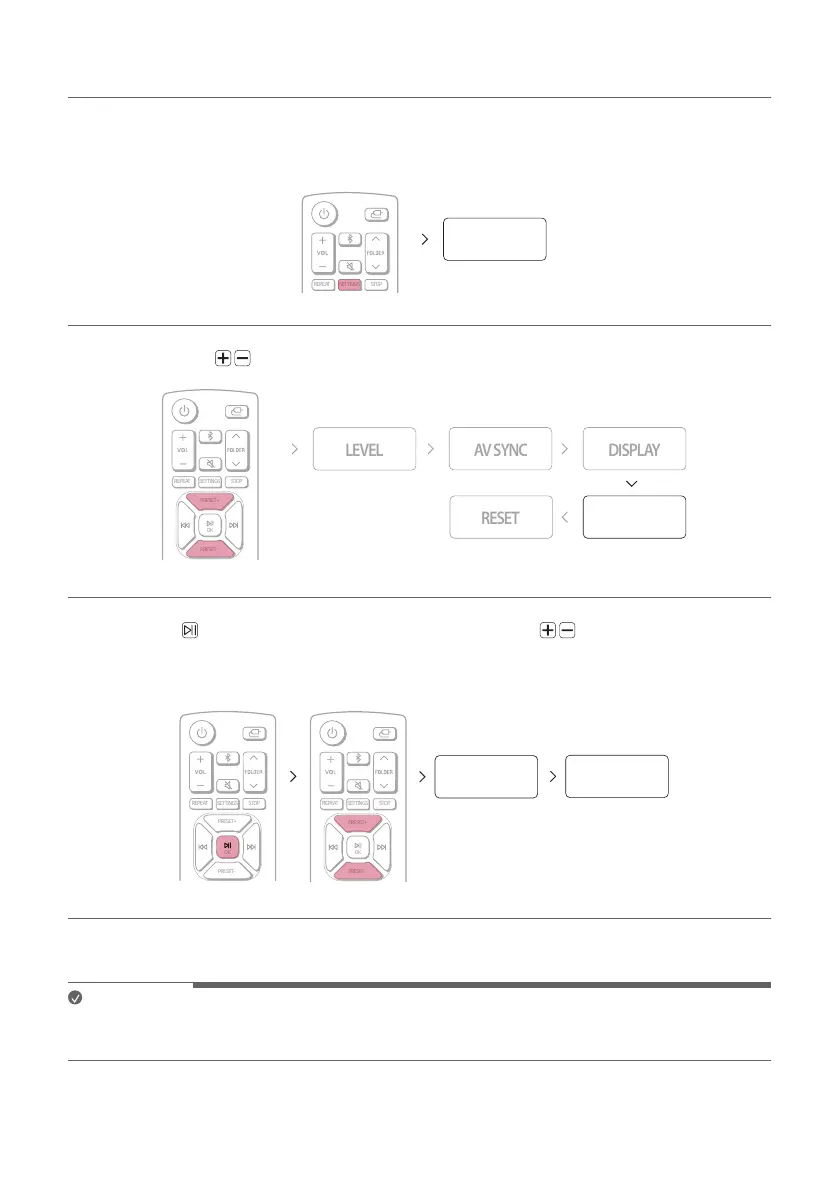
a Press the SETTINGS button on the remote control. “TEST TONE” appears on the status display.
SETTINGS
TEST TONE
b Press the PRESET button on the remote control until “DOLBY DRC” appears on the status display.
SETTINGS STOPREPEAT
PRESET+
OK
PRESET-
PRESET+
PRESET-
DOLBY DRC
c Press the OK button on the remote control. Then press the PRESET to set the DRC.
- OFF: Deactivates this function.
- ON: Activates this function.
SETTINGS STOPREPEAT
PRESET+
OK
PRESET-
PRESET+
PRESET-
SETTINGS STOPREPEAT
PRESET+
OK
PRESET-
OK
OFF ON
d Press SETTINGS to exit the setup menu.
Note
• Audio dynamic range compression lets you compress the dynamic range of the soundtrack based on the
dynamic range information included in the Dolby Digital signal.


 To Next Page