41
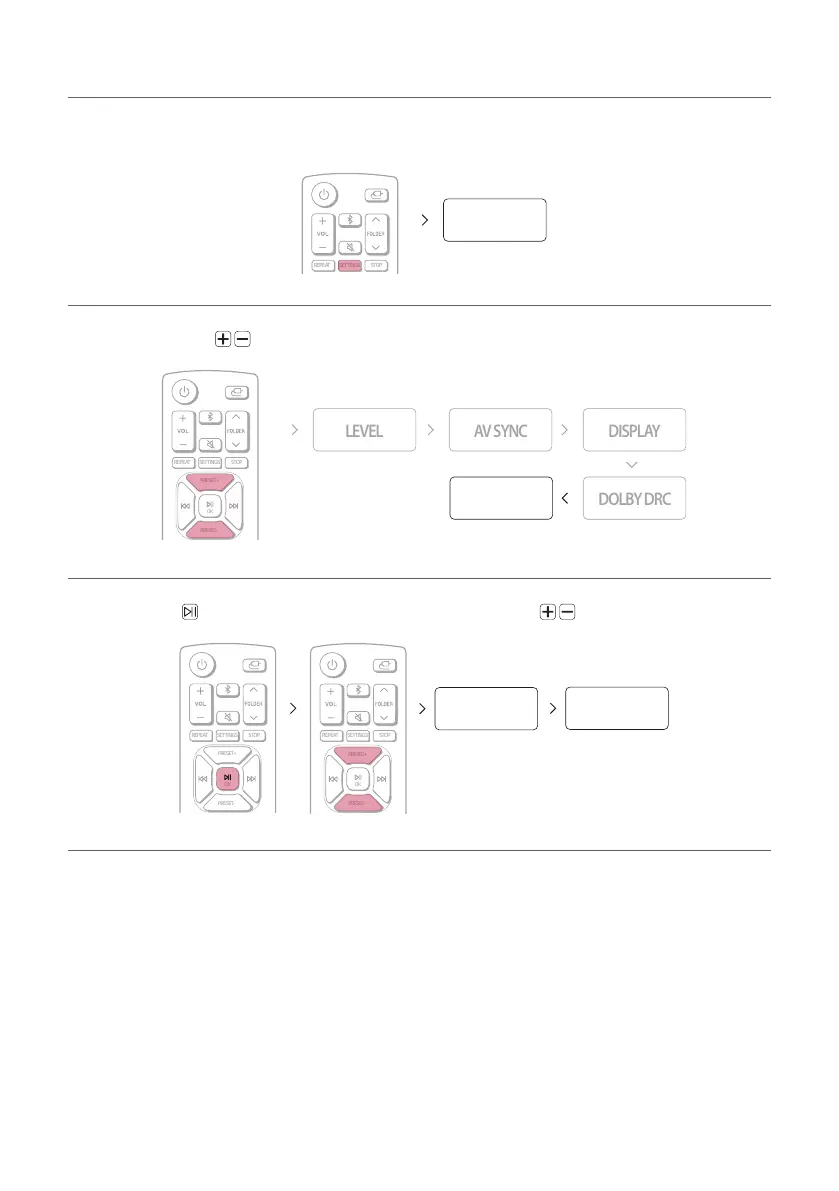
RESET menu
This allows you to initialise settings you have made in the SETTINGS menu.
a Press the SETTINGS button on the remote control. “TEST TONE” appears on the status display.
SETTINGS
TEST TONE
b Press the PRESET button on the remote control until “RESET” appears on the status display.
SETTINGS STOPREPEAT
PRESET+
OK
PRESET-
PRESET+
PRESET-
RESET
c Press the OK button on the remote control. Then press the PRESET to select “YES” or “NO”.
SETTINGS STOPREPEAT
PRESET+
OK
PRESET-
PRESET+
PRESET-
SETTINGS STOPREPEAT
PRESET+
OK
PRESET-
OK
YES NO
d Press SETTINGS to exit the setup menu.


 To Next Page