Section 2. Maintenance
Cleaning the Air Filter Screen
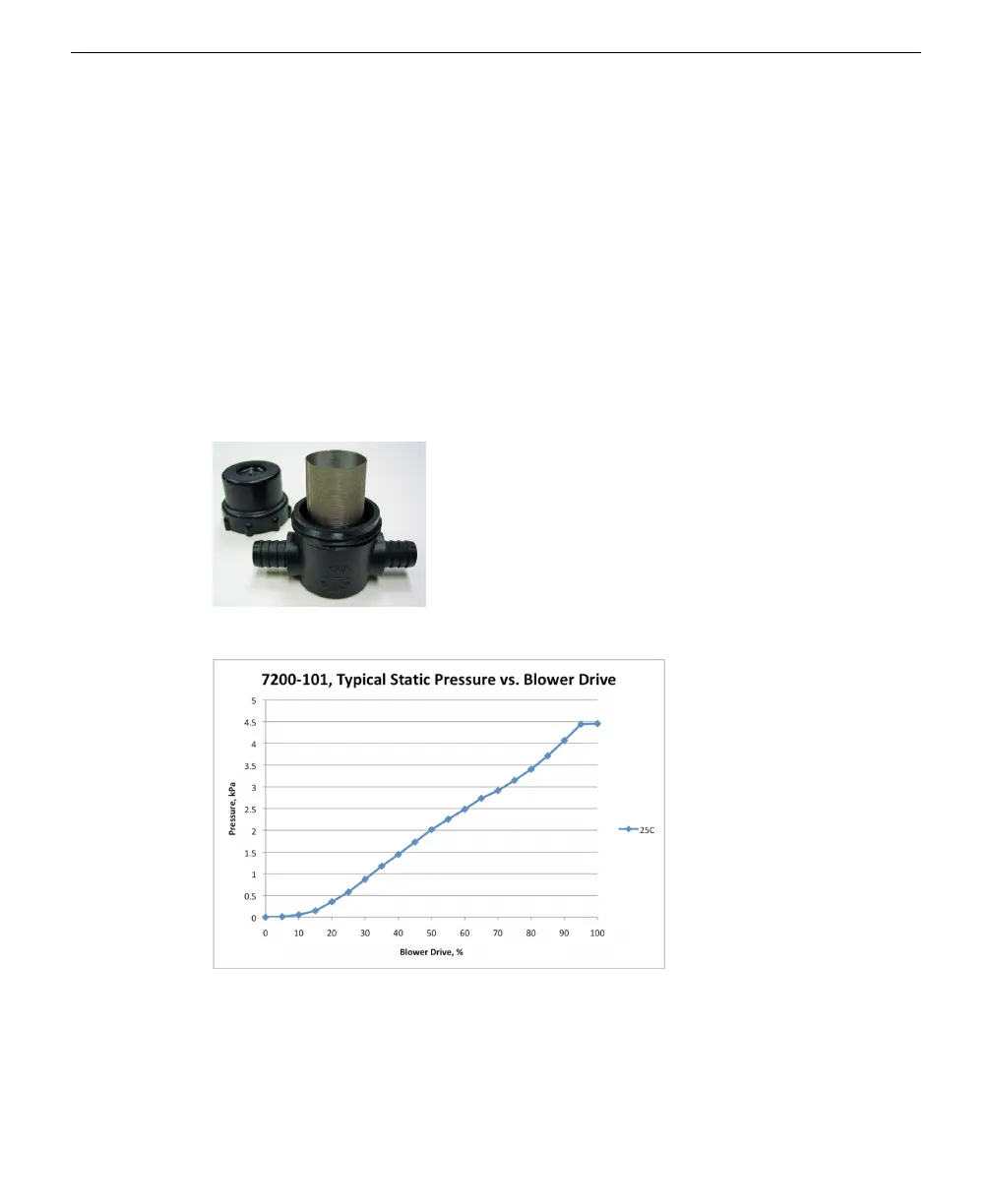
If the Flow Module is set to maintain flow (e.g., F15.0) and the filter screen
becomes clogged with debris, the Motor Drive and Pressure Drop readings will
increase, as the motor will have to work harder to maintain the desired flow rate
(see Figure 2-3 below and Figure 2-4 on the facing page).
If the Flow Module is set to constant blower drive (e.g., C25), the blower drive will
remain constant, but the measured flow rate will drop. Unscrew the cap on the fil-
ter, remove the screen, and clean with water or compressed air. Clean any remain-
ing debris from the body of the filter, and replace the screen. There is a
replacement screen in the spares kit under part number 301-10382.
Figure 2-2. Remove the cap on the filter and clean the screen with water or compressed air.
Figure 2-3. Plot of pressure drop (kPa) vs. blower drive in 7200-101. During normal oper-
ation, the 7200-101 pressure drop is about 1.0 kPa. Typical maximum is about 4.5 kPa at
100% motor drive.
2-2 7200-101 Flow Module



 To Next Page