Troubleshooting
27
10.0 TROUBLESHOOTING
The information below indicates various symptoms a user may
encounter in the event the Liebert GXT2U develops a problem. Use
this information to determine whether external factors caused the
problem and how to remedy the situation.
1. The Fault indicator will illuminate, indicating the UPS detected a
problem.
2. An alarm will sound, alerting that the UPS requires attention.
3. One or more additional load/battery level LED indicators will be illu-
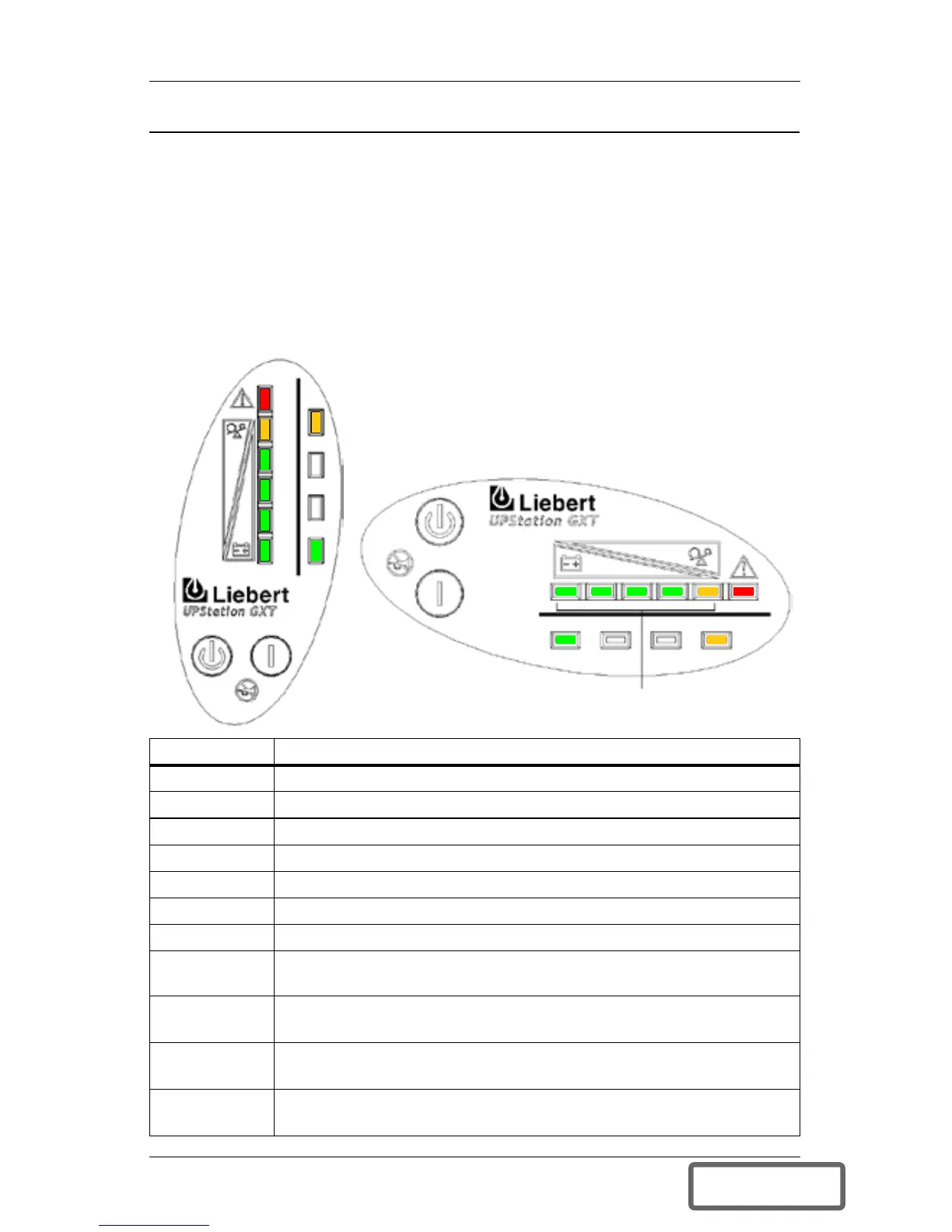
minated to provide a diagnostic aid to the operator, as described below:
LED status Diagnosis / Audible alarm
All LEDs On bypass due to output overload; beep every half-second
A LED On bypass due to overtemperature condition; beep every 4 sec.
B LED On bypass due to DC bus overvoltage; beep every 4 sec.
C LED On bypass due to control power supply failure; beep every 4 sec.
D LED On bypass due to PFC failure; beep every 4 sec.
E LED On bypass due to inverter failure; beep every 4 sec.
A&C LEDs UPS failed battery test; long beep every minute
C&E LEDs
UPS shutdown due to command from communication port
(SNMP); no beep
Battery LED
Flashing
Internal Battery source not available (continuous horn). Check
battery connection, completely power down and reboot UPS.
AC LED
Flashing
Line-to-neutral reversal in the AC input power supply or a loss of
proper grounding; continuous horn and UPS will not start.
Bypass LED
Flashing
Utility power voltage or frequency is out of tolerance; bypass is
unavailable.
This example shows the UPS
on bypass due to output overload.
Fault
E
D
C
B
A
A B C D E Fault
AC INPUT BATTERY UPS ON BYPASS
BATTERY
UPS ON
BYPASS
AC
INPUT
LOAD/BATTERY
LEVEL INDICATORS
DISCONTINUED
PRO DU C T







 To Next Page