FERRITE BEAD INSTALLATION
Serial Communications
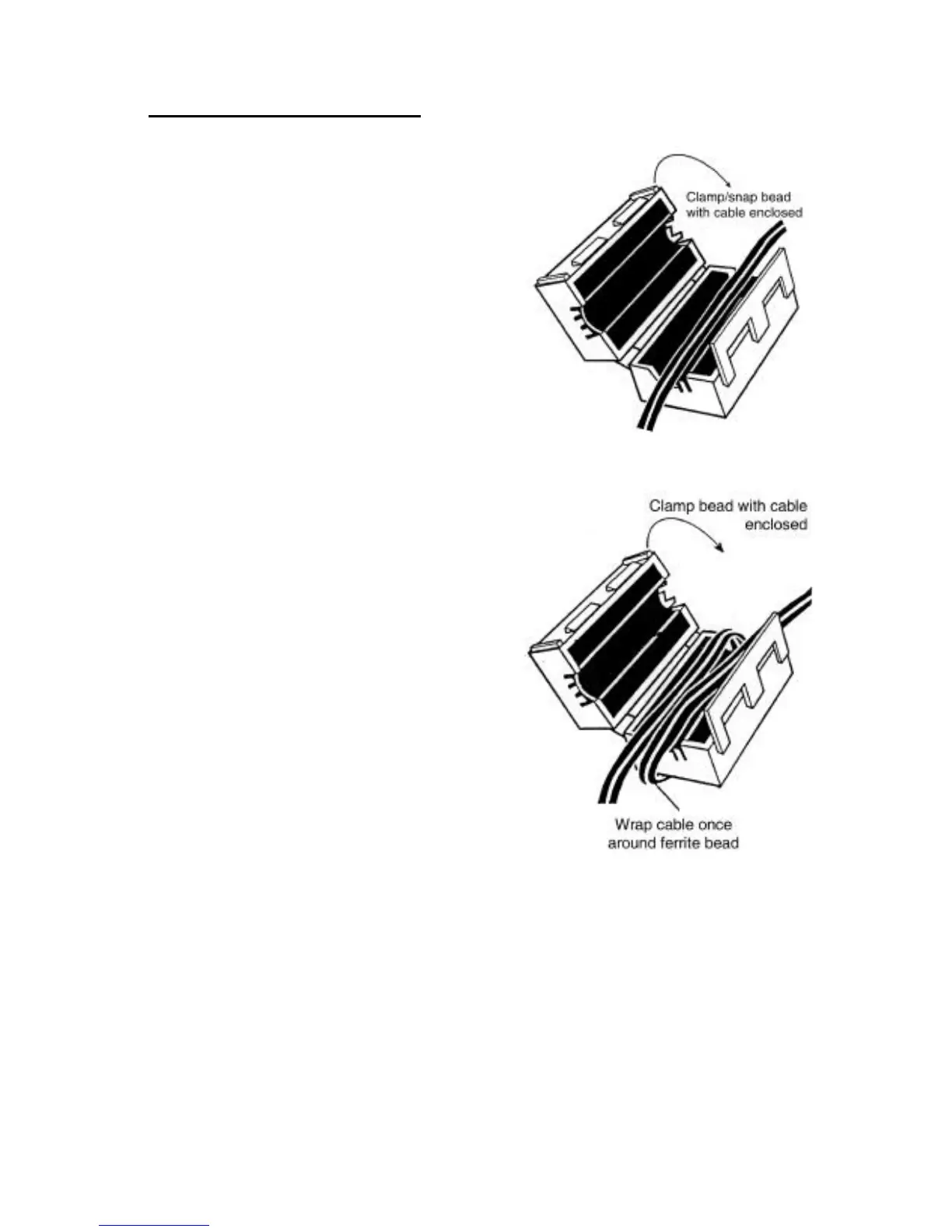
Attach the smaller enclosed ferrite bead
clamp to the communication cable as
shown in the drawing using the following
directions:
Open the ferrite bead.
Place the communication cable inside
the ferrite bead grove.
Position the ferrite beads as close as
possible to the end of the cable that
connects to the DB9 connector of the
UPS.
Close the ferrite bead so that the
ferrite bead’s case snaps closed with
the cable routed inside the ferrite
bead’s case.
SNMP Installation
Attach the larger enclosed ferrite bead
clamp to the network cable as shown in
the drawing using the following directions:
Open the ferrite bead.
Place the network cable inside the
ferrite bead grove.
Wrap the cable once around the
bead.
Position the ferrite cable as close as
possible to the end of the cable that
connects to the UPS.
Close the ferrite bead so that the
ferrite bead’s case snaps closed with
the cable routed inside the ferrite
bead’s case.









 To Next Page