The key shows the previous option.
Press to validate the data; the symbol disappears from the display.
Press the key to access the next programming step.
If no keys are pressed for 5 minutes, the unit switches to the simulation screen, “5.27.-
SIMULATION SCREEN”.
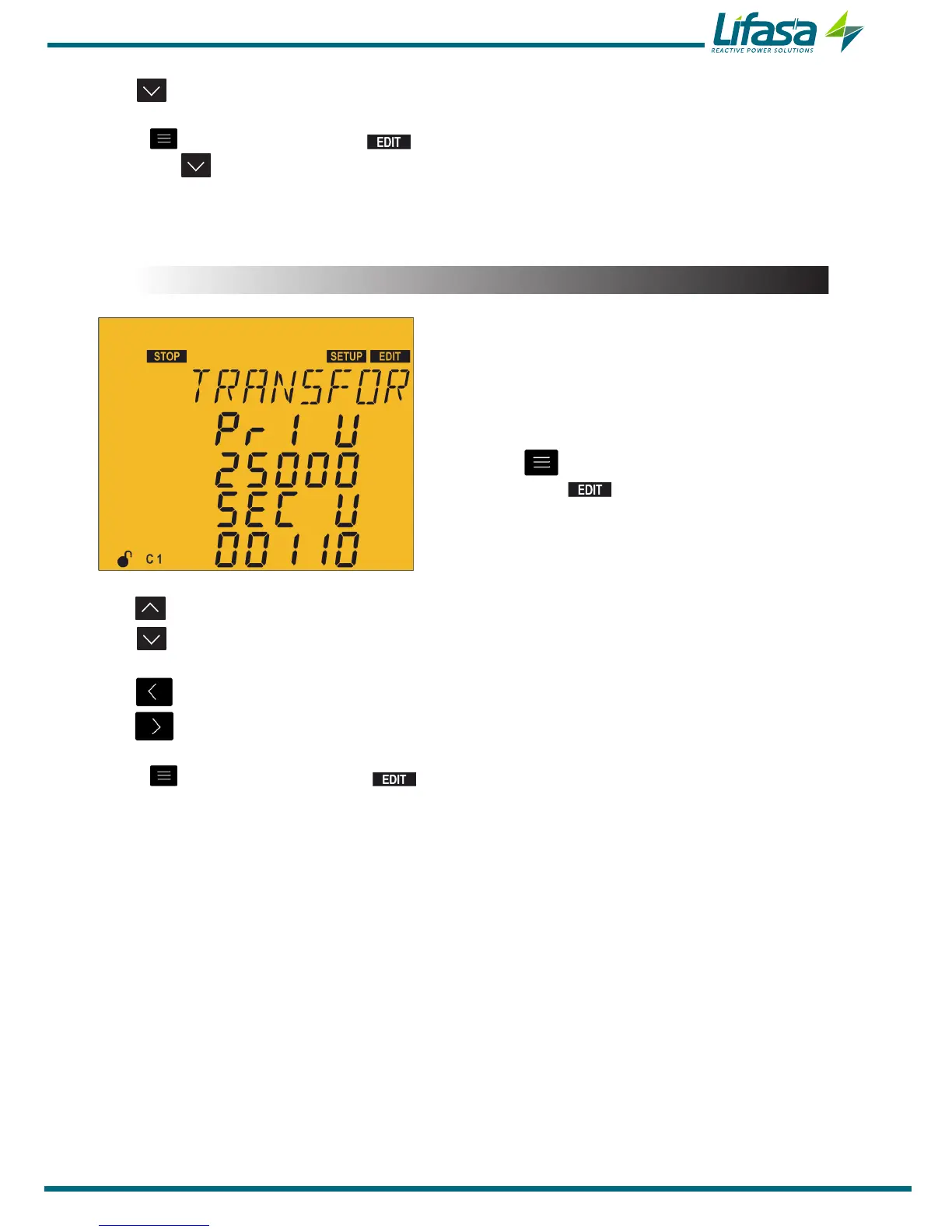
5.11.- VOLTAGE TRANSFORMATION RATIO
In this point the primary and secondary value of the
voltage transformer can be configured.
Press the key to enter editing mode. It is
identified by the symbol and the blinking of
the digits to be modified.
The key increases the digit value.
The key decreases the digit value.
The key skips to the previous digit.
The key skips to the next digit.
Press to validate the data; the symbol disappears from the display.
Voltage primary:
Maximum value: 99999.
Minimum value: 1.
Voltage secondary:
Maximum value: 99999.
Minimum value: 1.
Maximum possible voltage ratio: 1000.
NB: The voltage ratio is the ratio between the primary and secondary voltage.
Maximum value of the current ratio x the voltage ratio: 200000.
If the value entered is lower than the minimum value or higher than the maximum value,
the backlight of the display ashes and the value entered is replaced with the minimum or
maximum value, or with the last value validated.
85


 To Next Page