22
2. Setup & Use
3. Optional
Accessories
4. Troubleshooting
5. Warranty, Safety
& Specifications
1. Overview
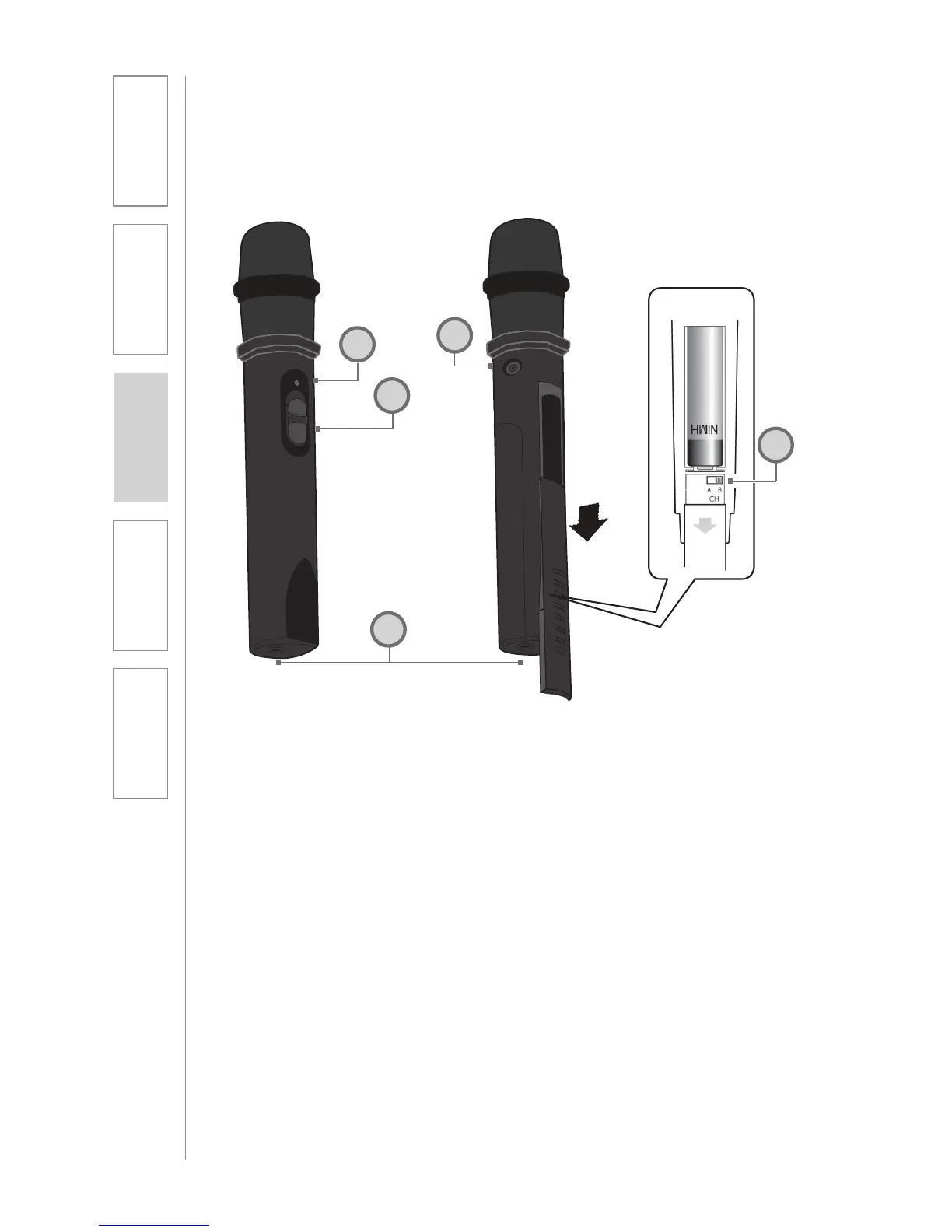
1
2
3
5
1. POWER SWITCH
2. POWER/CHARGE INDICATOR:
this light glows blue when turned
on and turns off to indicate low
battery level. When charging, the
light glows red.
3. AUDIO INPUT: plug a laptop,
MP3 player or other audio device
into this jack to wirelessly transmit
the audio signal to be played
through the system.
4. CHANNEL SELECT SWITCH
(CH A/B): Located in the battery
compartment, this switch is set to
channel B at the factory.
5. CHARGER INPUT: Plug the
charging cable from the REDMIKE
cradle charger or into this jack.
REDMIKE Share: Controls and Connections
4


 To Next Page