6 Zulu User Guide
Using your Zulu headset
A
B
C
D
E
F
H
I
G
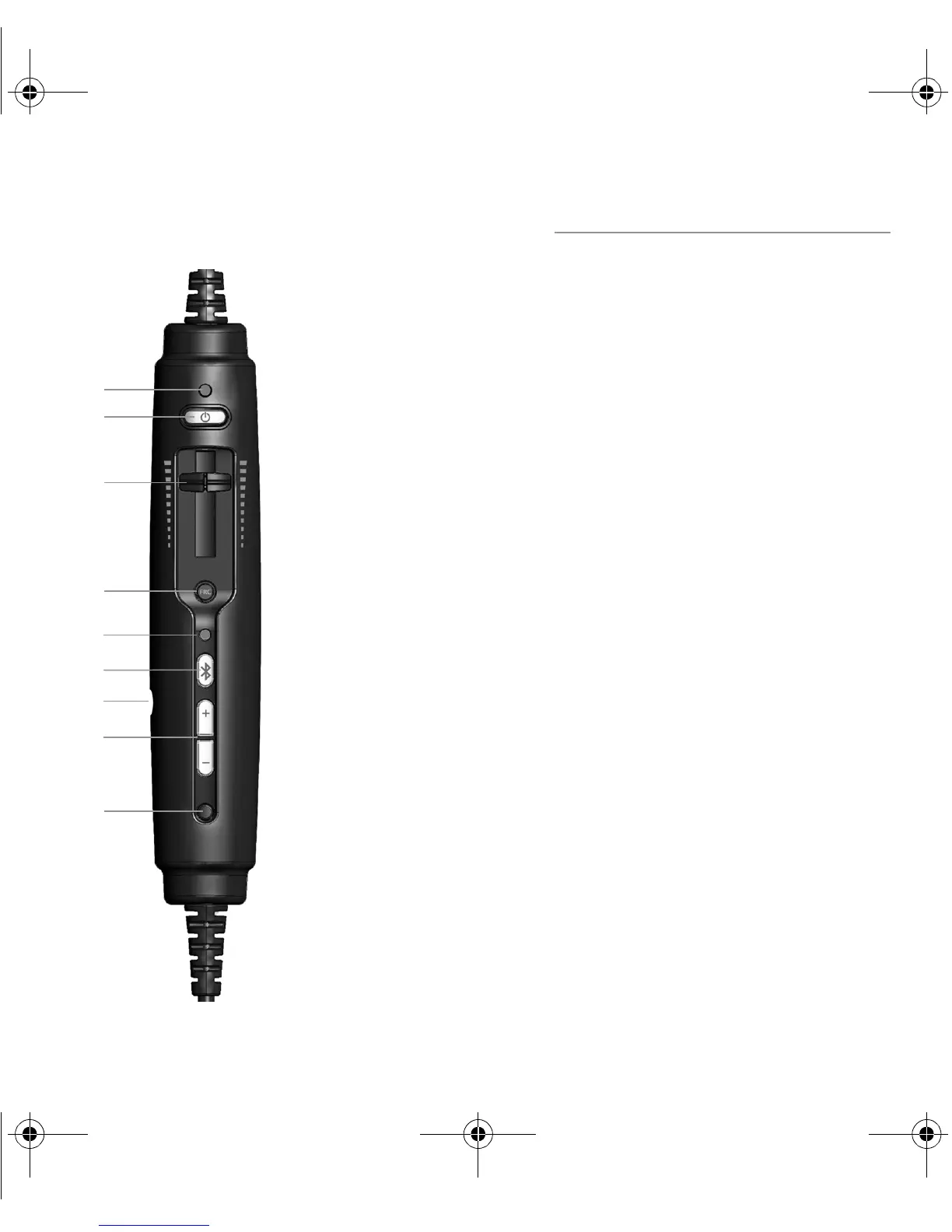
The Zulu Controller
A Power indicator LED: Flashes green when power is
supplied to Zulu and batteries are strong. Flashes red when
batteries are low.
B Power button: Powers on headset, turning on Active Noise
Reduction (ANR). Press button once to turn Zulu on; press and
hold to turn Zulu off.
C Volume control: Lets you control audio panel volume with
individual sliders for each ear. Does not affect the volume
of auxiliary devices.
DFRC
®
(Front Row Center) button: Turns on and off
Front Row Center (FRC). Front Row Center enhances stereo so
that sound seems to come from all around you, not just from
right and left.
E Bluetooth indicator LED: Flashes blue when Bluetooth
mode is on and red when Bluetooth is being turned off. In
pairing mode, flashes alternating red and blue.
F Bluetooth button: Turns on and off the Bluetooth signal
and controls Bluetooth-connected devices.
G Auxiliary input jack: Provides a wired input for audio
devices such as music players and cell phones.
H Bluetooth volume buttons: Controls the volume of
Bluetooth devices.
I Auto MusicMute button: Quiets music and audio from
auxiliary devices during radio communications. Does not
affect cell phone calls.
ZuluUG_online.book Page 6 Thursday, December 27, 2007 9:50 PM


 To Next Page