Lifting Column LC3 IC | 19
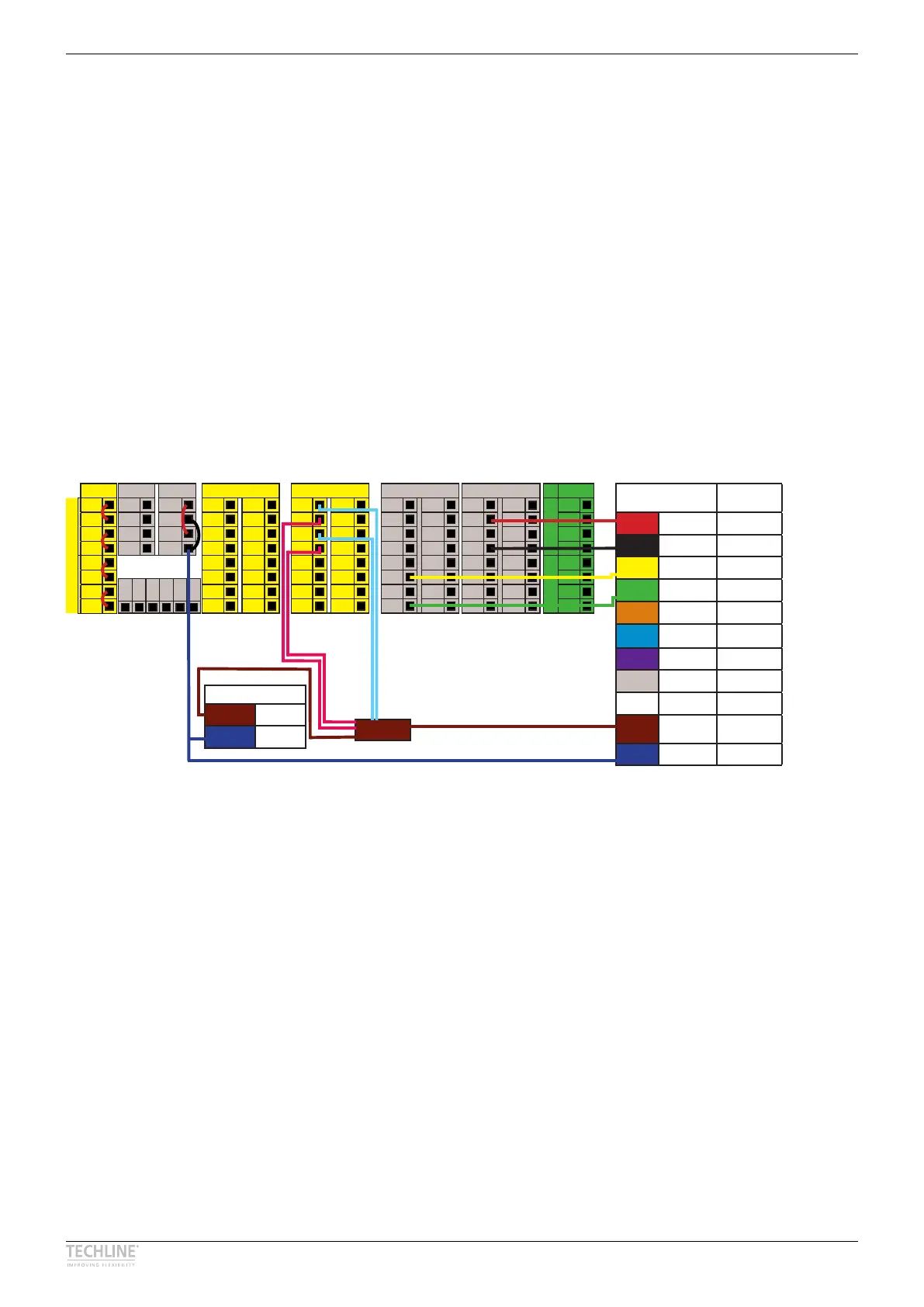
Wiring example for ELEVATE Easy
Safety
Emergency Stop
24 V
EI0
24 V
EI1
Safeguard Stop
24 V
EI0
24 V
EI1
Configurable Inputs
24 V 24 V
CI0
CI4
24 V 24 V
CI1
CI5
24 V 24 V
CI2
CI6
24 V 24 V
CI3
CI7
Configurable Outputs
0 V 0 V
CO0
CO4
0 V 0 V
CO1
CO5
0 V 0 V
CO2
CO6
0 V 0 V
CO3
Co7
Analogue
Analogue Inputs
AG
AI0
AG
AI1
Analogue Outputs
AG
AO0
AG
AO1
Digital Inputs
24 V 24 V
DI0
DI4
24 V 24 V
DI1
DI5
24 V 24 V
DI2
DI6
24 V 24 V
DI3
DI7
Digital Outputs
0 V 0 V
DO0
DO4
0 V 0 V
DO1
DO5
0 V 0 V
DO2
DO6
0 V 0 V
DO3
DO7
Remote Power
12 V PWR
GRD
GRD
ON 24 V
OFF
0 V
DI11
DI10
DI9
DI8
24 V
0 V
IC I/O LC3 Possible
UR I/O
Run out Digital Input DO0 - DO7
Run in Digital Input DO0 - DO7
End stop in Digital Output DI0 - DI7
End stop out Digital Output DI0 - DI7
Reserved Orange
Reserved Light blue
Reserved Violet
Reserved Grey
Reserved White
Power
+ 24 V
COX = System
emergency stop
GND GND
Power supply*
Power + 24 V
GND GND
Safety relay(s)*
LC3 IC pinout
URCap wiring diagram for ELEVATE Easy
*Power supply and safety/contactor relays are purchased separately
UR e-Series with ELEVATE™ Easy – Wiring example
ELEVATE Easy can be directly used with an UR e-Series cobot due to the ELEVATE URCap� ELEVATE Easy
is recommended when the column should only run to its endstop positions� Connect the column to the
UR control box as shown in the wiring diagram� You can choose the port number during the setup of the
URCap on the teach pendant� ELEVATE does not come with safety relay/contactors nor power supply� The
wiring diagram only shows a suggestion to integrate ELEVATE into a safe torque off system�
Download the ELEVATE URCap from LINAK�com and get more information�


 To Next Page