14
2022-07-19
1 2
Spring Return
3 Point
0-10VDC
VAV
0-10VDC
From Zone
PT 1000
PT 1000
Serial number
Select Slave/damper
_14
Deactivate/
activate Damper-->
Adressing Slaves
-> SEF
Communication
De-/Activate Damper
->Adressing Slaves
SEF
Communication
De-/Activate Damper
Status Overview
-> System Setup
Settings
Manual/Auto
SEF Mode:
Off
AFA in system
No
SEF Mode:
Off_
AFA in system
No
SEF Mode:
Pressure_
AFA in system
No
Number: 14
Damper:
Smoke ctrl damper_
Section: 3_
Number: 14
Damper:
Smoke ctrl damper
Section: 3
Number: 14
Damper:
Enabled
Section:1
Number: 14
Damper:
Enabled_
Section:1
Number: 14
Damper:
Smoke ctrl damper_
Section:1
Number: 14
Damper:
Smoke ctrl damper
Section: 1_
lindab | commissioning guide
FireSystemPro
We reserve the right to make changes without prior notice
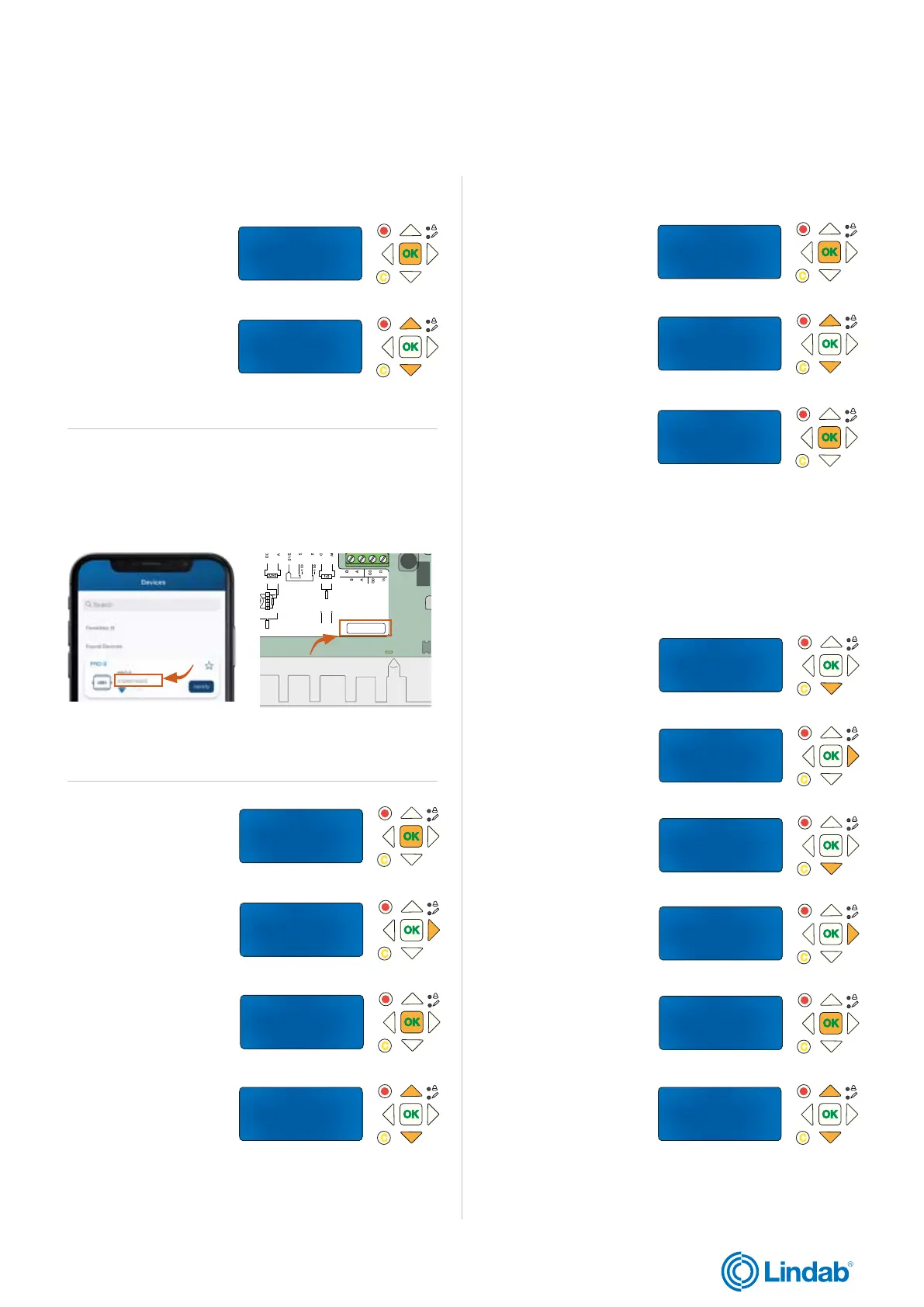
2.10 Activate SEF mode
1. Press ”down” to find
”System Setup”
2. Press ”forward” to
enter ”System Setup”
3. Press ”down” to find
”SEF”
4. Press forward to
enter ”SEF” mode
5. Press ”OK” to edit
”SEF” mode
6. Use ”up” and down”
arrows to change
to desired SEF mode.
13. Press ”OK” to con-
firm or change section
for the damper
11. Press ”OK” to con-
firm setup for damper
and set section for
damper
Damper setup and section is now changed for
selected damper unit
8. Press ”forward”
to edit ”De-/Activate
Damper”
9. Press ”OK” to
start edit status for
”Damper”
10. Use ”up” and down”
arrows to change
”Damper” to desired
setup
12. Use ”up” and down”
arrows to change
”section” number if
needed
Section setup in PRO-M (cont.)
Continue with next step on following page
5. Press ”OK” to start
edit ”Select slave
number”
Select Slave/damper
_6
Deactivate/
activate Damper-->
6. Use ”up” and ”down”
arrows to change
”slave number” to edit
Tips! Use the ProLink
TM
application to see modbus address
applied for a specific PRO-S unit. To know which PRO-S
to choose, checkup the serial number for the unit in the
ProLink
TM
app and control it with the identification number
inside the PRO-S unit.
7. Press ”OK” to confirm
”slave number”
Select Slave/damper
14
Deactivate/
activate Damper-->
Figure 5: ID number for
PRO-S in ProLink
TM
app
Figure 6: ID-number for
PRO-S inside the unit
012202140023


 To Next Page