8
2022-07-19
Language
English
Language
_English
Language
_Danish
Language
Danish
Status Overview
->Access Rights
->Log on
Log off
Change password
Log on
Enter password ****
Cur. level: None
Log on
Enter password _
Cur. level: None
Log on
Enter password 1_
Cur. level: None
Log on
Enter password 1111
Cur. level: None
Log on
Enter password ****
Cur. level: Admin
Log on
Log off
-> Change password
Log on
Log off
Change password
Settings
Manual
-> Access Rights
Change password for
level: Operator
New password:
Change password for
level: Operator_
New password:
Change password for
level: Admin
New password:_
Change password for
level: Admin
New password:****
lindab | commissioning guide
FireSystemPro
We reserve the right to make changes without prior notice
2.0 Quick start guide
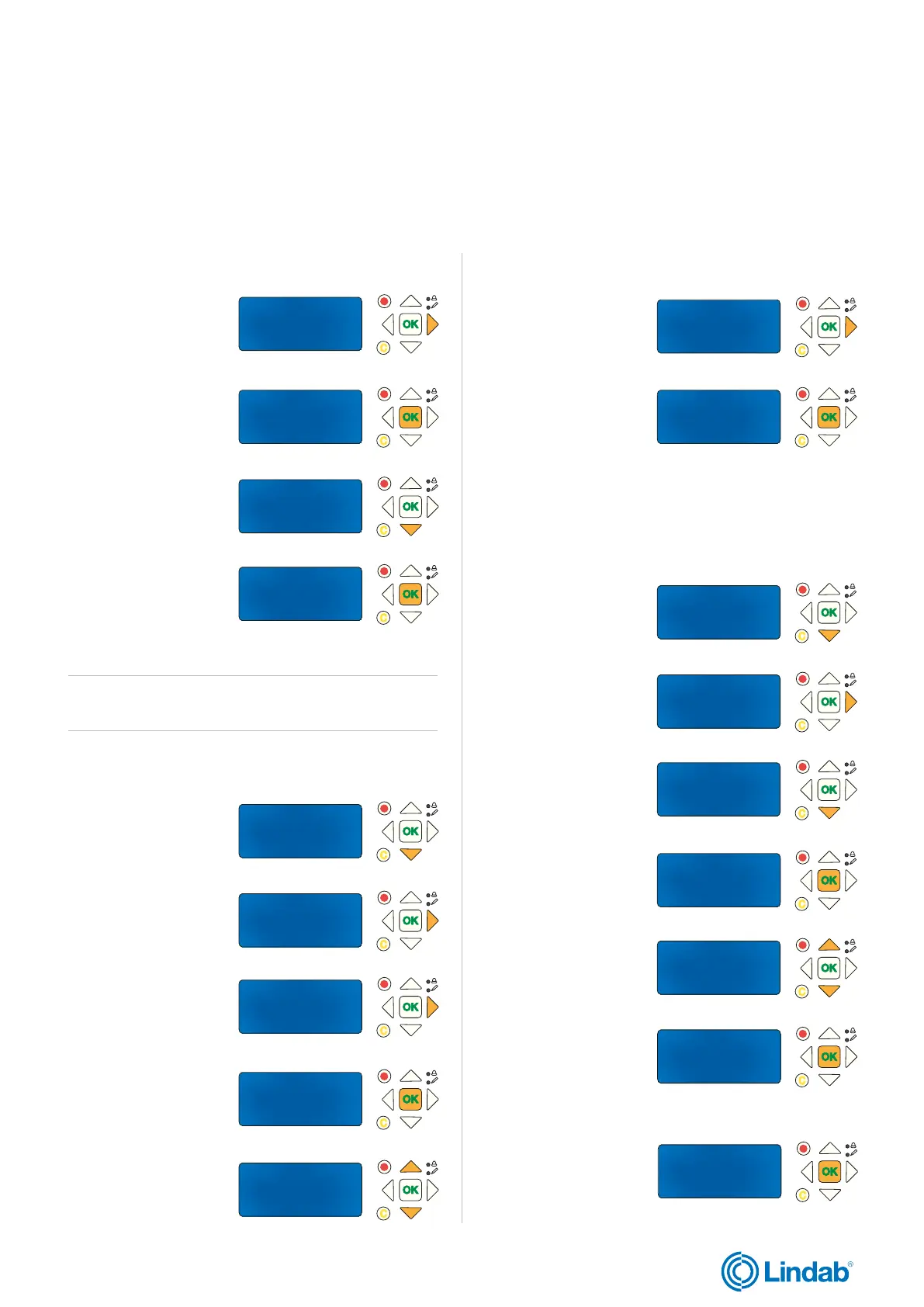
This section provides you with guidlines to common settings and configurations to get the Fire System Pro running.
Note! Each guide starts from the main menu. To go back, press “back” button until you reach the main menu.
2.1 Choose language
Language is now changed.
1. Press “forward”
button to find
”Language
2. Press “OK” to edit
language value
3. Press ”down” to
change language
4. Press “OK” to
confirm
2.2 Log in
1. Press “down”
to find ”Acccess rights”
2. Press “foward” to
enter access rights
3. Press ”forward” again
to select log on
4. Press “OK” to start
entering password
5. Use ”up” and ”down”
arrows to set number
6. When first number is
set, press ”forward” to
set next number (and
so on).
7. Press ”OK” when
password is set.
2.3 Change password
1. Press “down”
to find ”Access rights”
2. Press “foward” to
enter access rights
3. Press ”down” to find
”Change password”
4. Press ”OK” to start
editing
5. Use ”up” and ”down”
arrows to set level for
password changes
You are now loged in.
Note! Cur. level on display changes according to user login and
access right.
6. “OK” to start
entering New password
8. Press “OK” when
new password is set
7. Enter password ( step 5-6 in 2.2 log in section)
Note! Choose between English and Danish.
Standard language is English.
Password is now changed.


 To Next Page