9
2022-07-19
Adressing Slaves
SEF
Communication
-> De-/Activate Damper
->Adressing Slaves
SEF
Communication
De-/Activate Damper
Status Overview
-> System Setup
Settings
Manual/Auto
Select Slave/damper
1
Deactivate
/activate Damper -->
Damper number: 1
Activated: No
Damper number: 1
Activated: _
Damper number: 1
Activated: Yes_
Damper number: 1
Activated: Yes
->Add slave
Replace slave
Remove slave
Reset all slaves
->Adressing Slaves
SEF
Communication
De-/Activate Damper
Status Overview
-> System Setup
Settings
Manual/Auto
Start slave number:
6
Start adding: No
Status: Idle
Start slave number:
_
Start adding: No
Status: Idle
Start slave number:
4
Start adding: No
Status: Idle
Start slave number:
4
Start adding: No
Status: Idle
Start slave number:
4
Start adding: Yes
Status: Idle
Start slave number:
4
Start adding: Yes
Status: Idle
lindab | commissioning guide
We reserve the right to make changes without prior notice
FireSystemPro
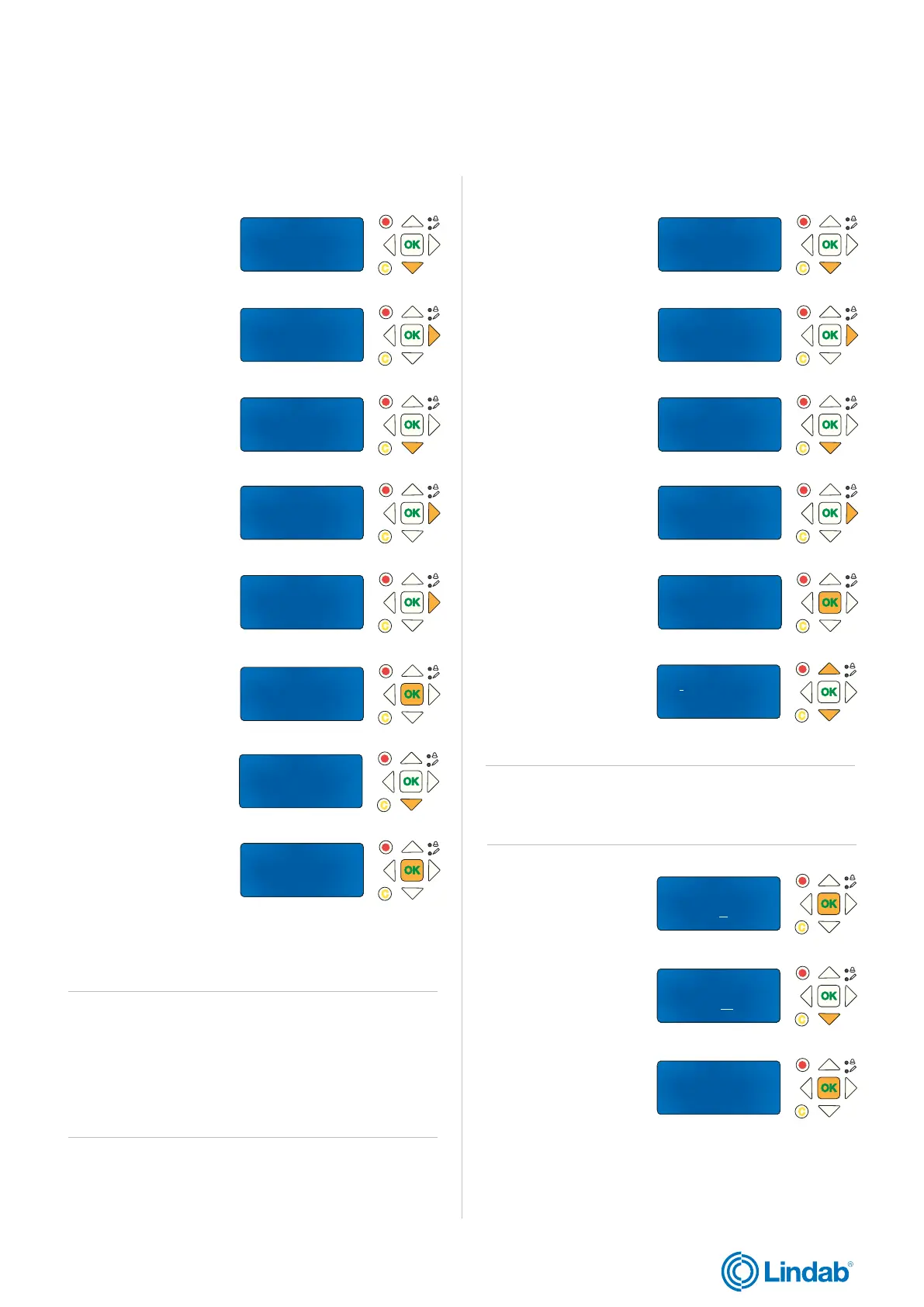
2.4 Activate local re dampers
1. Press ”down” to find
”System Setup”
2. Press ”forward”
to access ”System
Setup”
3. Press ”down” to find
“De-/Activate Damper”
4. Press ”forward” to
access ”De-/Activate
Damper”
5. Press ”forward” to
access ”Damper
numbers”
6. ”OK” to edit activated
status (Yes/No)
7. Press ”down” to
change activated
status to YES
8. “OK” to confirm
Damper 1 is now activated
.
Note! Local dampers (connected to PRO-M) can only have
adress one (1), two (2) or three (3).
To activate damper number two (2) and three (3), follow
step 5-8 above. Press “up” button to change damper
numbers.
2.5 Add PRO-S damper units to PRO-M
1. Press ”down” to find
”System Setup”
2. Press ”forward”
to access ”Addressing
Slaves”
3. Press ”forward” again
to access ”Add slaves”
4. Press forward again
to access ”Start slave
number”
5. Press ”OK” to edit
”Start slave number”
6. Use ”up” and ”down”
arrows to change
”Start slave number”
7. ”OK” to confirm slave
number and edit
”Start adding”
8. Press ”down” to
change start adding
value to YES
9. ”OK” to confirm ”start
adding”
Continue with next step on following page
Note! Lowest number for damper unit (“start slave number”)
is four (4).


 To Next Page