6
2022-07-19
1 2
Spring Return
3 Point
0-10VDC
VAV
0-10VDC
From Zone
Smoke
PT 1000
PT 1000
Serial number
lindab | commissioning guide
FireSystemPro
We reserve the right to make changes without prior notice
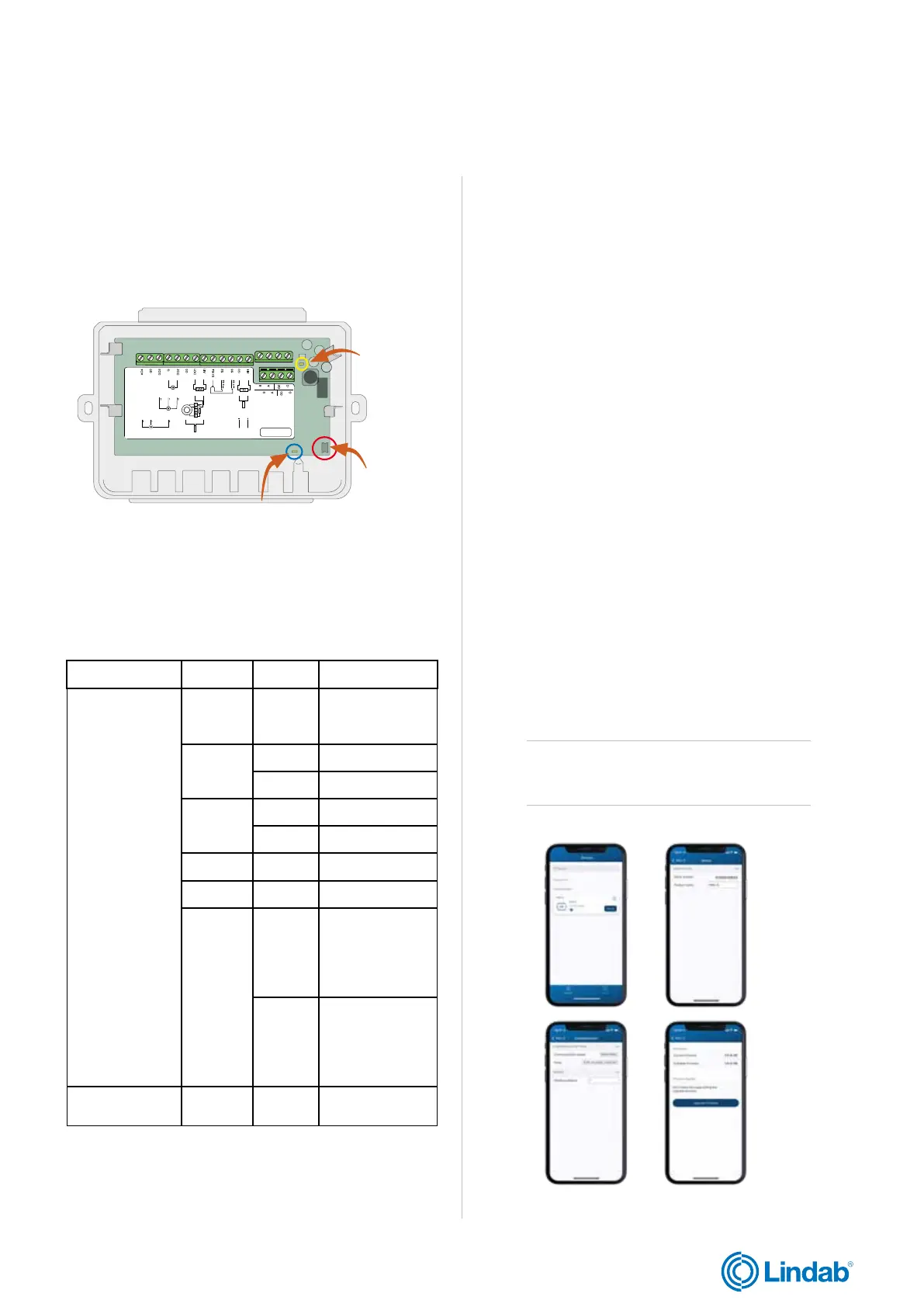
Push-button
LED light for identification
LED light for
communication
Figure 3: Inside PRO-S
LED light Colour Pattern Description
Identification
Blue Steady
Bluetooth
connection
active
Yellow
Steady Service alarm
Blinking Unit identified
Red
Steady Alarm
Blinking Factory reset
Green Steady Everything ok
Magenta Steady Unit offline
White
Steady
Unit has
address 1 and
is ready to be
addressed in the
system
Blinking
The button has
been pressed
on the unit and
it’s waiting to be
addressed
Communication Yellow
Fast
blinking
Communication
in process
Figure 4: Screenshots from Lindab ProLink
TM
application
1.6 PRO-S light indications
The PRO-S damper unit has two different LED lights to
indicate status for communication and identification, see
table 1.1. below
Table 1.1: PRO-S led light indications
1.7 ProLink
TM
application
The ProLink
TM
application is available on Android and iOS
and can be used to find a PRO-S unit, to change ModBus
address and name of a unit, and update the PRO-S
software. In order to access and enable particular
operations and settings in the ProLink
TM
application, a
valid password is required to be entered.
Administrator - password: Admin
• Update firmware
• Reset to default values
• Save and import local configuration
• Change password on all users
• Read values decided by application
Service - password: Service
• Reset to default values accepted by application
• Save and import local configuration
• Change password on this user level
• Read values decided by application
Operator - password: Operator
• Reset to default values accepted by application
• Save and import local configuration
• Change password on this user level
• Read values decided by application
Guest - password: N/A
• Read values decided by application
Attention!
Change password after the first admin login


 To Next Page