7
2022-07-19
lindab | commissioning guide
We reserve the right to make changes without prior notice
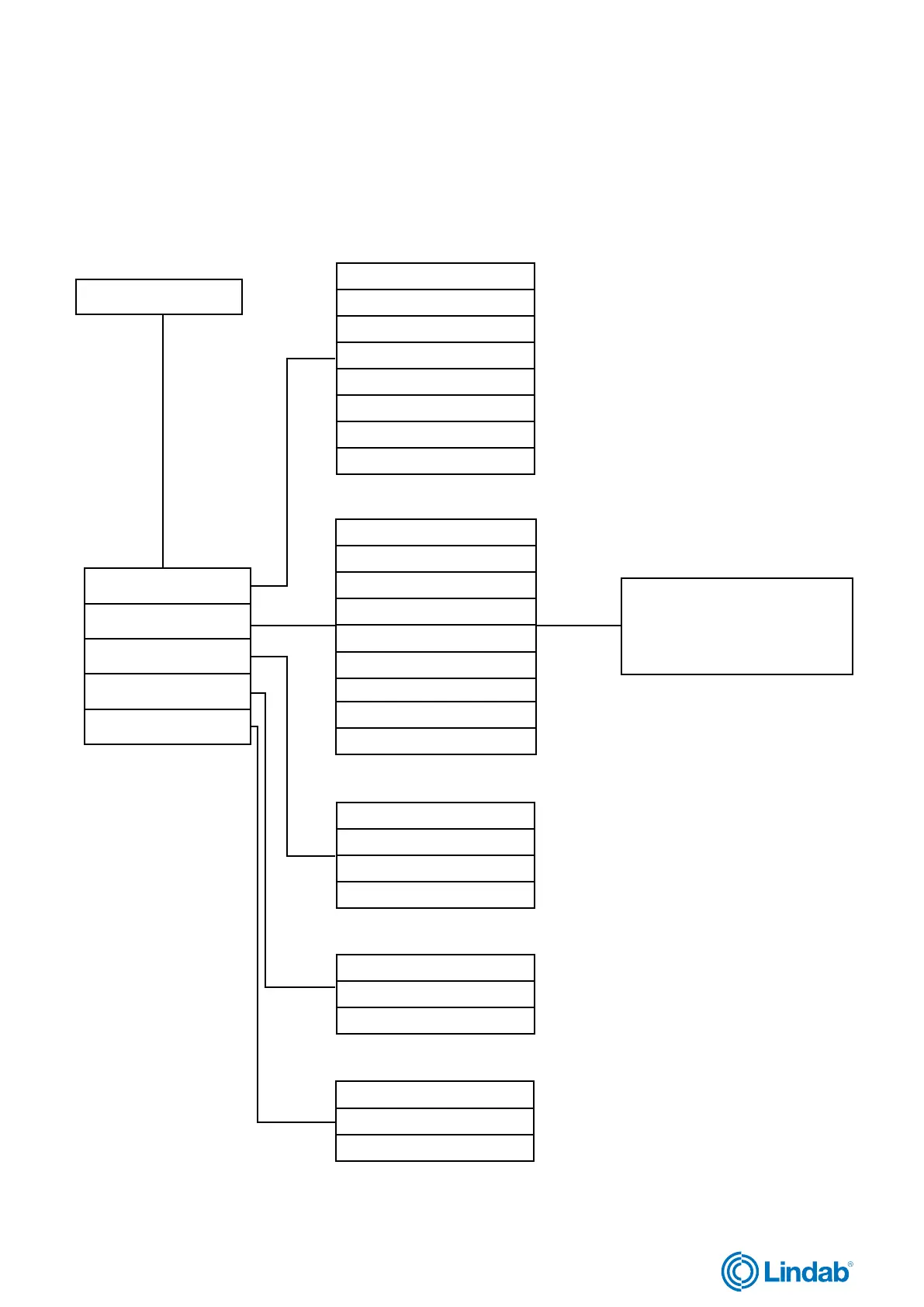
FireSystemPro
See complete menu list and
function description under
the chapter “Complete list of
menu functions”.
1.0 Status Overview
2.0 System Setup
3.0 Settings
4.0 Manual/Auto
5.0 Access Rights
1.1 Com alarm acknow.
1.2 Alarm log
1.3 Exercise log
1.4 Input/Output
1.5 Dampers
1.6 Smoke detectors
1.7 SEF
1.8 Selected modes
2.1 Adressing slaves
2.2 SEF
2.3 Communication
2.4 De-Activate damper
2.5 Detector/Temp AI1
2.6 Pressure sensor
2.7 Miscellaneous
2.8 System activate
2.9 Factory settings
3.1 Exercise settings
3.2 Delay AHU stop
3.3 Date and time
3.4 Language
4.1 Function test
4.2 SEF
4.3 Damper
5.1 Log on
5.2 Log off
5.3 Change password
1.8 Menu structure
The programming functions and configurations of the Fire System Pro are made in the Pro-M controller. The interface menu
is structured as followed:
Start screen


 To Next Page