Rev: 08.31.20 Page 11 CCD-0002697
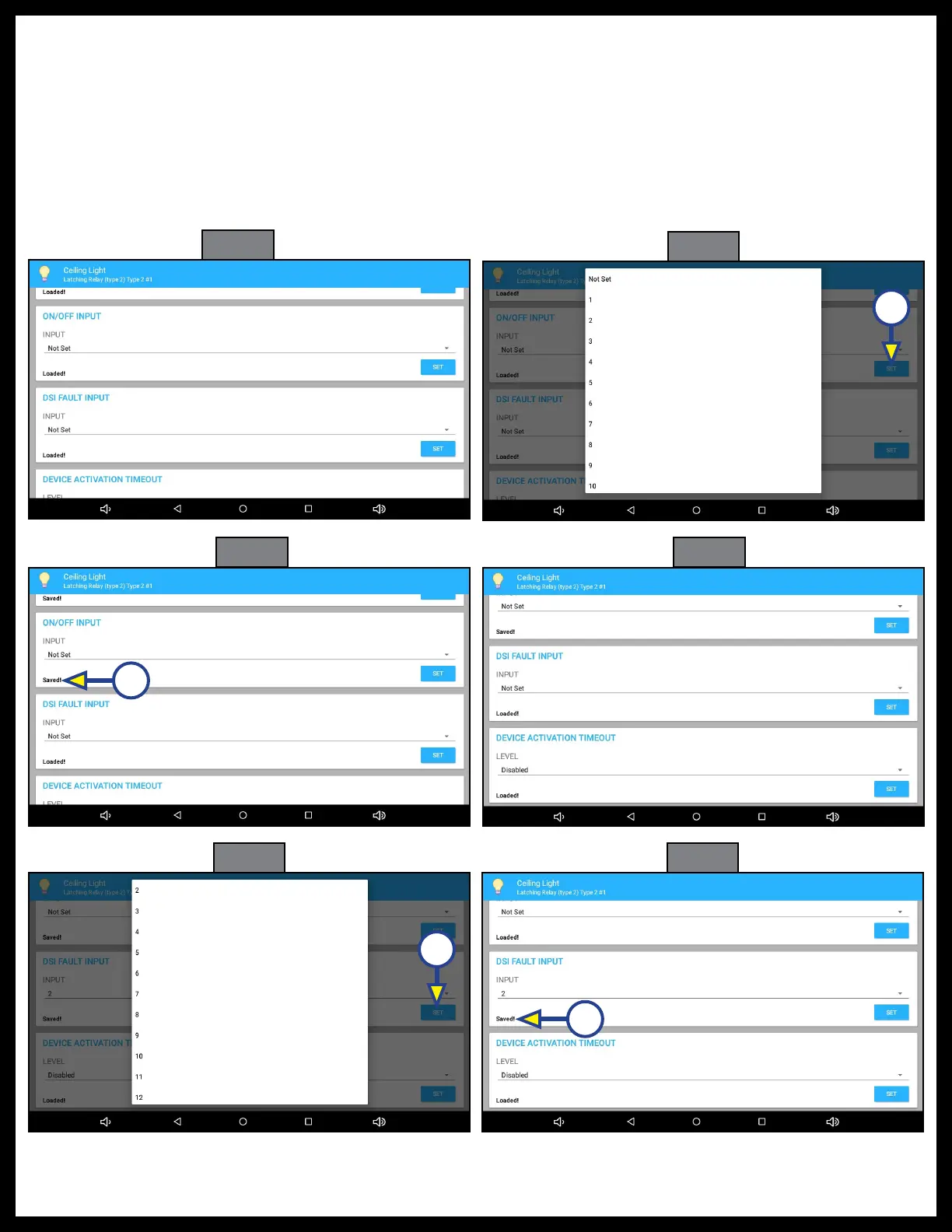
20. Press SET (Fig. 30A). Saved! will replace Loaded! on the screen (Fig. 31A).
21. ON/OFF INPUT (Fig. 32): Scroll down to ON/OFF INPUT.
22. Choose one of the options (Fig. 33): Not Set, 1 to 16.
NOTE: Use caution not to assign the same input to multiple outputs.
23. Press SET (Fig. 33A). Saved! will replace Loaded! on the screen (Fig. 34A).
24. DSI FAULT INPUT (Fig. 35): Scroll down to DSI FAULT INPUT.
25. Choose one of the options (Fig. 36): Not Set, 1 to16.
26. Press SET (Fig. 36A). Saved! will replace Loaded! on the screen (Fig. 37A).
Fig. 32
Fig. 33
Fig. 34 Fig. 35
Fig. 36
Fig. 37
A
A
A
A



 To Next Page