Rev: 08.31.20 Page 18 CCD-0002697
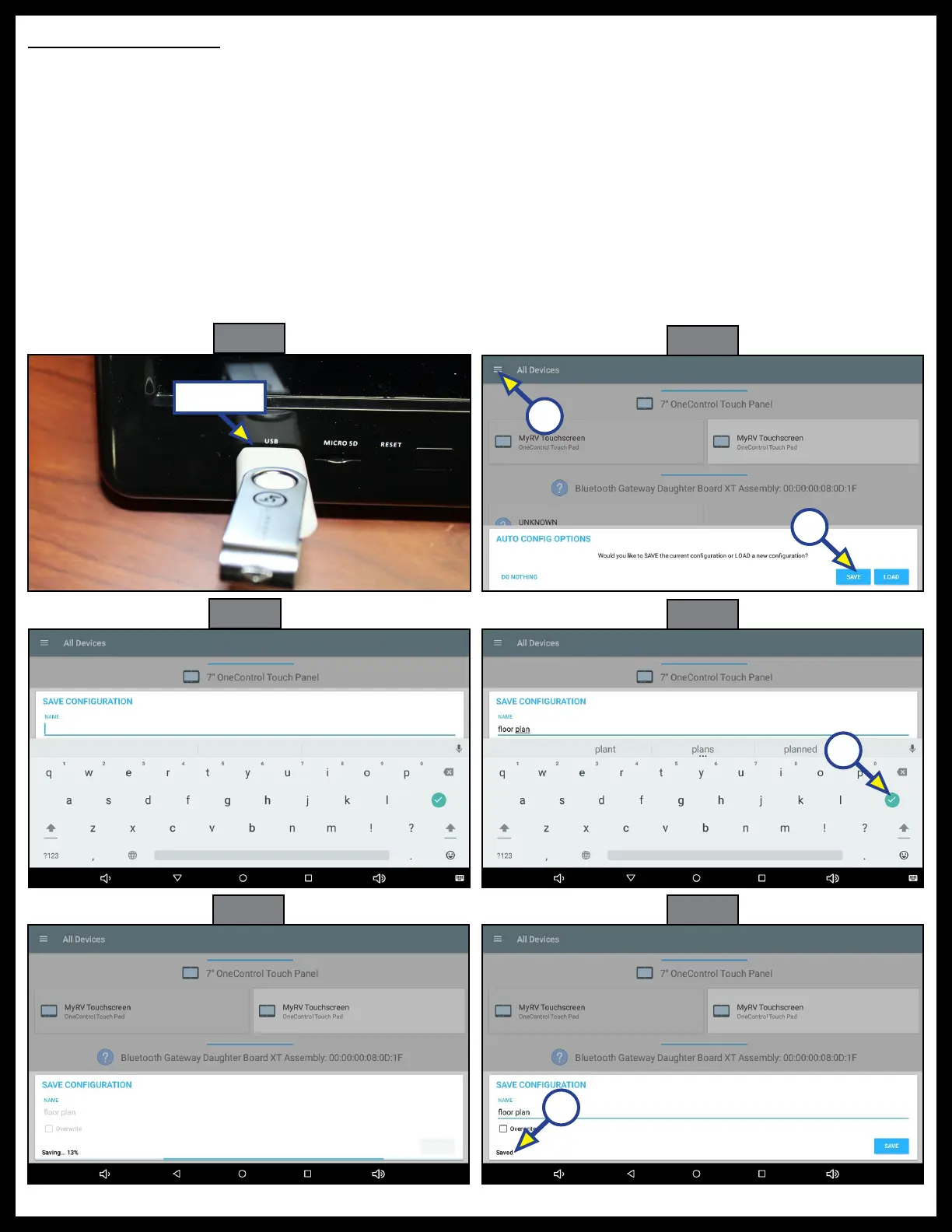
Saving Configuration
The X Series Configurator may also be utilized to save the installed configuration onto a clean thumb drive
so it can be loaded onto other controllers.
1. Insert thumb drive into the USB port in the front of the OneControl Touch Panel (Fig. 63).
2. A dialogue box will ask whether to save or load the configuration (Fig. 64). Press SAVE (Fig. 64A).
NOTE: If the box doesn't pop up automatically, it can be accessed by pressing the menu bars in the top left
corner beside All Devices (Fig. 64B).
3. Name the configuration (Fig. 65).
4. Press green check mark when completed (Fig. 66A).
5. Wait a few seconds while the configuration is being saved (Fig. 67). Saved will appear in the lower left-
hand corner of the box when the configuration is saved (Fig. 68A).
6. Remove thumb drive.
Fig. 63
Fig. 64
Fig. 65
Fig. 66
Fig. 67
Fig. 68
A
USB Port
A
A
B



 To Next Page