Rev: 08.31.20 Page 13 CCD-0002697
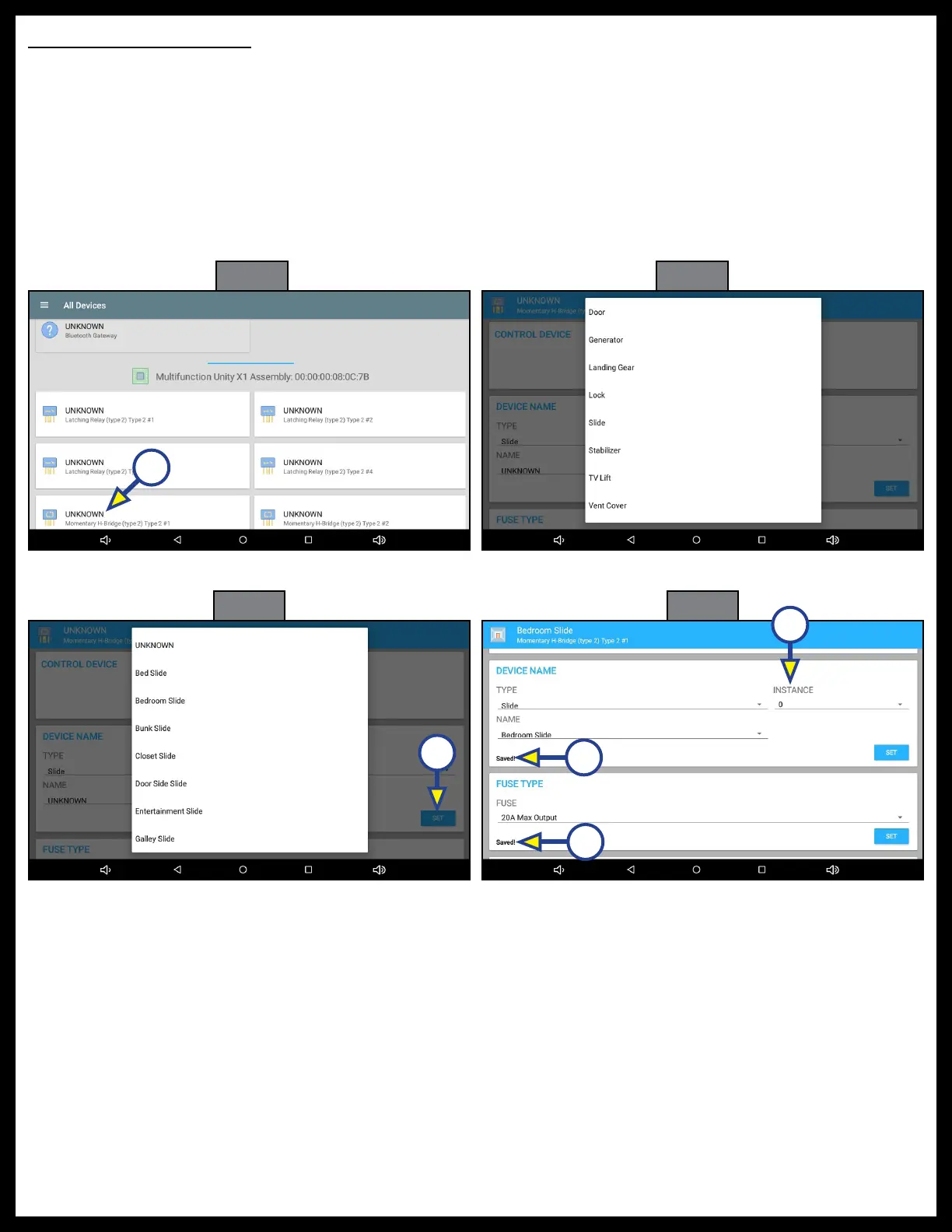
Fig. 41 Fig. 42
A
Reverse Polarity Outputs
1. Press UNKNOWN at Momentary H-Bridge #1 (Fig. 41A) to begin programming reversing outputs.
2. Press UNKNOWN under TYPE and select device type (Fig. 42).
NOTE: If more than one device type of the same name is used, press INSTANCE (Fig. 44C) to select a
number, e.g. Bedroom Slide 1, Bedroom Slide 2, etc.
3. Press UNKNOWN under NAME to select device name (Fig. 43) and press SET (Fig. 43A) so Saved!
appears in the lower left of the DEVICE NAME field (Fig. 44A).
4. Press the field under FUSE to select fuse type and press SET so the selection is saved (Fig. 44B).
Fig. 43
Fig. 44
A
A
B
C



 To Next Page