EasyManua.ls Logo

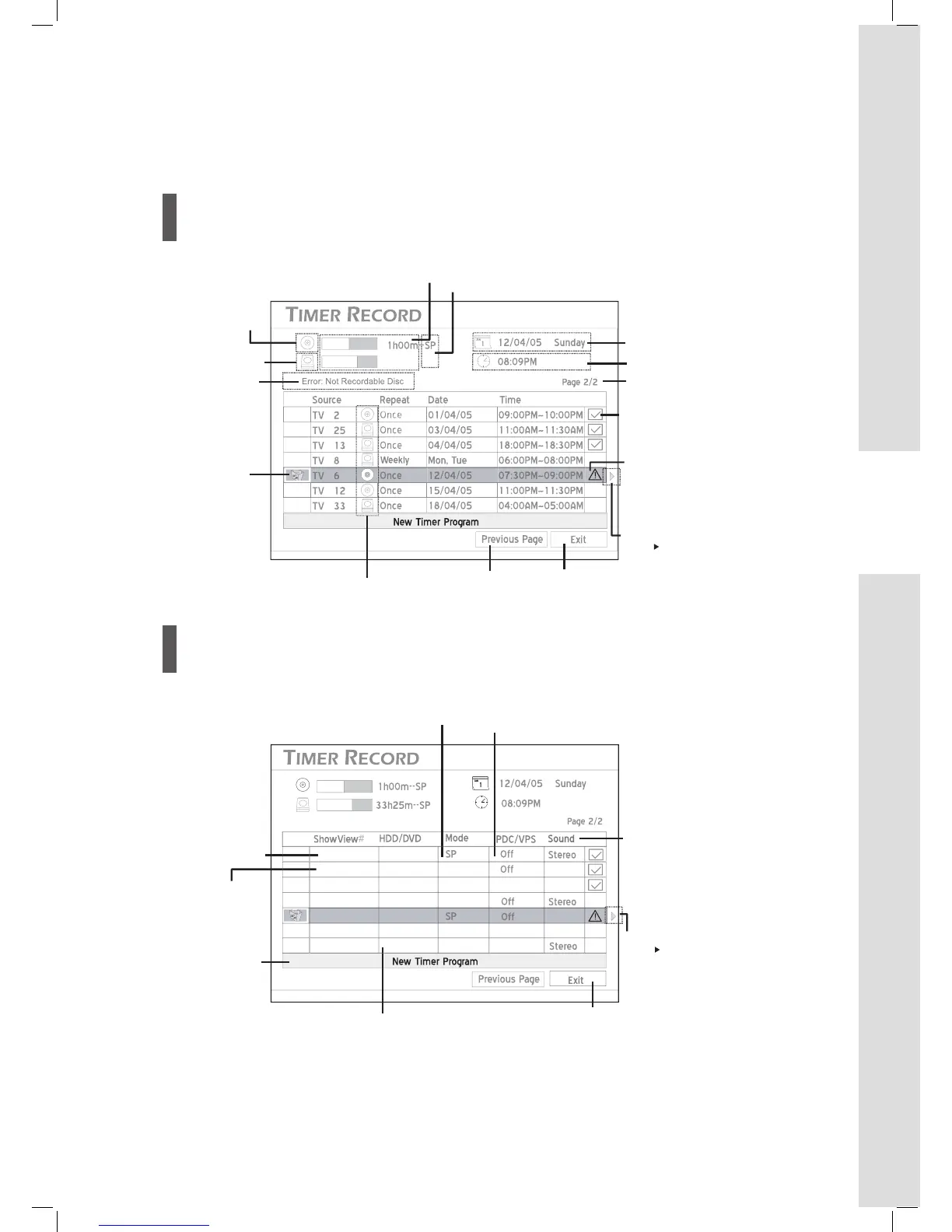
LiteOn HD-A940G - Timer Record Menu; Info Screen 1; Info Screen 2

LiteOn HD-A940G
84 pages
Print Icon
To Next Page IconTo Next Page
To Previous Page IconTo Previous Page
Loading...
33h25m--SP
Exit button
Press to go to
previous page
Preset recording mode
System date
System time
Page index
Error
message
Target medium for
the timer program
Delete icon
The icon appears
when the timer
program is
highlighted.
Press to delete a
timer program.
Indicates the
timer program
was successfully
activated
Indicates the
timer program
was not
successfully
activated
Remaining time (available space)
(*white bar represents space available at current recording mode)
Disc
HDD
Scroll indicator.
Press to
go to Info
Screen 2 for
more details
99999
HDD
Target medium for
the timer program
Exit button
Press to enter
the timer
program setup
screen
ShowView
number of the
timer program
Recording mode
of the timer
program
----------
1972623
HDD
DVD
EP
HQ
On
Mono
Mono
Timer program
set using the
Date/Time mode
PDC/VPS setting
of the timer program
TV audio
setting of the
timer program
Mono
Mono
On
On
18370524
420124
061776
HDD
HDD
DVD
DVD
HQ
EP
HQ
----------
Scroll indicator
Press to
go to Info
Screen 1 for
more details

Table of Contents

Related product manuals