12
The Charging Dock (continued)
Setting Up the Charging Dock
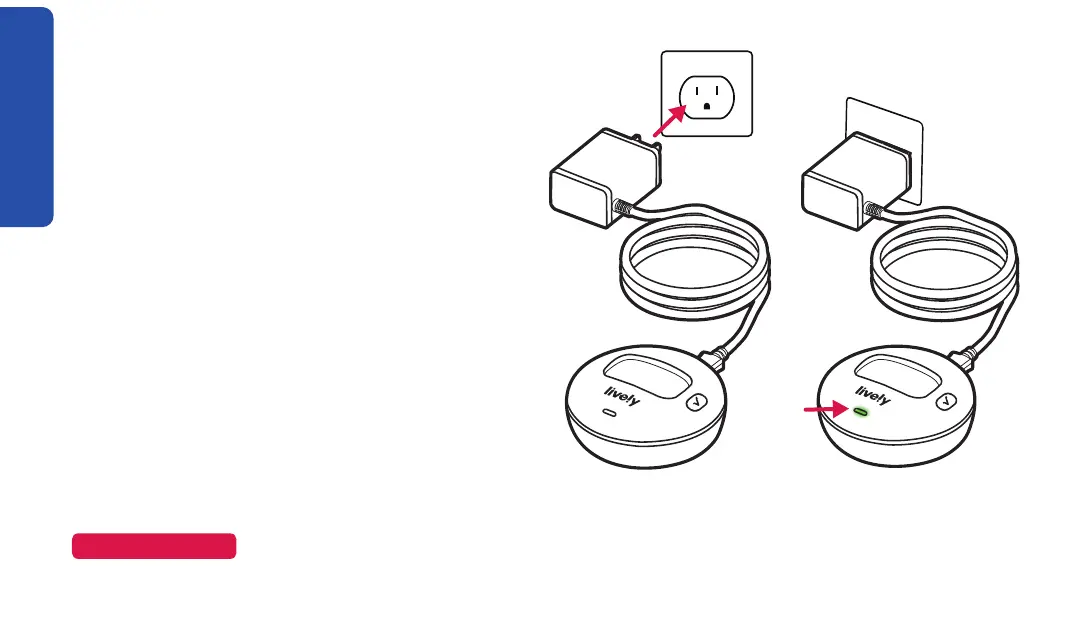
The charging dock makes it easy for you to
always have your Lively Mobile2 fully charged
and ready to go.
1. Determine where you would like to place your
charging dock. Do not place the charging
dock in a location where it could get wet.
2. Plug the power cord’s USB-C connector into
the back of the charging dock.
3. Plug the power cord into a wall outlet. The
power indicator on the charging dock
illuminates green.
NOTE
If the power indicator doesn’t turn green, make sure the outlet you are using isn’t controlled by a
light switch.


 To Next Page