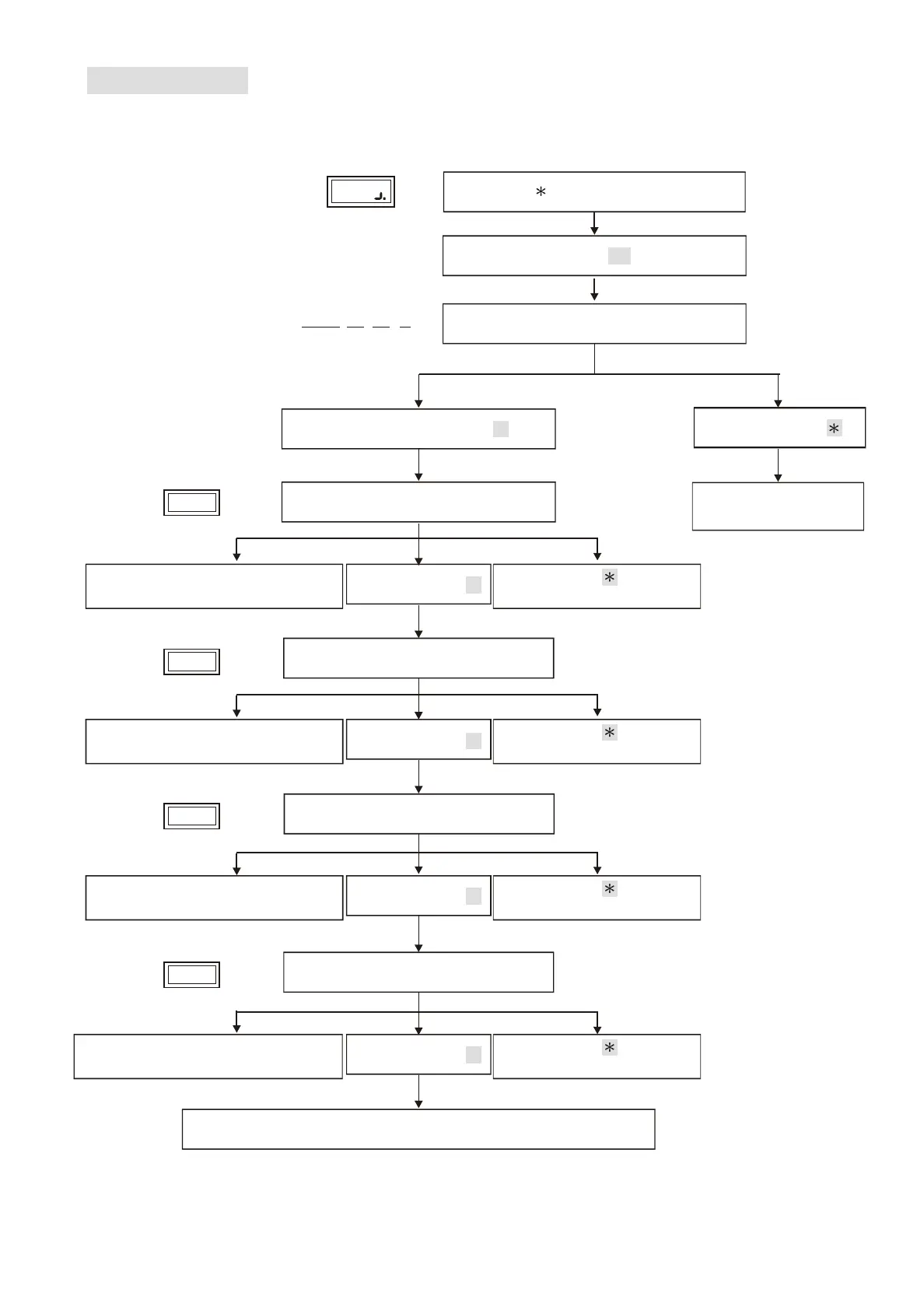
10
Enter 16
Back to system
function selection.
Display
Enter # system password #
Escape, enter
Display current date
2007.01.01 1
Y M D
W
Function (16) Set Date
Example 2012/04/30 Monday => 2012/04/30 (1) (default value as 2007/01/01 (1))
Error. Continuous beep sound
and go back to year entering.
Error. Continuous beep sound
and go back to month entering.
Error. Continuous beep sound
and go back to date entering.
Error. Continuous beep sound and
go back to day of the week entering.
Confirm Enter #
Confirm Enter #
Confirm Enter #
Confirm Enter #
Change setting,enter #
Enter year (00~99)
Enter month(01~12)
Enter date(01~31)
Enter Day of the week (1~7)
One beep sound to go back to system function selection.
Display
16.
1
Display
16.
2
Display
16.
3
Display
16.
4
Escape. Enter to go back
to system function selection.
Escape. Enter to go back
to system function selection.
Escape. Enter to go back
to system function selection.
Escape. Enter to go back
to system function selection.
Lock Control - Kouterbaan 63 - 1840 Malderen - Belgium - Tel. +32 52 57 43 02 - info@lockcontrol.be - www.lockcontrol.be



 To Next Page