17
Unlock with Facial Recognition
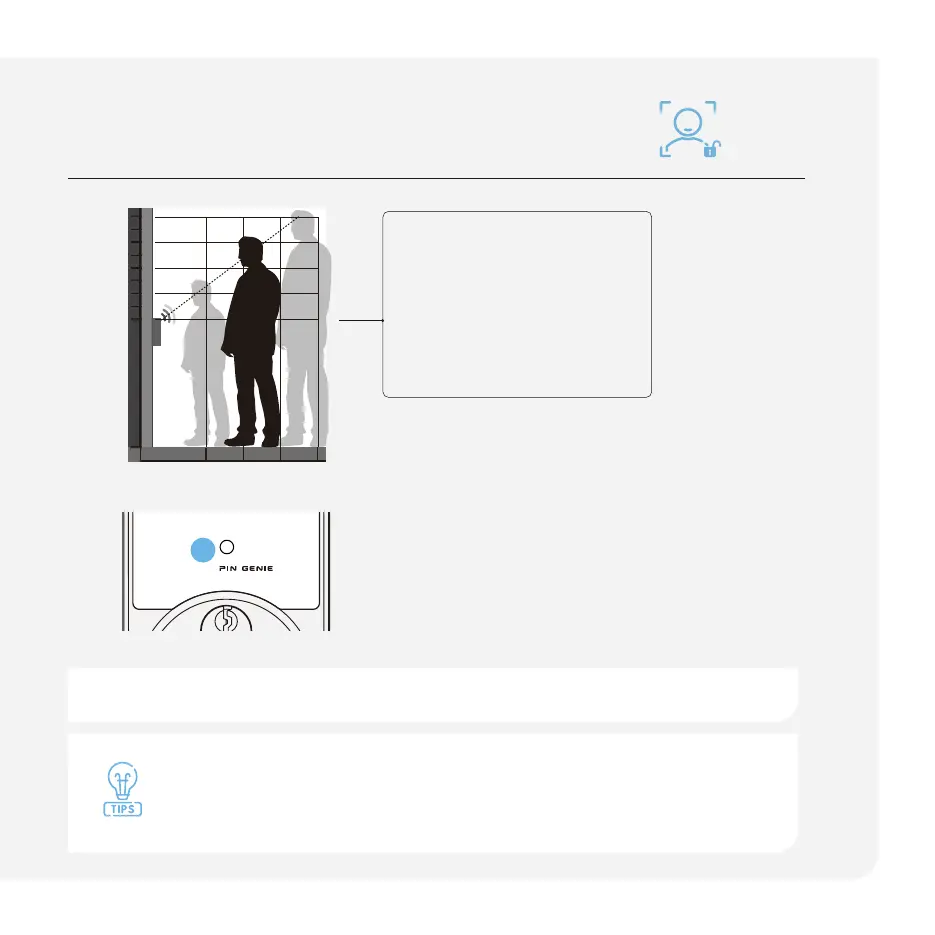
Blue Light
Face detected; scanning has started
Green Light
Door is unlocked
Red Light
Adjust your distance and ensure nothing is
obstructing your face*
Stand in front of the lock
at a distance of 1 – 3 feet
(0.4m – 1m)
Refer to the diagram for the
recommended distance for
optimal distance from between
yourself and the lock.
0.4m 0.6m 0.8m
1.1m
1.3m
1.5m
1.7m
0m
1.9m
1m
Check the battery level. To extend battery life, facial recognition will be
disabled when battery level is dropped below 20%. Charge the battery
to reactivate the sensor.
After eight consecutive incorrect attempts within two minutes, the facial recognition feature will be temporarily disabled.
*See troubleshooting to learn more.
Powered by
a



 To Next Page