DSL Installation Diagram
Page 10
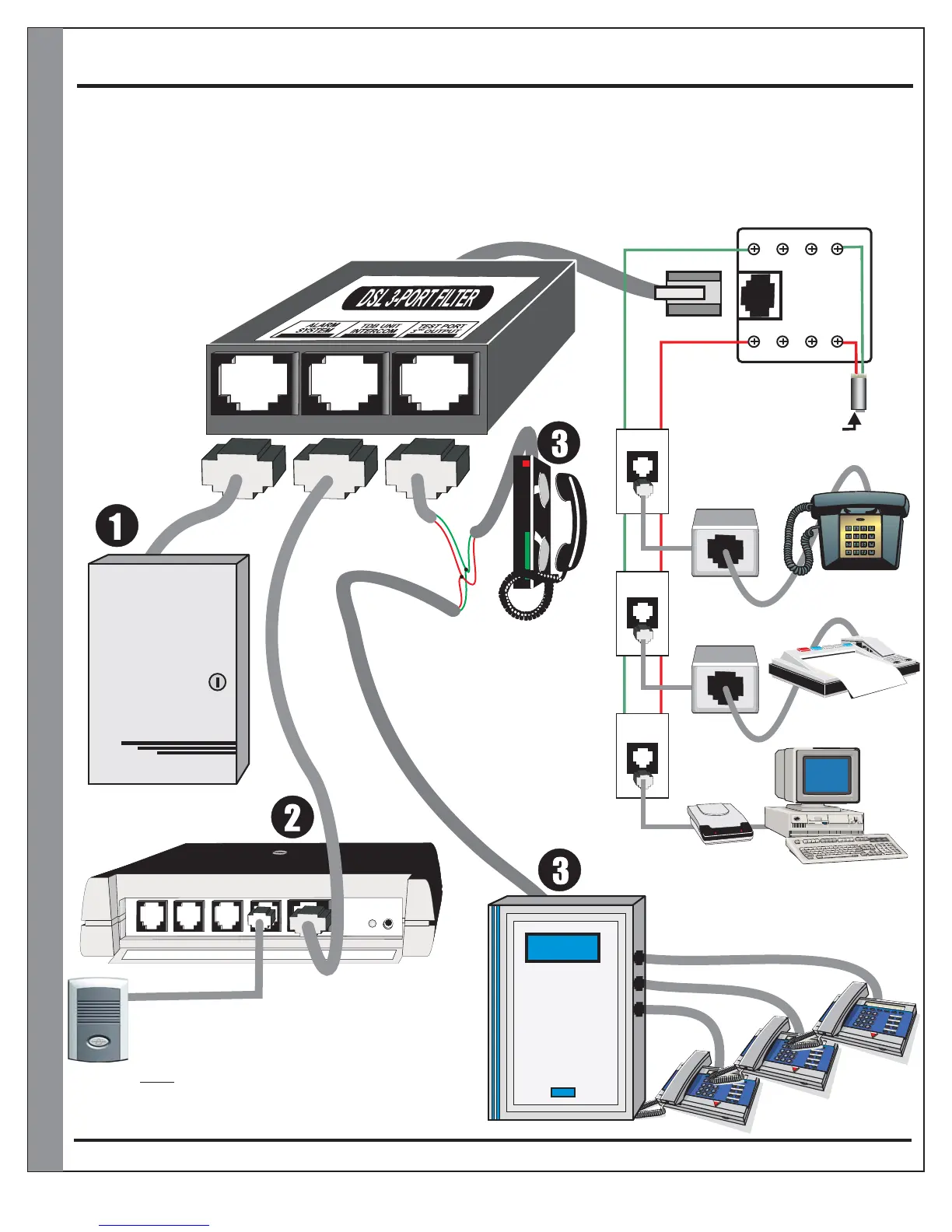
LX-DSL3F 3-PORT FILTER Installation Diagram
Alarm Panel
A202CR & A204CR
OUT
OUT
IN
IN
RJ31X
(CA38A)
Data Jack
Standard
DSL Filter
Standard
DSL Filter
High-Speed
Internet Modem
(supplied by internet provider)
Brown
Red
Red
Red
Grey
Green
Green
Green
STRUCTURAL
PANEL
OR
This (TEST / 3rd Output) PORT
can be used for:
1) Test phone (for isolating
and troubleshooting problems)
2) For a KSU phone system
configuration
3) To all the premise phones
which do not require high
speed internet connection
which will eliminate the
need to have DSL filters
at every phone jack
RJ45 RJ45 RJ45
PHONE
SYSTEM
KSU
Note: This (DSL 3-PORT FILTER) may cause a
to occur. This may result in
the caller to partially hear the low level conversation
between the home owner and the visitor at the door station
when the caller is placed on hold using the
ON-HOLD command.
LOW-
LEVEL AUDIO CROSS-TALK
ONLY
*4
(see also Terms & Conditions on the back for complete Warranty and Issues to avoid)
LINE from phone provider,
VOIP Modem or Cable Modem


 To Next Page