27
LOCATING A SPECIFIC TITLE (DVD)
IfaDVDdisccontainstitlenumbers,youcanlocateaspecictitlebydirectlyselecting
itstitlenumber.
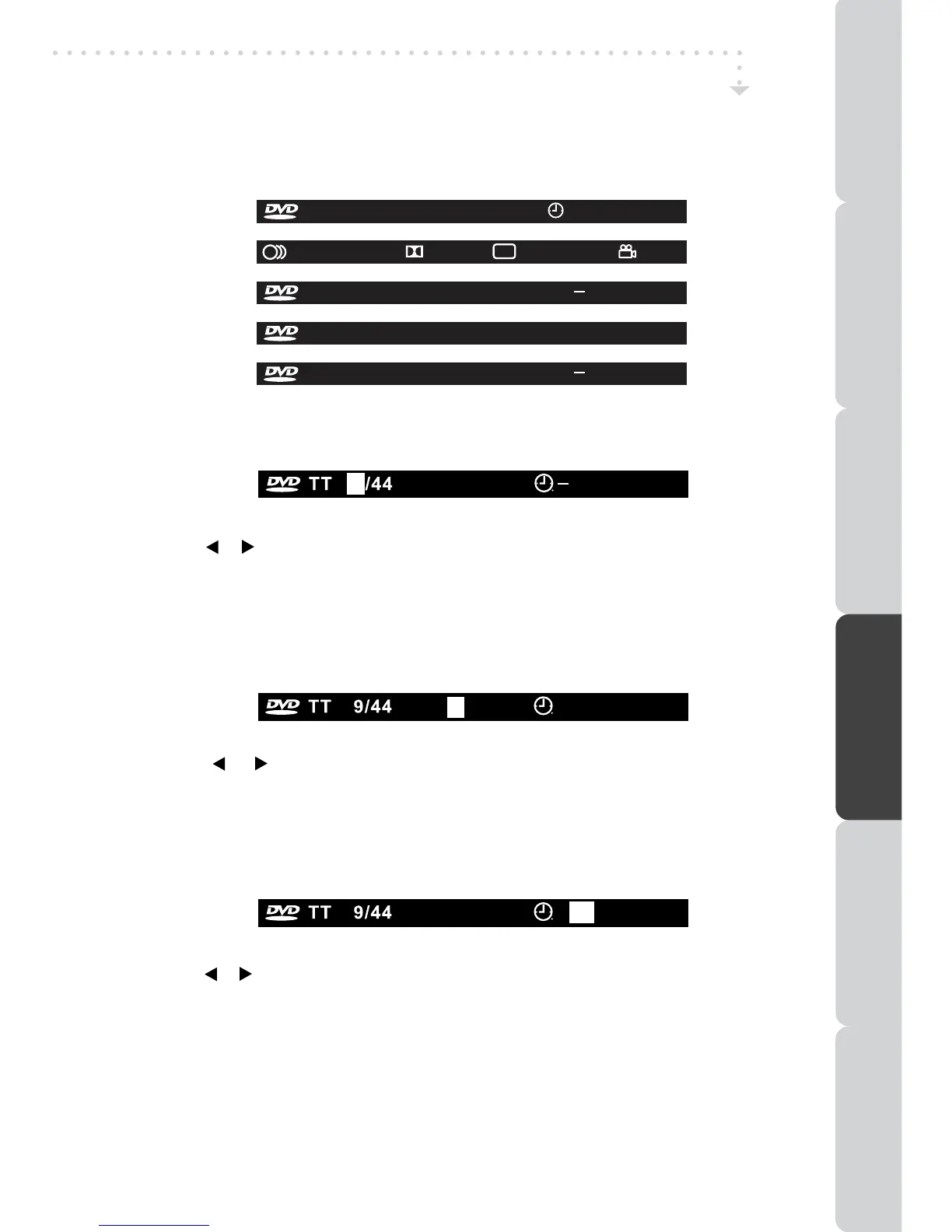
1.InSTOPmode,presstheGOTObutton.
2.Pressthe or buttontohighlightaspeciceldandpressthecorrespondingnumber
button(s)forthetitleyouwant.
3.PresstheENTER•OKbuttontoconrm.Theunitwillstartplaybackabout3secondlater.
LOCATING A SPECIFIC CHAPTER / TRACK
Ifyouknowthechapter/tracknumberyouwanttoplay,youcanlocateaspecicchapter
/trackbydirectlyselectingachapter/tracknumber.
1.PresstheGOTObuttontosearchforyourdesiredchapter/track.
2.Press the
or button tohighlight achapter / trackand press thecorresponding
numberbutton(s)forthechapter/trackyouwant.
3.PresstheENTER•OKbuttontoconrm.Theunitwillstartplaybackabout3secondlater.
DISPLAY
Whilethediscisplaying,presstheDISPLAYbuttonrepeatedlytodisplayinformationon
operationstatus.
SPECIAL FUNCTIONS
DVD FEATURES
LOCATING A SPECIFIC TIME
Youcanmovetoaspeciclocationbyenteringitscorrespondingtime(hours,minutes,
seconds).
1.PresstheGOTObutton.
2.Pressthe or buttontohighlightatimeandpressthecorrespondingnumberbutton(s)
forthesettingpointyouwant.
3.PresstheENTER•OKbuttontoconrm.Theunitwillstartplaybackabout3secondlater.
Note:
• Somediscsmaynotrespondtothisprocess.
• Thismethodoflocatingatitle/chapterisavailableonlyonaDVDdiscthatcontainstitle/
chapternumbers.
• Somescenesmaynotbelocatedaspreciselyasyouspecied.
• Thismethodforaccessingspeciclocationsisavailableonlywithinthecurrenttitleof
theDVDdisc.
CH
004/008
00 : 00 : 07
CH
004/008
00 : 00 : 07
CH
004/008
00 : 00 : 07
TT 9/44 CH 4/8 00 : 00 : 07
....
D 2CH OFF OFF
1/1 ENG
TT 9/44 CH 4/8 C 00 : 00 : 07
TT 9/44 CH 4/8 T 00 : 00 : 07
TT 9/44 CH 4/8 T 00 : 00 : 07
PREPARATIONCONNECTIONSUSING THE FEATURES
USING THE DVD / iPod
FEATURES
TROUBLESHOOTINGSPECIFICATION



 To Next Page
 Loading...