14
Programming Your Duration Cooking Time
Programming Cooking Time
You can use this function to set the cooking time. Ensure the oven in manual mode.
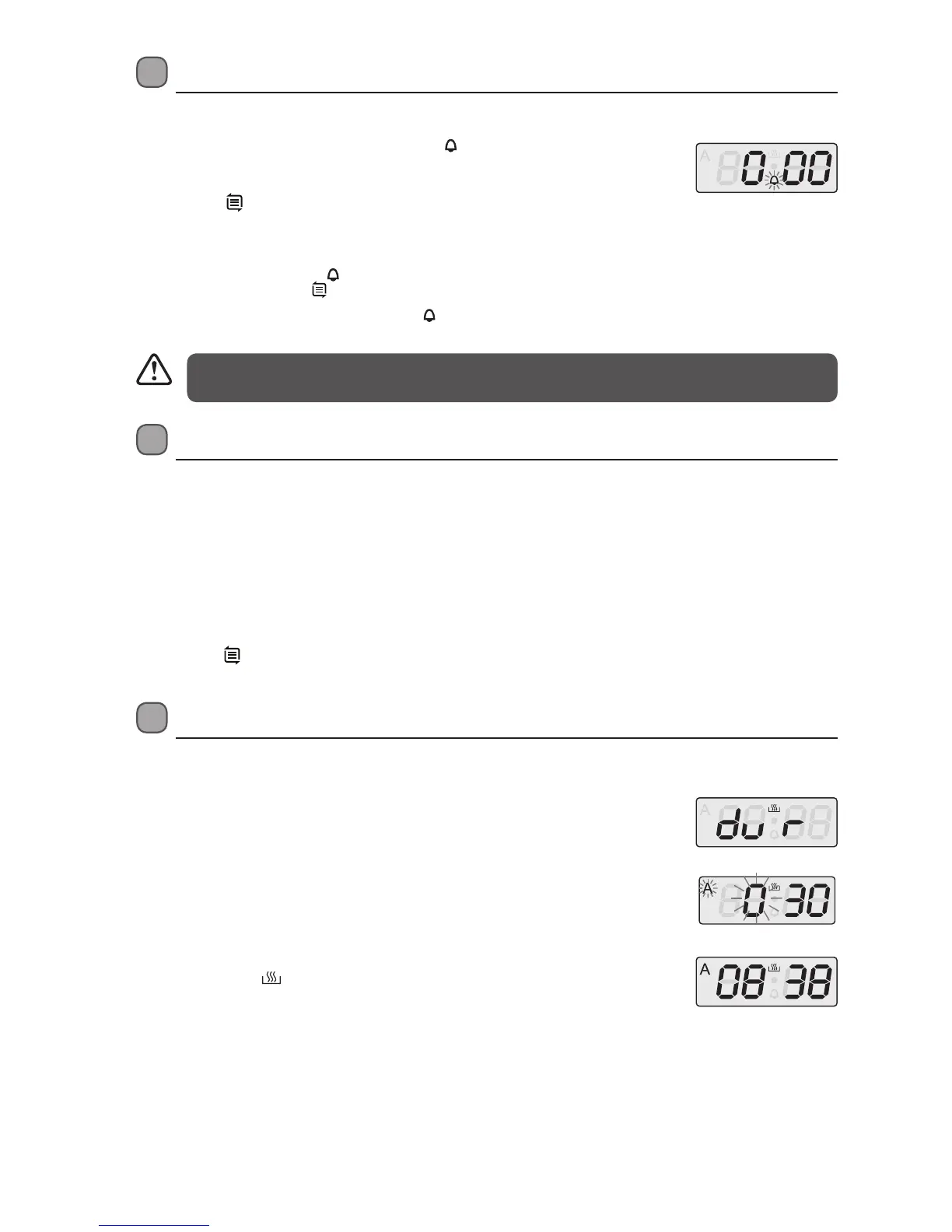
1. Press MODE twice to display “dur”.
2. Press the + / - buttons to set the cooking time. The “A” symbol will flash on the
LED display.
3. Press MODE to confirm.
4. Turn the Function Control knob to the desired cooking mode.
5. Set to the required temperature by turning the Thermostat Control knob
clockwise. Both the function indicator and thermostat indicator will light up, the
symbol “A” and
icon will be display on the screen. The oven will then start to
operate.
6. Once the cooking time is reached, the oven will sound and stop cooking.
The symbol “A” will begin to flash on the screen. Press any button to stop the
beeping. The oven is now in Standby mode.
7. After cooking, turn the Thermostat Control knob and the Function Control
knob to the “0” position. Press MODE to for 3 seconds or more to set the oven to
Manual mode again to use the oven.
Kitchen Timer
While the oven is not in use and in Manual mode, this feature allows you to use the oven as a timer.
1. Press the MODE button. The timer indicator “
” will flash, and “0.30”
will show on the display.
2. Press the + / - buttons to set the hour.
3. Press the
to confirm the hour and select the minutes.
4. Press + / - buttons to set the minutes.
5. Press the MODE to confirm.
6. After the timer is set, the “
” will light up solidly. (You can check the
alarm time by pressing
.)
7. When time is up, the oven will beep and “
” will flash. Press any
button to turn off the alarm.
• The timer range is 0:00 – 23:59.
• The kitchen timer is used only as an alarm. This function WILL NOT affect the oven.
* All images are for indication only; please refer to your individual unit for actual item.
Automatic Standby Mode
This oven features a power-saving and safety feature:
The unit will automatically switch to Standby Mode 10 hours after Manual Mode has been selected. This ensures the oven is not
left on accidentally.
The safety feature will not interrupt the Full Automatic Programming function.
1. Five (5) hours after activating Manual Mode, the clock will flash once a second to warn you the unit will
enter Standby Mode.
2. After a total of 10 hours, the until will enter Standby Mode.
3. Press any key to reset the timer, if you intend to continue using the oven.
4. Or, press
and “+” together for 3 secs or more to enter Standby Mode if the oven will not be used.
LBMULB13_IB_130620_chris.indd 14 20/6/13 11:41 AM


 To Next Page