Logitek
5
Operation
MTK-MASTER (Master Module)
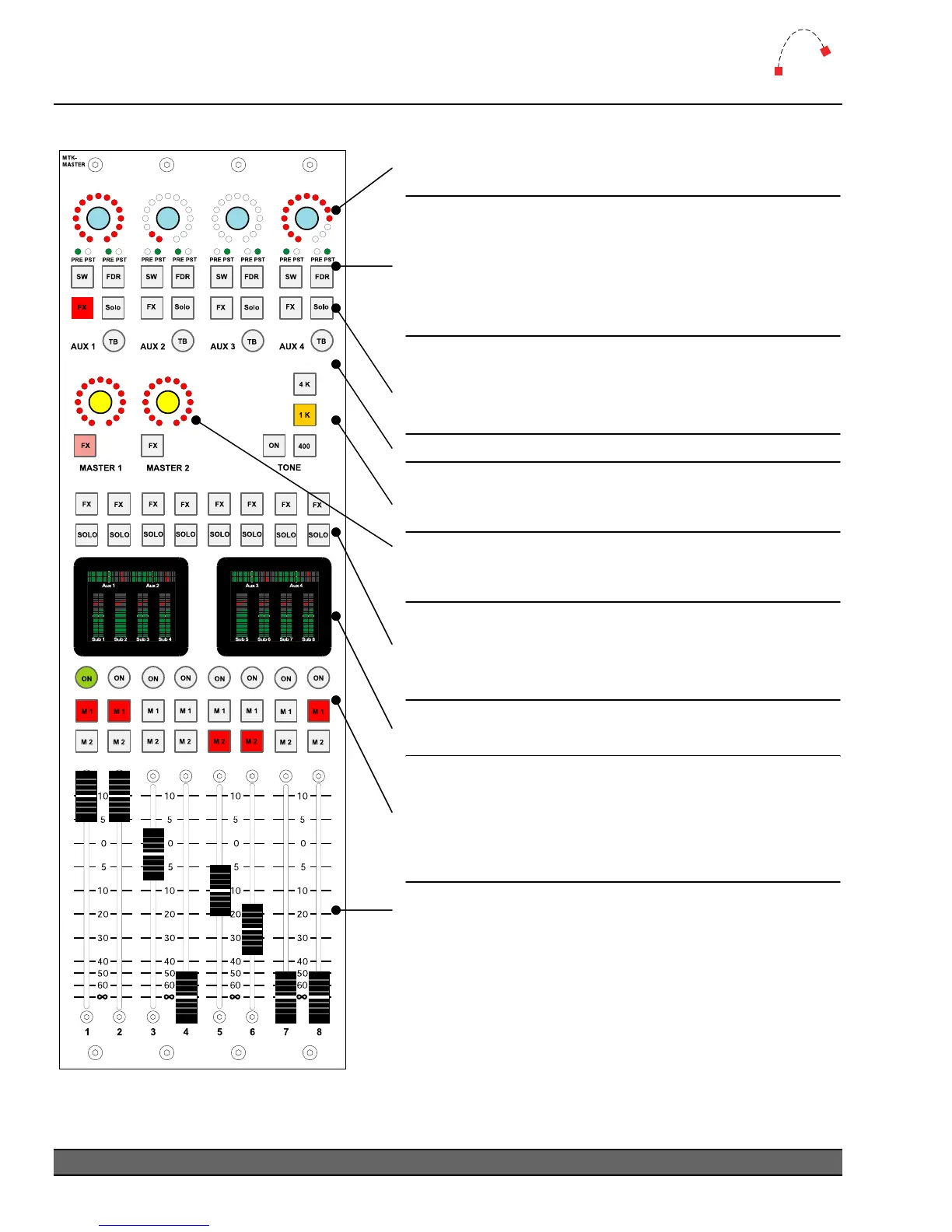
Select from 4K, 1K or 400 Hz tone at unity gain.
Press
ON to switch the tone to the Master, Sub-
master and Aux bus outputs.
Master bus gain control. Level is indicated by Ring of
Fire LEDs. Press FX to assign a Master bus output to
the Effects module for EQ and dynamics processing.
Press FX to assign a Sub-master bus output to the
Effects module for EQ and dynamics processing.
Press SOLO to hear only that bus output on the
Control Room monitor.
Aux bus master gain control for Aux 1 through Aux 4.
Level is indicated by
Ring of Fire LEDs.
For each Aux bus, toggle the SW button to change
between pre & post-switch (main on/off switch)
Aux
bus operation. Toggle the
FDR button to change
between pre & post-fader
Aux bus operation.
The green PRE & PST LEDs above each button
indicate the currentl
selected mode.
Press FX to assign an Aux bus output to the Effects
module for EQ and dynamics processing.
Press
SOLO to hear only that bus output on the
Control Room monitor.
Press the TB button to talkback to an Aux output.
Left screen shows Sub 1-4, Aux 1 & 2 output meters.
Right screen shows
Sub 5-8, Aux 3 & 4 output meters.
The eight faders control gain for each of the Sub-
master
mix busses.
Fader range is from infinity to +10dB.
When the fader level has been changed by recalling a
snapshot, the current level will be displayed on screen.
Moving the fader will not alter the level until the fader
passes through that value.
The ON button for Sub-master busses 1-8 determines
the on/off state of the
Sub-master direct outputs and
the
Sub-master sends to the M1 & M2 Master busses.
Toggle
M1 and M2 to assign/de-assign the Sub-master
to
Master mix busses.
Logitek Artisan Reference Manual
30



 To Next Page