21
NOTE! If the load centre exceeds the allowed distance shown in the load diagram,
there is a risk that the Rotator will turn over, when rotating.
Upper edge forks/below
edge Multi-purpose carriage.
Load centre distance from
upper edge of
the forks/below edge
Multi-purpose carriage.
4.2 Avoid overloads
The maximum load must not be exceeded. Remember, that the Rotator is
designed for evenly distributed load, - goods on pallets etc. If the forks are point-
loaded on one side, there is a risk of bending.
NOTE! When driving with the truck, the forks should be placed in horizontal position.
Max.capacity of the Rotator/Multi-purpose carriage: 1000 kg / 700 Nm
(see load diagram).
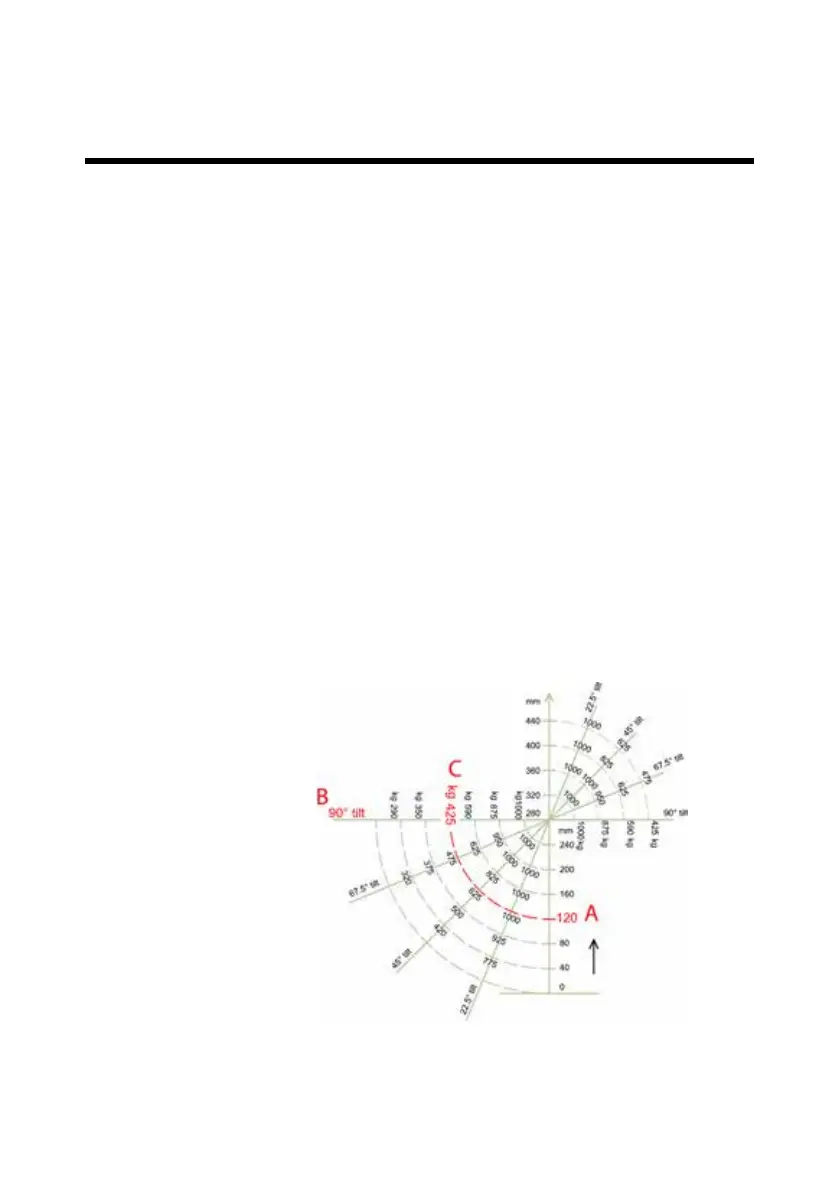
Load diagram
When the forks are tilted, the spatial position of the load changes. This means that
the load capacity that can be tilted is reduced, the larger the distance is between
load centre of the load and rotation centre.
In order to use the load diagram, the following three facts have to be known:
• The distance from the upper edge of the forks/below edge of the Multi-purpose
carrige to the load centre
• Requested tilt degree
• Weight of the load
Example:
• The load centre is placed 120 mm (A) over the forks/ below edge Multi-purpose
carrige
• Tilt degree: 90º (B)
• Weight of the load: 400 kg
It appears from
the load diagram that
the maximum allowed
load is 425 kg (C).
4.0 Optimum safety


 To Next Page