10
dmx
in
active
XXX = address · PXX = pump · FXX = fan
P. = pause
(min) · F. = fogtime (sec)
1. = pause · 2./3./4. = level a · 5./6./7. = level b
timer
profile
P15
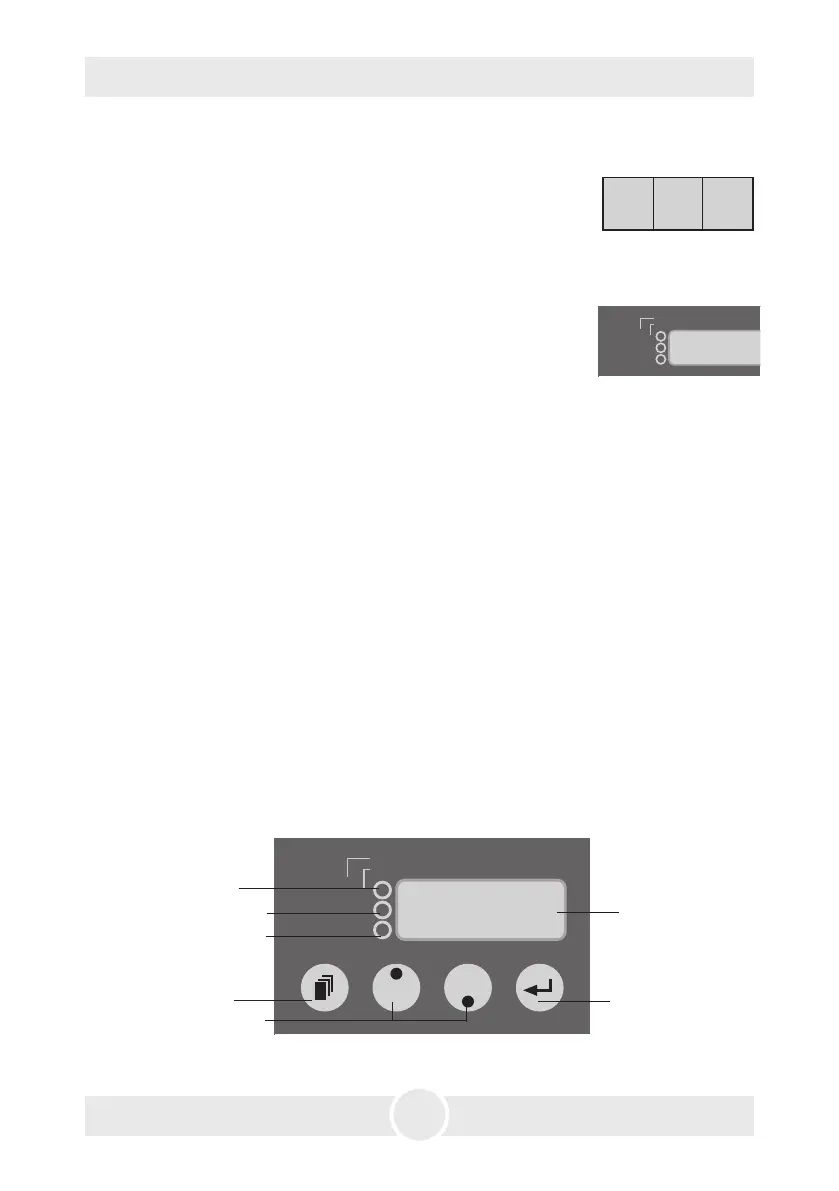
5.4 Control choices
14: Mode-button
15: Up/Down-button
16: Enter-button
17: Led-Display18: Active-LED, green
19: DMX-LED, yellow
20: Profile/
Timer-LED, red
Fig. 1: Adjusting the pump output
5.3 Switching the device off
5. Operating the Unique 2.1
a. Press the Mode button [14] till „OFF” appears on the display.
After 15 Seconds the machine will switch into the post-run-
mode automatically. On the LED display lines appear which
move from upper left to the lower right while the heater is
cooling.
To cut this process short, the air pump works with full power
for a short time and also put all remaining fluid out of the va-
porizer. The remaining fluid will maybe come out as a bigger
haze cloud. This is normal and no failure of the machine.
When the heater is cooled down, a red decimal point will appear on the right bottom
edge of the display.
b. When you switch off the DMX signal, the machine will be switched into the post-
run-mode to cool down automatically after 15 Seconds.
Note: Please make sure that the Unique
2
will not be disconnected too early to allow
the fan to run until the device has cooled down. This will ensure that no fluid remains
in the vaporizer to come out as droplets when the device is switched on next time.
dmxin
active
XXX = address · PXX = pump · FXX = fan
P. = pause
(min) · F. = fogtime (sec)
1. = pause · 2./3./4. = level a · 5./6./7. =
timer
profile
.
_


 To Next Page