12
EN
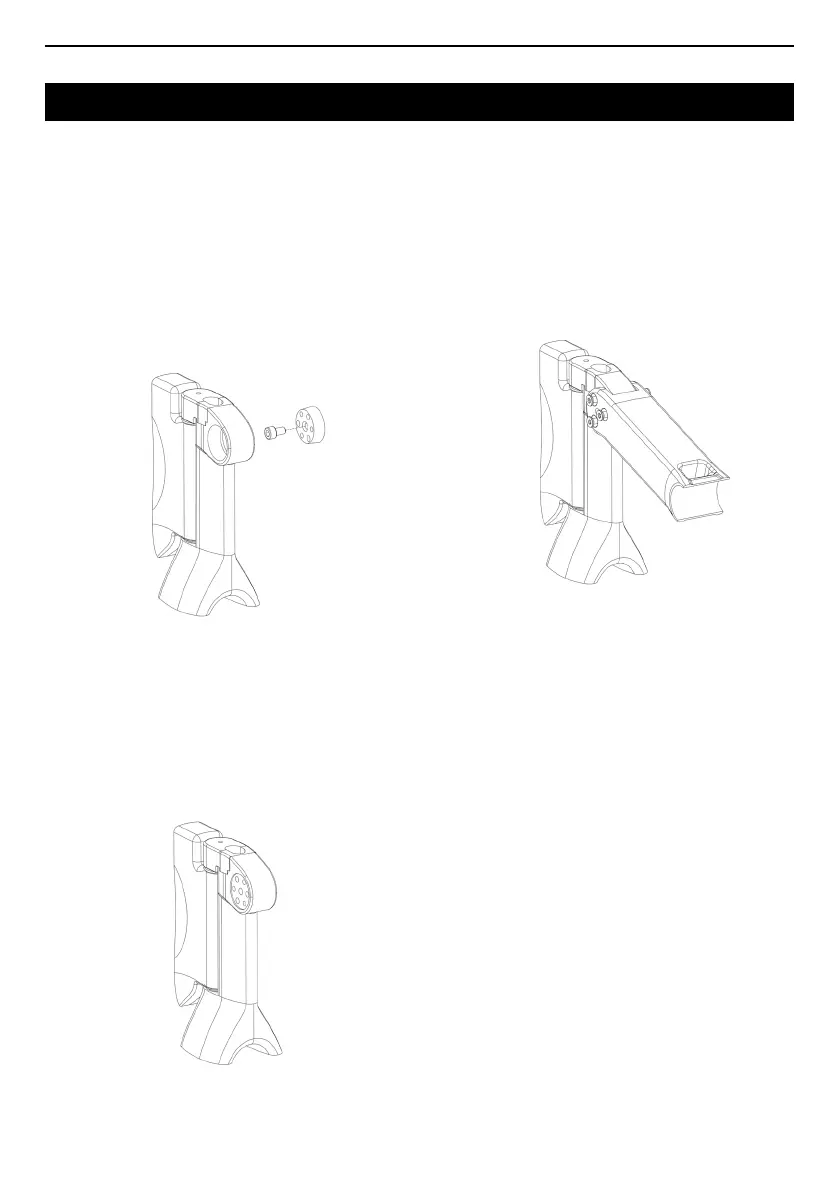
2 I Grease the M6x10 extraction screw (4).
1 I Degrease the cones (1 & 6), the headset cap (3)
and the stem with a clean cloth.
3 I Manually screw the M6x10 screw into the left
cone and tighten until it rests on the small diameter
of the cone.
4 I Line up the cones in the headset cap. The hole in
the right hand cone must be aligned with the thread
of the left hand cone.
5 I Apply light pressure to the cones to ensure
they stay in place in the headset cap. The cones
must not protrude from the headset cap before
mounting the stem.
6 I Position the stem on the headset cap.
7 I Align the holes in the stem with the holes in the
cones. Then pre-tighten the 6 M5x30 screws
(coated in threadlocker such as LOCTITE 243) to
hold the stem in place.
8 I Adjust the stem angle. Stem angles can vary
between +20° and -9° (horizontal reference).
9 I Evenly tighten each of the FHCX M5x30 screws
to a torque of 8Nm using a torque wrench with a T25
head. To ensure the screws are evenly tightened,
alternately tighten the left and right screws.
The right hand screws go through the right side of
the stem and tighten into the left cones and vice
versa.



 To Next Page