in the instrumenl
panel
will light to confim that the
syslem is
enabled
(although
nospeed
hasyetbeen set). Alternallvely,
this
operation
maybecombined
with that fot activation, by
prcssing
the on button
iollowed by lhe set
button
(see
below)-
To actjvate ctuise
cantrol: Drive the cario the desired cruising
speed
and
prcss
lhe
set button. The accelerator may
now be
released,
bul the set speed
will be maintained
{road
gtadie.t
and winds
permitting).
The accele€lor may be used to increase
speed
temporarily
without atrecting the setting.
Note;The system cannol be
activated below 30 mph
(45
km/h)
or above
130 mph
(210
km/h), or in firct or second
gear
Deactivation: Cruise
control will be deactivaled when anyof
the
following
actions occur:
-
The brake
pedal
is depressed;
-
The clutch
pedalis
deprcssed.
-
The on/off/cancel bulton
is
pressed.
ln any of lhese
cases, normal manual speed conl.ol will be
resto€d, butihe system will remain
enabled.
Resumer
To resume cruise,
press
the
rcsume swilch. The ve-
hicle speed will aulomatically
adjusl to the cruise setting.
Chanqing the cruise
seftingr Whilst cruise is active, lhe speed
selting can be adjusted by holding
down the '+'or '-' buttons to
accelerate or slow
the car to the desircd new speed.
On release
ofthe bulton, thatspeed willthen
be set. Alternatively, a single
shorl
press
of either
button will incrcase or decrease
the setting
by 1 mph
{1.5
km/h).
lfthe sysiem
is not active, the car can be driven lo
the desircd
speed, and the set button
pressed-
To disable cruise cantrol:
To
switch
off the systemr wilh
cruise
inactive,
p€ss
the on/off switch; the tell tale
lamp will be exlin-
guished.
After switching off the ignition, cruise control
will be
do-selected forthe next drive cycle.
\
@L
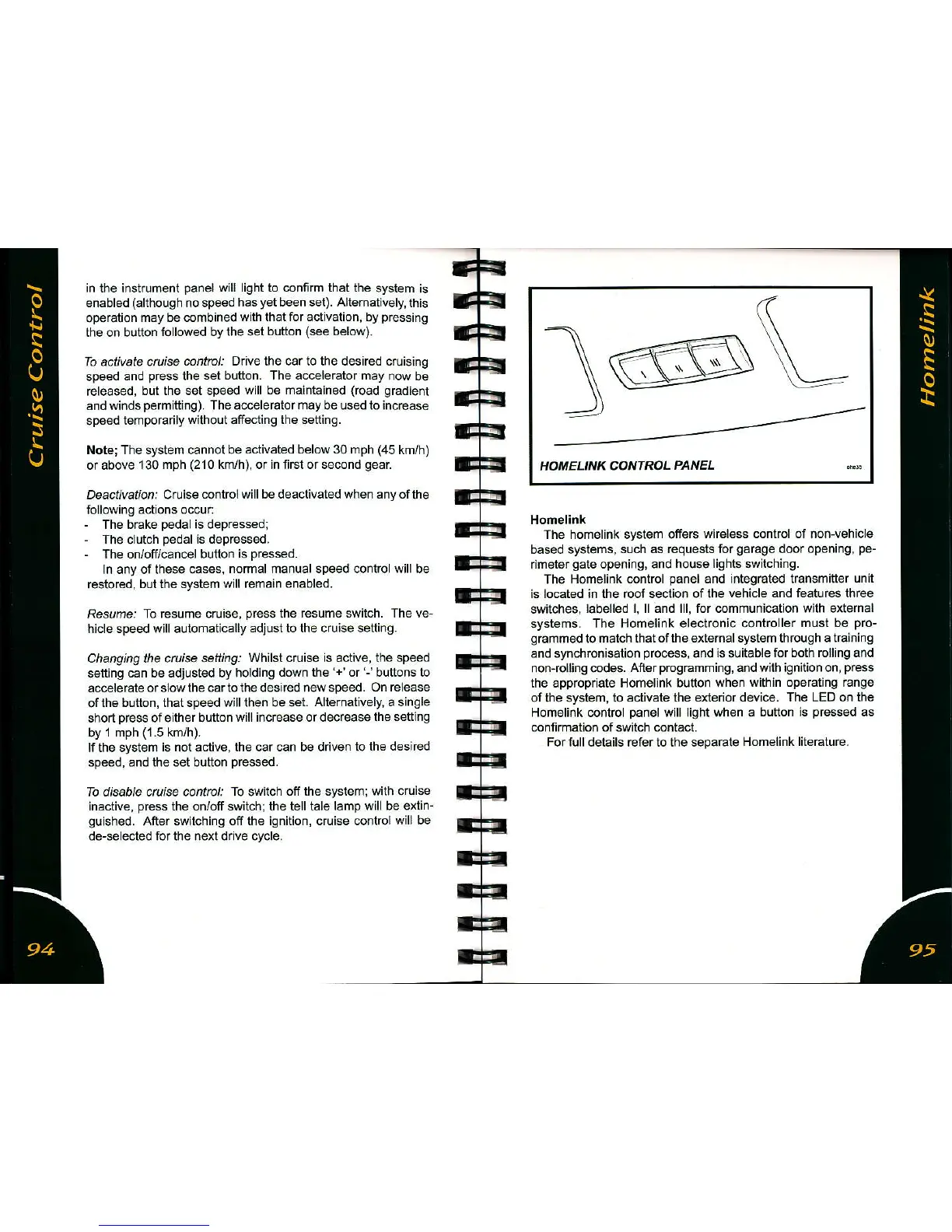
HOMELINK
CONTROL
PANEL
Homelink
The homelink syslem
offers wireless contrcl of non-vehicle
based systems.
such as rcquesls lor
garage
doo.
opening.
pe-
nmetergate opening. and
house lights switchiflg.
The Homelink
control
panel
and integrated transmitler
unit
is located ;n the roof section of the
vehicle and featurcs thrce
switches,
labelled l, ll and lll, for communication with extemal
syst€ms. The Homelink electronic
controller musl be
pro-
grammed
to
match thatofthe externalsystem through a training
and synchronisation
process,
and is suitabletorboth
rolling and
non-rolling codes. After
programming,
and with ignition on,
press
the appropriate Homelink button
when within opetating mnge
of the system, to activate the exle or device. The LED on the
Homelink control
panel
will light
when a bution is
pressed
as
connmation of switch contacl.
Fortulldetails refer lo lhe sepalaie
Homelink liietalure.



 To Next Page