I422 GB I 10 17 31100212
G
B
6
ALARM INDICATION
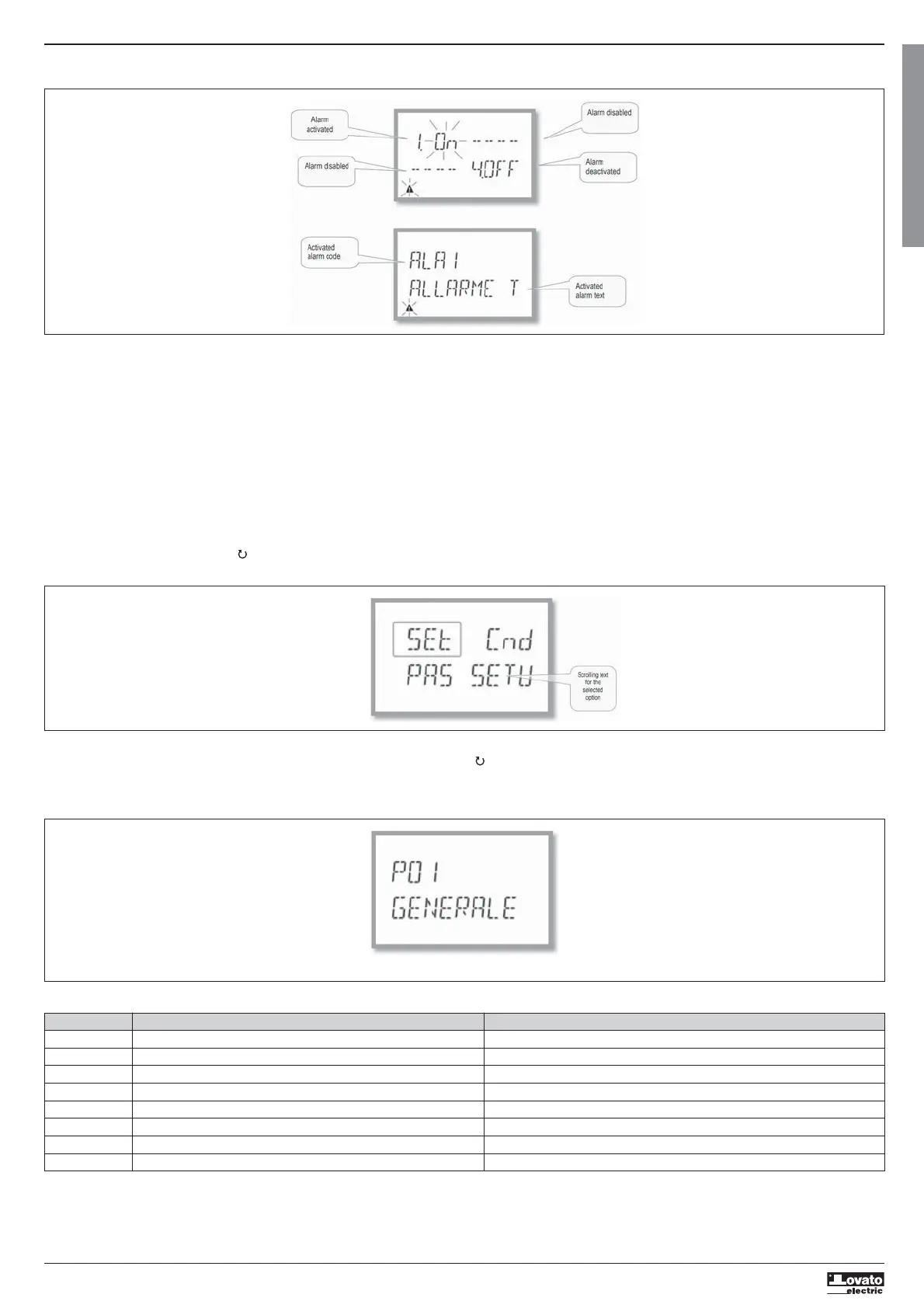
– If alarms are enabled (see menu P09), the DMG100-110 displays the page, with the corresponding status and the format indicated in the figure:
– With Alarm activated, the word ON flashes with the triangle symbol, while if it is not activated the word OFF is constant.
– If no alarm is programmed, dashes are displayed. After about 3 s, the scrolling text of the alarm programmed in parameter P09.n.05 appears.
– With several alarms active, the text of the corresponding alarm alternates on the display.
– Dedicated parameter P02.14 for the utility menu can be used to make the display backlighting flash in the event of an alarm to highlight the presence of the fault.
– The alarm reset method depends on parameter P09.n.03. This determines whether it can be automatic, on the disappearance of the alarm conditions, or requires manual intervention through the commands menu
(C.07).
SETTING PARAMETERS (SETUP) FROM THE FRONT PANEL
– From the standard measurement display, press MENU to call up the main menu, then select SET and press to access the settings menu.
– The display indicates the first menu level P.01 at the top left of the display, with selection 01 flashing.
– Select the desired menu (P.01, P.02, P.03) using the
buttons. During selection, the alphanumeric display scrolls a brief description of the currently selected menu.
– To exit and return to the measurement display, press MENU.
MAIN MENU
To access the main menu:
– Press the MENU button. The main menu is displayed (see figure), with the available options:
• SET – Access to the set-up menu
• CMD – Access to the commands menu
• PAS – Password entry
– The selected option flashes. Descriptive text for the selection scrolls in the alphanumeric display.
– If the password needs to be set, the menu opens with the option PAS already selected.
– Press
to select the desired option, then to confirm.
– To return to the measurement display, press MENU again.
Code MENU DESCRIPTION
P01 GENERAL Specifications of the system
P02 UTILITY Language, brightness, display, etc.
P03 PASSWORD Enablement of protected access
P04 INTEGRATION Measurement integration times
P05 HOUR COUNTER Enablement of hour counter
P07 COMMUNICATION Communication ports (DMG110)
P08 LIMIT THRESHOLDS (LIMn) Measurement thresholds
P09 ALARMS (ALAn) Alarm messages
– The following menu lists the available menus:
Setup: menu selection


 To Next Page