EasyManua.ls Logo

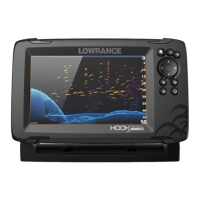
Lowrance HOOK-7x - User Manual

Lowrance HOOK-7x
36 pages
Print Icon
To Next Page IconTo Next Page
Loading...
lowrance.com
ENGLISH
HOOK-X Series
Operation manual
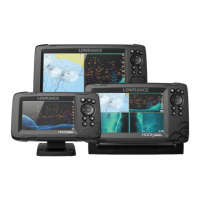
HOOK-4x HOOK-5x HOOK-7x

Other manuals for Lowrance HOOK-7x

Question and Answer IconNeed help?

Do you have a question about the Lowrance HOOK-7x and is the answer not in the manual?

Summary

Introduction to Lowrance HOOK-X Series

Unit Controls Overview

Details the function of the unit's physical buttons and keys for operation.

Getting Started with Your Unit

Guides users through initial setup actions like turning on, adjusting backlight, and muting audio.

Basic Operation and Navigation

Setup Wizard Configuration

Guides users through initial unit configuration for optimal performance.

Accessing the Main Settings Menu

Details the procedure for entering the main system configuration menu.

Applying Fishing Modes

Enhances unit performance by applying preset sonar settings for fishing.

Cursor and Mode Operations

Advanced Mode Features

Enables advanced features and settings for enhanced control.

Display Pages and Layouts

Overlay Data Configuration

Enables and customizes the display of data overlays on sonar screens.

Sonar Operation and Features

Understanding CHIRP Technology

Explains CHIRP's benefits for image quality, target separation, and depth.

Using Trackback for Sonar History

Review recent sonar history by scrolling backwards through data.

Sensitivity Settings Explained

Controls display detail, managing clutter and echo visibility.

Transducer Frequency Selection

Choosing the operating frequency for the transducer.

Sonar Options Menu

Accesses various settings to optimize sonar display and performance.

DownScan Options Menu

Configuration options specific to the DownScan sonar display.

Overlay Data Setup

Allows selection and display of data on top of sonar pages.

Sonar Settings Configuration

Conventional vs. DownScan Settings

Adjusting settings applicable to both sonar modes.

Manual Mode Operation

Provides advanced control over sonar parameters for expert users.

Fishing Mode Functionality

Applies optimized sonar settings for specific fishing conditions.

DownScan Operation Details

DownScan Trackback Functionality

Review historical data captured by the DownScan sonar.

DownScan Frequency Options

Selects the transducer frequency for optimal DownScan resolution or penetration.

DownScan Options Explained

Covers various settings to optimize the DownScan display.

Overlay Data on DownScan

Allows selection of data to be displayed on top of the DownScan page.

System Settings and Configuration

Settings Menu Overview

Accesses installation and configuration settings for the unit.

System Settings Adjustment

Adjusts unit settings like language, mute audio, and advanced mode.

Advanced Mode Enable

Enables features and settings only available in Advanced mode.

Specifications (HOOK-4 x & HOOK-5 x)

Specifications (HOOK-7 x)

Summary

Introduction to Lowrance HOOK-X Series

Unit Controls Overview

Details the function of the unit's physical buttons and keys for operation.

Getting Started with Your Unit

Guides users through initial setup actions like turning on, adjusting backlight, and muting audio.

Basic Operation and Navigation

Setup Wizard Configuration

Guides users through initial unit configuration for optimal performance.

Accessing the Main Settings Menu

Details the procedure for entering the main system configuration menu.

Applying Fishing Modes

Enhances unit performance by applying preset sonar settings for fishing.

Cursor and Mode Operations

Advanced Mode Features

Enables advanced features and settings for enhanced control.

Display Pages and Layouts

Overlay Data Configuration

Enables and customizes the display of data overlays on sonar screens.

Sonar Operation and Features

Understanding CHIRP Technology

Explains CHIRP's benefits for image quality, target separation, and depth.

Using Trackback for Sonar History

Review recent sonar history by scrolling backwards through data.

Sensitivity Settings Explained

Controls display detail, managing clutter and echo visibility.

Transducer Frequency Selection

Choosing the operating frequency for the transducer.

Sonar Options Menu

Accesses various settings to optimize sonar display and performance.

DownScan Options Menu

Configuration options specific to the DownScan sonar display.

Overlay Data Setup

Allows selection and display of data on top of sonar pages.

Sonar Settings Configuration

Conventional vs. DownScan Settings

Adjusting settings applicable to both sonar modes.

Manual Mode Operation

Provides advanced control over sonar parameters for expert users.

Fishing Mode Functionality

Applies optimized sonar settings for specific fishing conditions.

DownScan Operation Details

DownScan Trackback Functionality

Review historical data captured by the DownScan sonar.

DownScan Frequency Options

Selects the transducer frequency for optimal DownScan resolution or penetration.

DownScan Options Explained

Covers various settings to optimize the DownScan display.

Overlay Data on DownScan

Allows selection of data to be displayed on top of the DownScan page.

System Settings and Configuration

Settings Menu Overview

Accesses installation and configuration settings for the unit.

System Settings Adjustment

Adjusts unit settings like language, mute audio, and advanced mode.

Advanced Mode Enable

Enables features and settings only available in Advanced mode.

Specifications (HOOK-4 x & HOOK-5 x)

Specifications (HOOK-7 x)

Lowrance HOOK-7x Specifications

General IconGeneral
Display Size7 inches
Resolution800 x 480 pixels
Frequency83/200 kHz, 455/800 kHz
GPSNo
Waterproof RatingIPX7
BacklightLED
TransducerIncluded
Display TypeColor TFT LCD
Depth Capability1000 ft (305 m)
Operating Temperature-15°C to 55°C
BatteryNo
Power Output500 Watts (RMS)

Related product manuals