EasyManua.ls Logo

Lumens VC-A70HB - User Manual

Lumens VC-A70HB
41 pages
Print Icon
To Next Page IconTo Next Page
Loading...
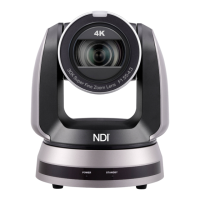
VC-A70H
(PTZ Video Camera)
Installation Guide - English
[Important]
To download the latest version of Quick Start Guide,
multilingual user manual, software,
or driver, etc., please visit Lumens
https://www.MyLumens.com/support

Questions and Answers

  • J
    Jennifer RogersAug 18, 2025
    What to do if Lumens VC-A70HB cannot be operated by remote control?
    • J
      johngomezAug 19, 2025
      If your Lumens Security Camera isn't responding to the remote control, first check that the Camera Select on the remote is compatible with the IR Select on the camera. Also, prevent the camera from direct sunlight. Ensure that energy-saving bulbs and IR touch screens are as far from the camera as possible to avoid interference. If you're using multiple cameras in the same area, operating two remote controls simultaneously can cause signal interference, so it's recommended to use only one remote control at a time.
  • K
    Kurt HarrisAug 21, 2025
    What to do if there is no image output from Lumens VC-A70H Security Camera?
    • S
      Samuel OrrAug 21, 2025
      If you're not getting any image output from your Lumens VC-A70H Security Camera, start by checking the power. Next, verify that the DIP switch is properly set. Ensure that your display supports the output resolution, generally 1080p60, 1080i60, or 720p60. Finally, replace the cables to make sure they are not faulty.
  • S
    Sherri JacksonAug 23, 2025
    Why is the Lumens VC-A70H Security Camera image severely delayed?
    • D
      David TrujilloAug 23, 2025
      If the image from your Lumens VC-A70H Security Camera is severely delayed, try using 1080p or 720p 60/50 Hz signals instead of 25/30 Hz signals.
  • C
    Chad LeeAug 26, 2025
    What to do if Lumens VC-A70HB is not working after changes to DIP Switch setting?
    • J
      John MurphyAug 26, 2025
      If your Lumens Security Camera isn't working after you've changed the DIP switch settings, unplug the power cord, reconnect it, and then turn the camera back on. This will apply the new settings.
  • V
    Victoria RichardsonAug 28, 2025
    What to do if Lumens VC-A70HB device cannot be controlled with Codec?
    • A
      Allison BarnettAug 28, 2025
      To troubleshoot a Lumens Security Camera that cannot be controlled with a Codec, first consult your distributor to ensure the firmware is up to date. Verify the connection is correct, using RS-232/422 Input. Also, confirm that System Switch DIP 1 and DIP 3 are correctly configured.
  • L
    leblanccharlesAug 30, 2025
    What to do if Lumens Security Camera device cannot be controlled with RS-232/RS422?
    • B
      brendawattsAug 30, 2025
      If your Lumens Security Camera cannot be controlled with RS-232/RS422, ensure the connection is correctly established using RS-232/422 Input. Also, verify that System Switch DIP 1 and DIP 3 are set correctly.
  • D
    David OsborneSep 1, 2025
    Why VC-A70H Lumens VC-A70HB Security Camera cannot be operated by remote control?
    • S
      Susan LoweSep 2, 2025
      If your VC-A70H Lumens Security Camera cannot be operated by remote control, please check the following: * Confirm if the Camera Select on the remote control can be used together with the IR Select on VC-A70H. * Prevent the VC-A70H from direct sunshine. * Ensure that energy-saving bulbs and IR touch screens are as far away as possible to avoid interference. * If several VC-A70H cameras are connected in the same area, operating two remote controls simultaneously may cause signal interference. It is recommended to use only one remote control.
  • J
    Julia FrancisSep 4, 2025
    What to do if the device cannot be controlled with Codec for Lumens VC-A70HB?
    • J
      John EatonSep 4, 2025
      If the Lumens Security Camera cannot be controlled with Codec, consider these solutions: * Consult the distributor to ensure that the firmware version is the latest one. To check the version: Press [MENU] on the remote control, choose [Status], go to Page 5 of [System], and make sure the firmware version is correct. * Ensure the connection is correct (RS-232/422 Input). * Verify that System Switch DIP 1 and DIP 3 are correctly set.
  • S
    simmonsjamesSep 6, 2025
    What to do if the device cannot be controlled with RS-232/RS422 for Lumens VC-A70HB Security Camera?
    • N
      nancyballardSep 6, 2025
      If you're unable to control the Lumens Security Camera with RS-232/RS422, verify the following: * Ensure the connection is correct (RS-232/422 Input). * Make sure System Switch DIP 1 and DIP 3 are correctly set.
  • J
    Julie JamesSep 8, 2025
    What to do if VC-A70H Lumens Security Camera image is severely delayed?
    • J
      joyceholderSep 8, 2025
      If the VC-A70H Lumens Security Camera image is severely delayed, use 1080p or 720p 60/50 Hz signals rather than 25/30 Hz signals.

Lumens VC-A70HB Specifications

General IconGeneral
BrandLumens
ModelVC-A70HB
CategorySecurity Camera
LanguageEnglish

Related product manuals