Body Size: Set Full/Half Body
Head Position: Set the head position of the person in the screen
Block Area: Click into the Edit mode, frame by holding the left mouse
button and set the block area
Body Size: Set Full/Half Body
Head Position: Set the head position of the person in the screen
Block Area: Click into the Edit mode, frame by holding the left mouse
button and set the block area
Area Menu: Click into the Edit mode, frame by holding the left mouse
button and determine the area and moving range
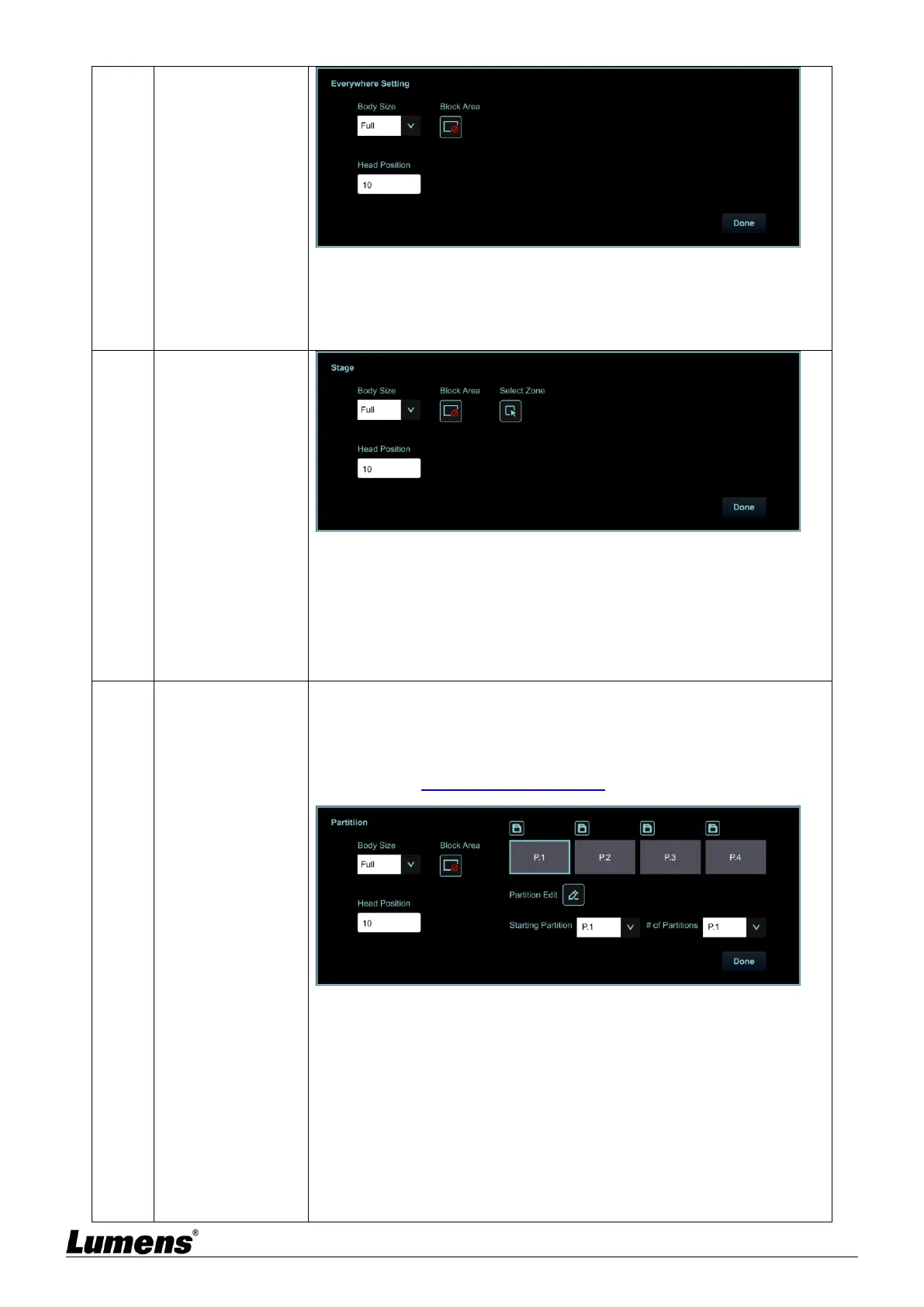
Set Partition Tracking. Up to 4 zones can be set
When a person enters the zone of a partition, the camera switches to the
partition. Tracking is not performed in the zone, but everywhere outside
the partition
Please refer to 5.2.4.2 Partition Tracking for the setting steps
Body Size: Set Full/Half Body
Head Position: Set the head position of the person in the screen
Block Area: Click into the Edit mode, frame by holding the left mouse
button and set the block area
Partition Edit: Edit, save partition positions and preview the partition
image.
Click to enlarge the partition image, and then click the enlarge icon to
cancel the preview.
Starting Partition: Initiating the partition position


 To Next Page
 Loading...