Luowice Wireless Security Camera User ManualLuowice Wireless Security Camera User Manual
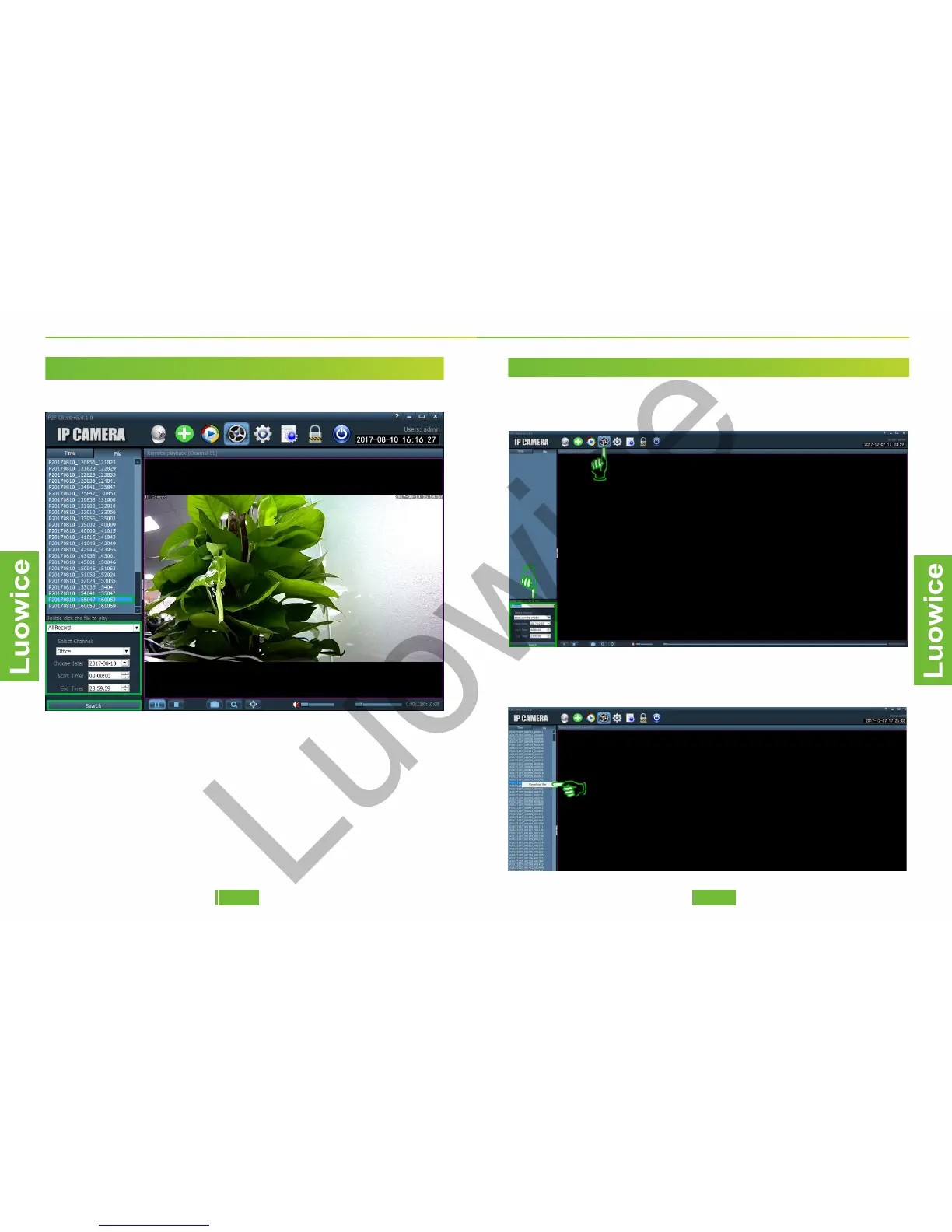
Function: To playback the video records stored in the SD card.
Operation: Please click the 'Remote Playback' icon. And choose the
record type, select the channel, date, start time/end time. And then click
'Search' and the record list will show on the left side. Double click the
time you want to playback and the recorded video will start playback.
Note: the playback speed is fixed and cannot be modified. You can drag
the blue bar at the bottom right side to choose a specific time to start video
playback.
2.10 The Remote Playback Interface (Playback Videos Recorded on the SD Card)
2.3.4 Action with Alarm
2.3.4 Action with Alarm
2.3.4 Action with Alarm
2.3.4 Action with Alarm
2.3.4 Action with Alarm
2.11 Backup Videos to the Computer and Change Format of the Videos
Operation: Please click the 'Remote Playback' icon on the top and the
interface shows as below. Select the channel, date and so on the left side
and click 'Search'.
Then the video files will show on the left side as below. And then move
the mouse to any file you want to back up and right click the mouse. Then
click 'Download file' and the Download Interface will pop out.
2928


 To Next Page