Luowice Wireless Security Camera User ManualLuowice Wireless Security Camera User Manual
2.3.4 Action with Alarm
2.3.4 Action with Alarm
2.3.4 Action with Alarm
2.3.4 Action with Alarm
2.3.4 Action with Alarm
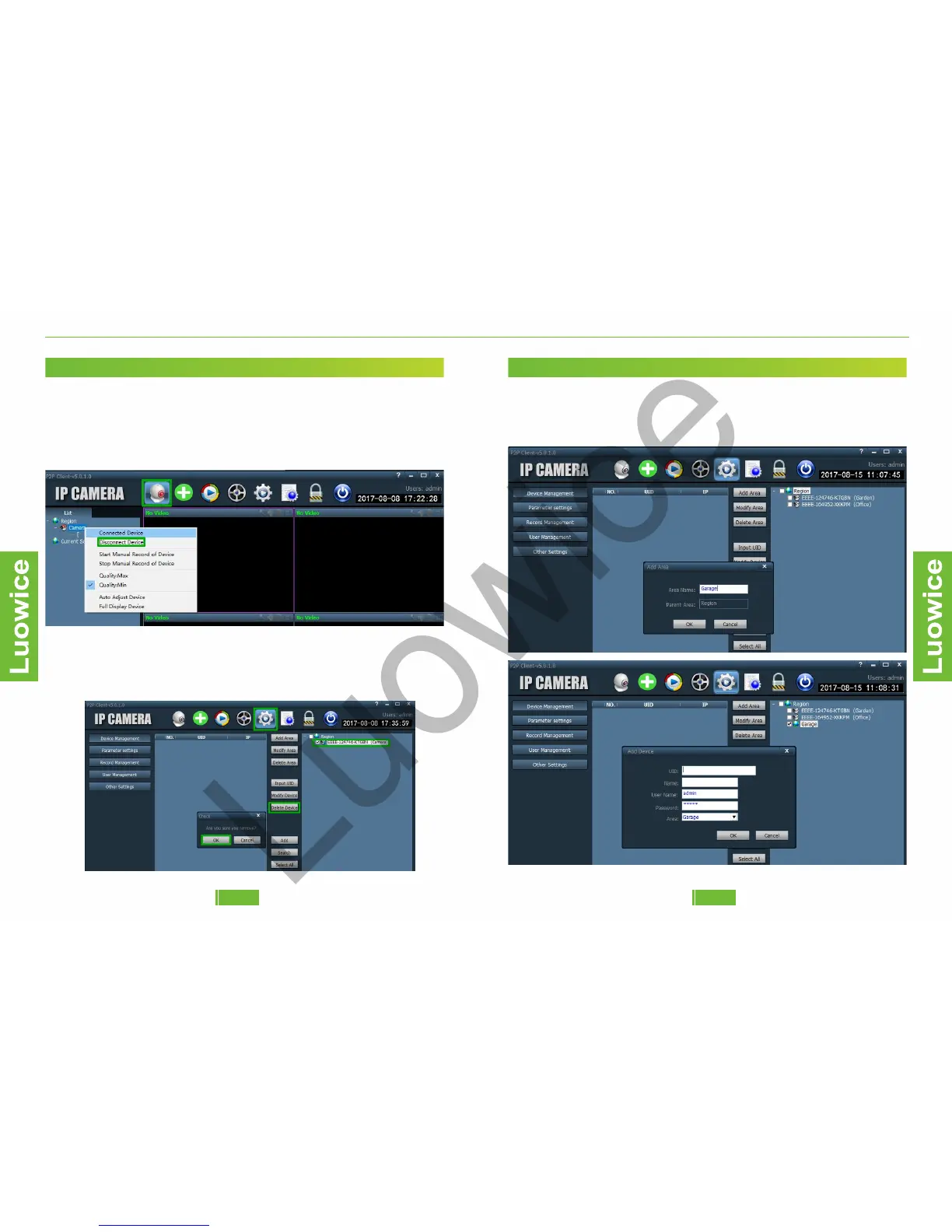
2.2.2 Delete Device
Function: Delete cameras from the PC Client.
Operation: Click the 'Preview' icon, and then take the mouse cursor to
'Camera' and right click the mouse. And click 'Disconnect Device' on the
pop-out page. Wait for seconds and the camera's live view will disappear
from the screen.
Then click the 'Config' icon and check the camera you want to delete
from the 'Region' list on the top right side. Then click 'Delete Device' and
click 'OK' on the pop-out page and the camera will be deleted
successfully.
2.3.4 Action with Alarm
2.3.4 Action with Alarm
2.3.4 Action with Alarm
2.3.4 Action with Alarm
2.2.3 Classify Cameras into Regions
To classify cameras into regions, please set up regions first. And then
add the cameras to the region you want to classify to when adding
cameras to the PC Client.
0908


 To Next Page