369374a 9 08.07.12
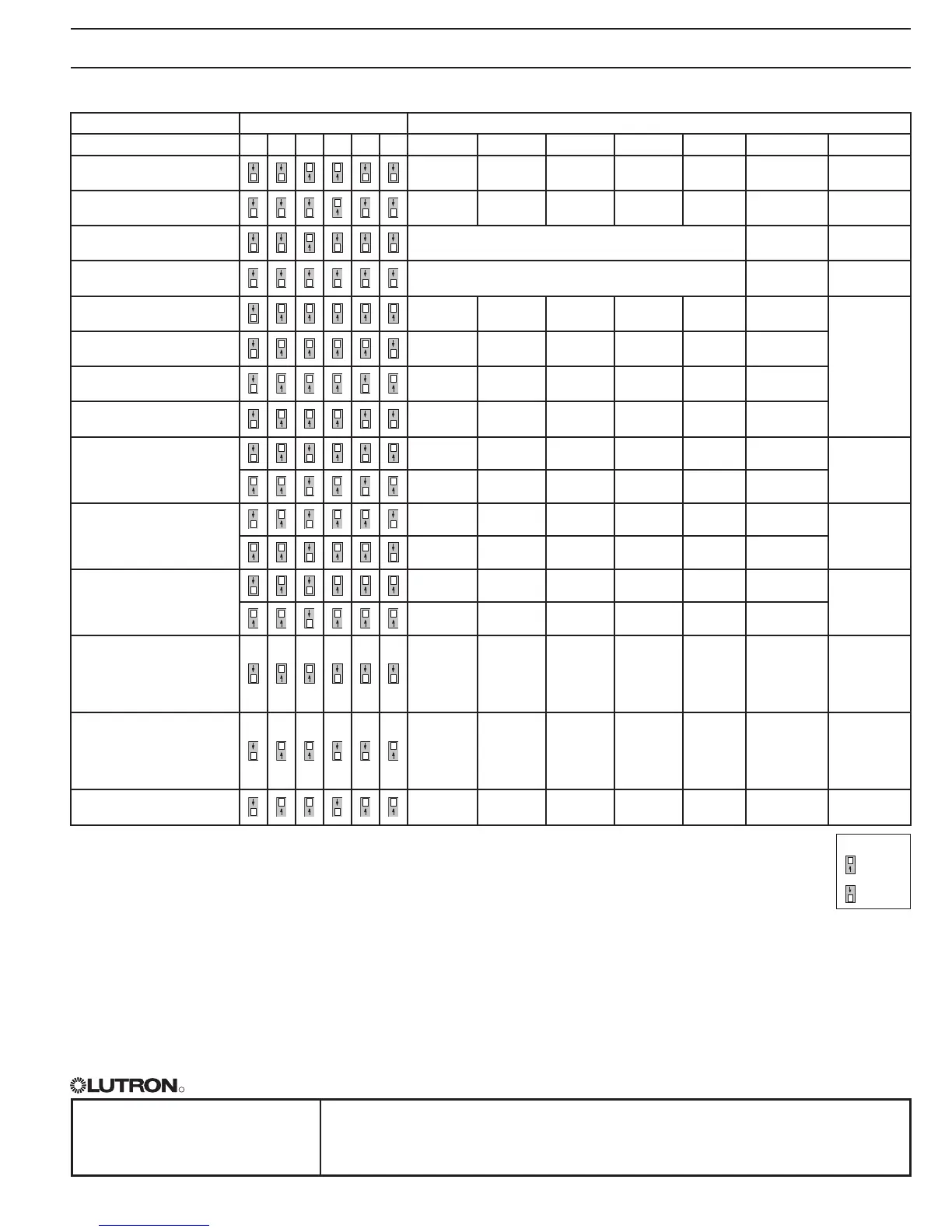
QSE-IO Operating Modes and DIP Switch Settings Overview (continued)
Mode Dip Switch Contact Closures Invoke:
Configuration 3 4 5 6 7 8 Input 1 Input 2 Input 3 Input 4 Input 5 Inputs Outputs
Partitioning
(momentary)
Wall 1 Wall 2 Wall 3 Wall 4 Wall 5 Momentary Maintained
Partitioning
(maintained)
Wall 1 Wall 2 Wall 3 Wall 4 Wall 5 Maintained Maintained
Occupancy sensor
(auto on/off)
Generates events on occupancy and vacancy Maintained Maintained
Occupancy sensor
(manual on/auto off)
Generates events on vacancy only Maintained Maintained
Zone toggle
(maintained)
Toggle 1 Toggle 2 Toggle 3 Toggle 4 Toggle 5 Maintained
Maintained
Zone toggle
(momentary)
Toggle 1 Toggle 2 Toggle 3 Toggle 4 Toggle 5 Momentary
Zone toggle with raise/lower
(maintained)
Toggle 1 Toggle 2 Toggle 3 Raise Lower Maintained
Zone toggle with raise/lower
(momentary)
Toggle 1 Toggle 2 Toggle 3 Raise Lower Momentary
Zone control
(maintained output)
Toggle 1 Toggle 2 Toggle 3 Toggle 4 Toggle 5 Maintained
Maintained
Toggle 1 Toggle 2 Toggle 3 Toggle 4 Toggle 5 Momentary
Zone control
(momentary output)
Pulse 1 Pulse 2 Pulse 3 Pulse 4 Pulse 5 Maintained
Momentary
Pulse 1 Pulse 2 Pulse 3 Pulse 4 Pulse 5 Momentary
Zone control
(pulsed output)
Pulse 1 Pulse 2 Pulse 3 Pulse 4 Pulse 5 Maintained
Pulsed
Pulse 1 Pulse 2 Pulse 3 Pulse 4 Pulse 5 Momentary
Hotel configuration 1
Service
(make up
room)
Privacy
(do not
disturb)
Doorbell
Start/end
afterhours
mode
Toggle
Scene 1/
Off
1-3:
Maintained or
Momentary
4-5:
Maintained
Maintained
(except 3)
Hotel configuration 2
Service
(make up
room)
Privacy
(do not
disturb)
Doorbell
Start/end
afterhours
mode
Enable/
disable
Scene
lockout
1-3:
Maintained or
Momentary
4-5:
Maintained
Maintained
(except 3)
Integration configuration
Control
output 1
Control
output 2
Control
output 3
Control
output 4
Control
output 5
Maintained or
Momentary
Maintained or
Momentary
Notes
• Occupancysensor:Eachinputrepresents1sensor/groupofsensors.Responsetosensoreventisprogrammableattheassignedlighting
control.
• “Momentary”outputpulseisoffixedduration(250msdefault).
“Pulsed”outputdurationcorrespondstoactivatingbuttonbeingheld/released.
• Hotel:“Service”and“Privacy”aremutuallyexclusive;“Doorbell”islockedoutwhen“Privacy”isactive.
• DIPswitch1mustbeup/ontoactivatethe"Start/EndAfterhours"featureonCCI4.
• DIPswitch2mustbeup/ontoactivatethe"ToggleScene"or"SceneBlackout"featureonCCI5.
• Occupancysensorswillnotparticipateinpartitioninglogic.
Legend:
Up/On
Down/Off






 To Previous Page