5
STEREO POWER AMPLIFIER M-10X
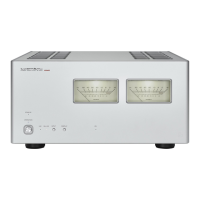
6. Display button (DISPLAY)
Selects the power meter light and display. This button oper-
ates differently depending on the setting of the BTL selec-
tion switch on the rear panel.
When STEREO is selected:
• Every time this button is pressed, the setting changes
as follows: light ON/power meter ON→light OFF/power
meter ON→light OFF/power meter OFF→light ON/power
meter ON...
When BTL (MONO) is selected:
• Only the power meter on the left side operates.
• Every time this button is pressed, the setting changes as
follows: right and left lights ON/power meter (left) ON→left
light ON/power meter (left) ON→light OFF/power meter
ON→light OFF/power meter OFF→right and left lights
ON/power meter (left) ON...
Factory default as follows:
At STEREO Power meter light ON
Power meter display ON
At BTL (MONO) Power meter right and left lights ON
Power meter display ON (left)
The setting of the display button is remembered in both
STEREO and BTL (MONO).
7. BTL indicator (BTL)
Lights when the BTL selection switch on the rear panel is
set to BTL (MONO) to show that this unit turns to a monau-
ral amplifier with BTL connection. When the BTL selection
switch is set to STEREO, this indicator turns off to show that
this unit turns to a stereo amplifier with normal connection.
Factory default: No lighting (STEREO)
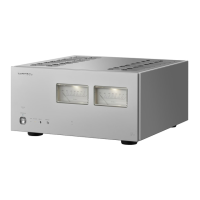
8. Power meters
Indicates the level of output to the speakers, with lighting
equipped.
The light/power meter operate differently depending on
the setting of the display button and the setting of the BTL
selection switch on the rear panel.
• This meter indicates the output level in decibels from −60
dB through +10 dB while the power meter is in operation.
• When STEREO is selected, the meter on the left reads the
level of the L channel, and the meter on the right reads the
level of the R channel.
• When BTL (MONO) is selected, the level is indicated only
with the left meter.


 To Next Page