44
Using the Lynx Evo App
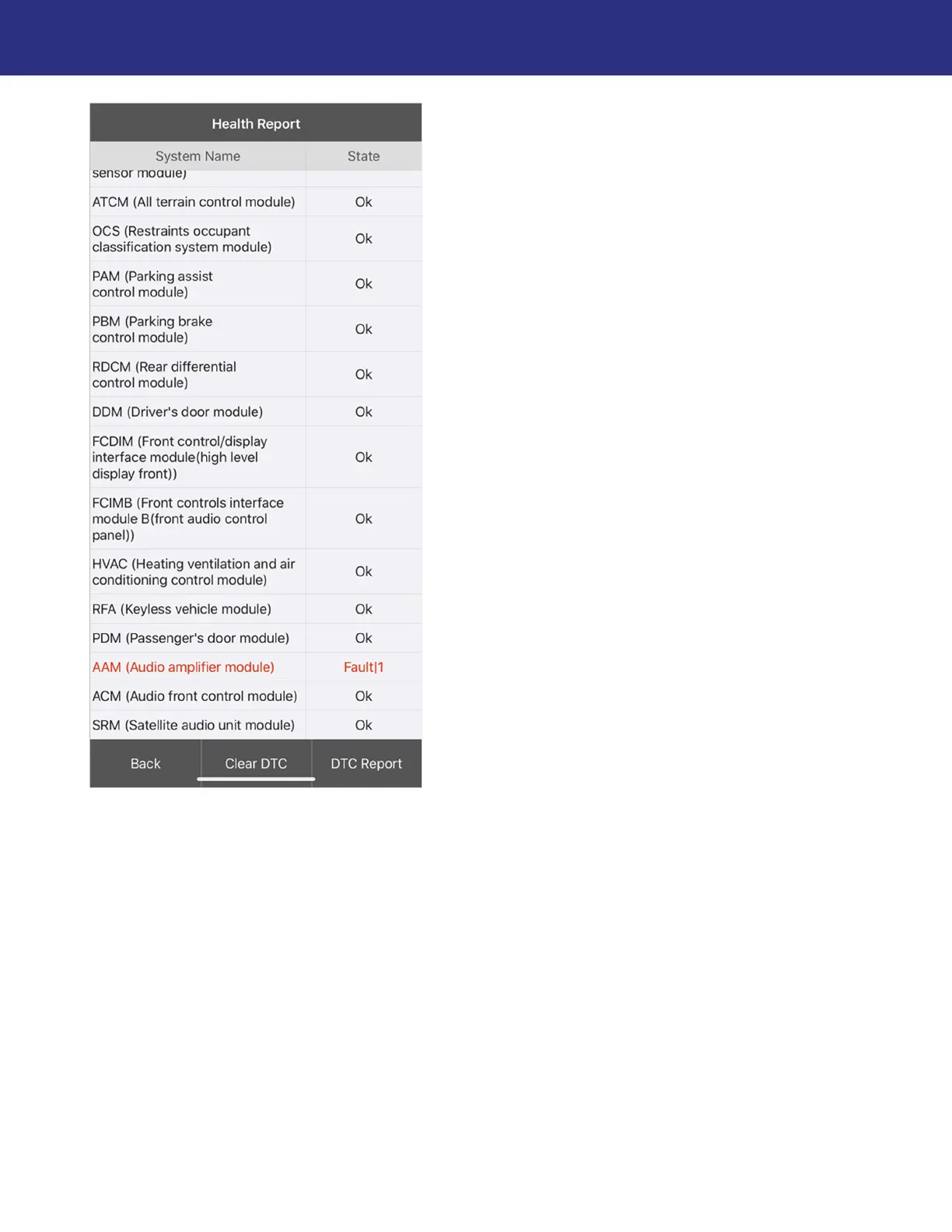
3. The progress will disappear from the list once the scan is completed. All scanned system
names will be listed, along with the scan results of each. Detected Diagnostic Trouble
Codes (DTCs) or “faults” will be highlighted in red text. From here, you can:
Press a listed fault to view the DTC information.
Press Clear DTC to clear any inactive DTCs across all ECUs.
NOTE: You will be prompted to confirm this action before DTCs are cleared.
NOTE: DTCs will not clear permanently from a system until the issue is repaired or
otherwise resolved within the vehicle.
Press DTC Report to create a report file. Additional information (e.g., owner name, license
number) can be optionally added to customize reports. These reports can be saved and
shared in PDF format via the available communication options on your device (e.g., email,
messaging, file sharing, wireless printer).
NOTE: An internet connection is required to share reports.


 To Next Page