3.1 Parallel Transmission
Connecting to the Parallel Port (Centronics)
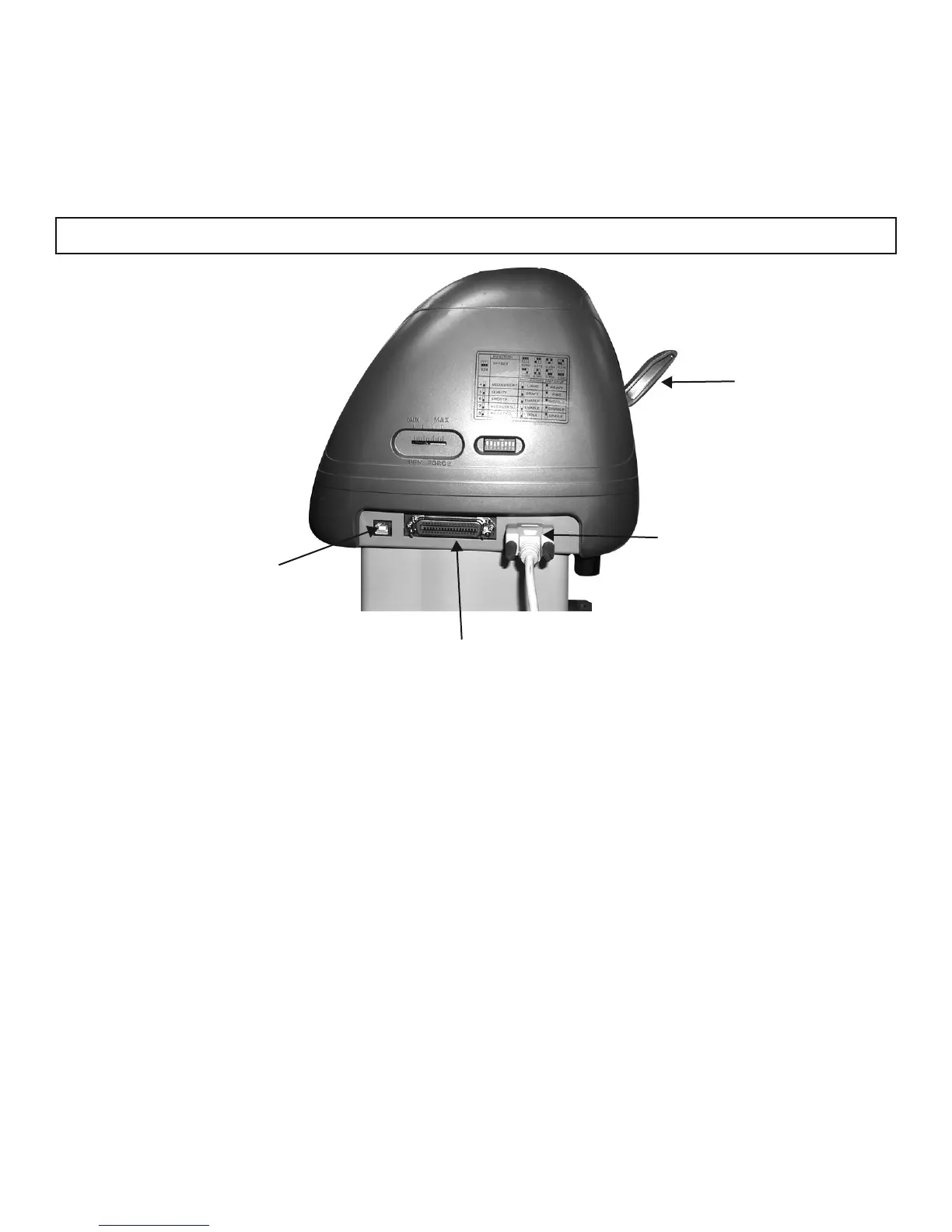
1. Connect a parallel cable to the cutting plotter and the host computer (Figure 3-1)
2. Set up the output port LPT1 or LPT2 from your software package
3.2 Serial Transmission
Connecting to the Serial Port (RS-232C)
1. For IBM PC, PS/2 users or compatibles, connect the RS-232C cable to the serial connector of the
assigned serial port (COM1 or COM2) of your host computer.
2. Set up the communication parameters (Baud Rate and Data Bits/ Parity) to match the setting of software
package, refer to chapter 3 – “Misc” key description.
3. Connecting Cutting Plotters
The cutting plotter communicates with a computer through a USB (Universal Serial Bus), Parallel port
(Centronics) or a Serial port (RS-232C). This chapter shows you how to connect the cutting plotter to a host
computer and how to set up the computer/cutting plotter interconnection.
!!Notice: When USB connection is enabled, both parallel port and serial port will be disabled automatically.
3. Connecting the Cutter 3-1
Figure 3-1
Serial Interface Connector
Parallel Interface Connector
USB Port
Lever


 To Next Page