18
2.3.1 Status bar
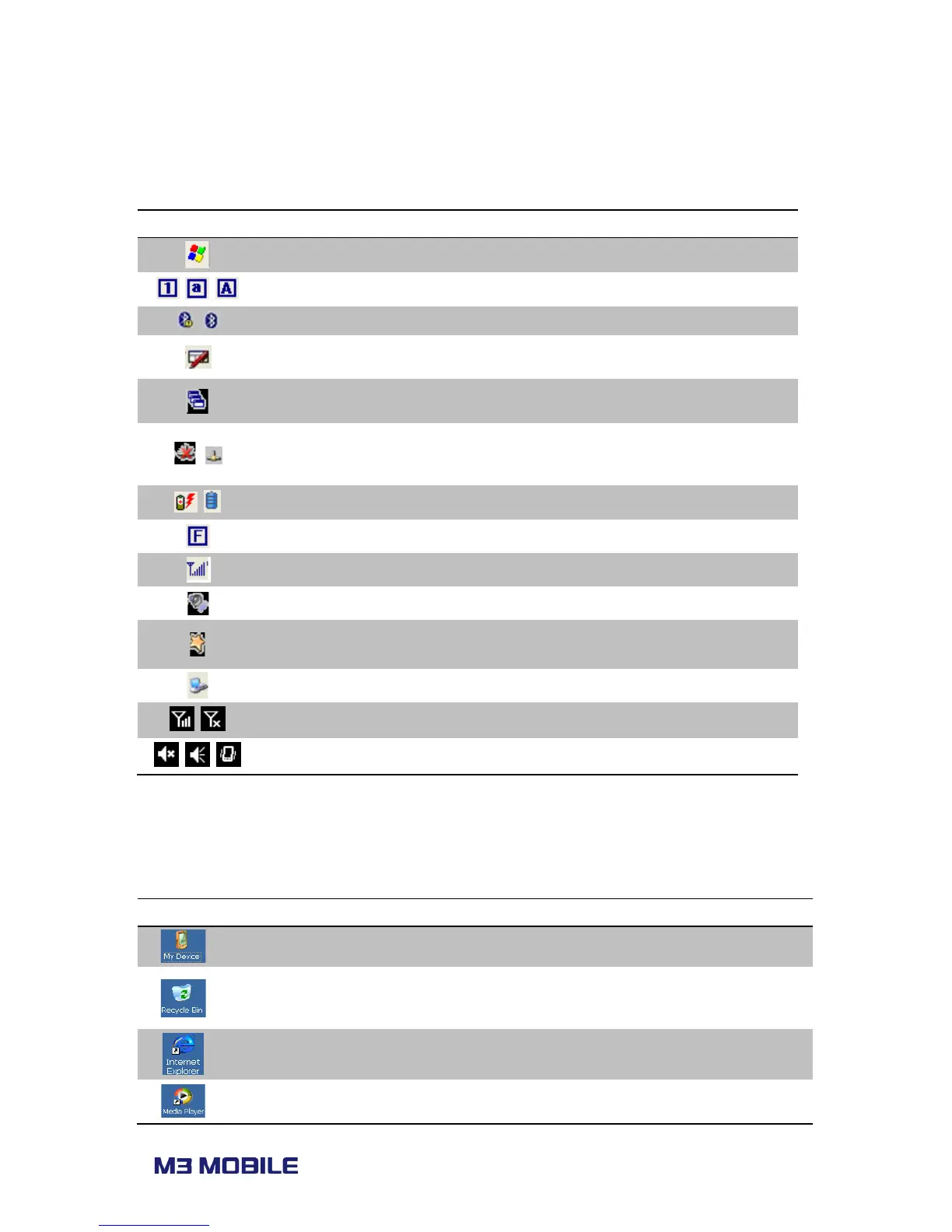
Status bar indicates the status of the device and ‘Start’ menu.
Start menu Expands the Start menu.
Input mode
Number Lowercase letter Uppercase letter
Indicates Bluetooth status of connection/disconnection.
Shows input mode. Users can choose input mode
between Transcriber and Keyboard with long press.
Shows list of programs that are currently running.
/
Network
Indicates connection/disconnection of network
status. Information of network connection will be seen
Battery status Charging or left power amount
Function mode Status of function mode. Only in Alpha-Numeric version.
Phone status Displays signal strength
Volume status Adjust volume while using M3 Black
Function mode
Directly connects to Turning on/off of WLAN,
Backlight and Task manager.
Connectivity Display data connectivity (Sync)
Phone status Displays signal strength
Volume status Indicates volume or vibration mode
2.3.2 Home screen
There are program icons which can be added and/or deleted in home screen.
My Device Categorize and list folders and files.
Recycle Bin
Remove and/or restore files or data.
☞ Files or data cannot be restored once they have
removed from recycle bin.
Internet Explorer Browse Web sites or use Intranet .
Play digital audio and/or video files.
☞ Su p p o rts A SF, W M A , M P3, W A V file s.



 To Next Page