40
Unit installation and configuration/General Settings
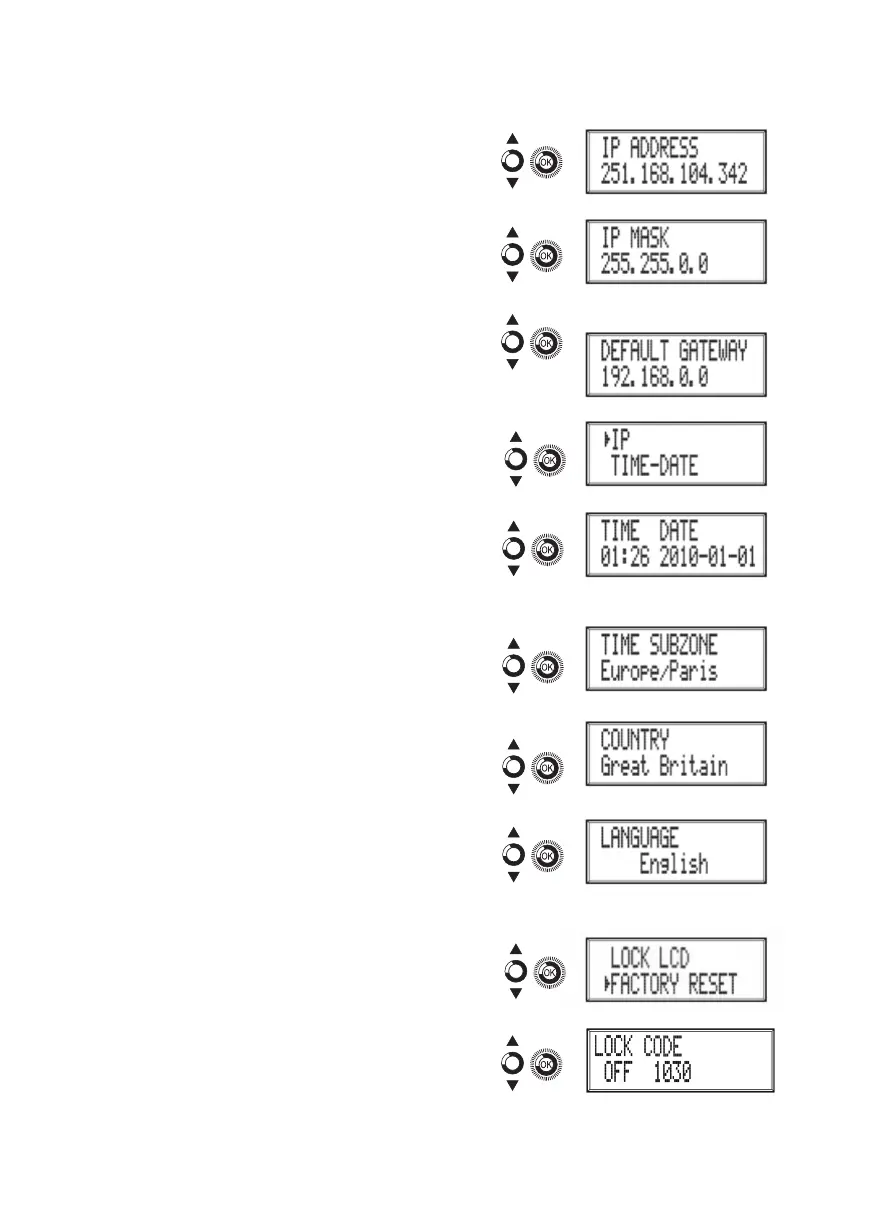
b) Locate and select the option IP AD-
DRESS. Enter the 12-digit sequence
corresponding to the static IP address of
the unit.
c) Locate and select the option IP mASk.
Enter the 12-digit sequence corresponding
to the IP mask of the unit.
d) Locate and select the option DEFAULT
GATEwAy. Enter the 12-digit sequence
corresponding to the IP direction of the
LAN gateway.
Setting the time
2) Locate and select the option TImE-DATE.
a) Locate and select TImE-DATE to con-
gure the time and date of the unit in the
format HH:mm yyyy-mm-DD.
b) Locate and select the option TImE
SUBzONE to congure the reference time
zone.
Selecting the country
3) Locate and select the option COUNTRy to
select the reference country.
Setting the language
4) Locate and select the option LANGUAGE to
establish the language of the menus on the
display: ESPAñOL, ENGLISH, FRANçAIS.
Blocking the LCD and joystick
5) Locate and select the option BLOCk LCD to
block access to the conguration from the LCD
display and using the control button.
a) Activate (ON) or deactivate (OFF) the
blocking option.
b) Establish a code to unlock the unit if this
option has been activated.



 To Next Page